Get a daily briefing on WhatsApp
Send the owner or a manager a short WhatsApp message each morning with yesterday's sales, cash and bank, who owes what, bills due, low stock and anything waiting for approval.
The owner's briefing is a short WhatsApp message at the hour you choose. It gives the day before at a glance, worked out from your books, so the owner knows where things stand before reaching the shop.
Before you begin
- Your company needs the AI add-on. See Switch AI on for your company.
- Connect your company's WhatsApp number under Settings → Notifications → Notification Channels. See Notification Channels.
- The person must be an active user of your company. The briefing shows only what their role may see.
- Only a company administrator can set this up.
Where to find it
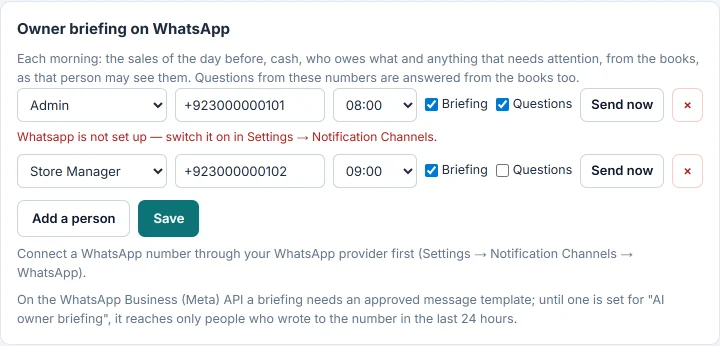
Open Settings → Notifications → AI and scroll to Owner briefing on WhatsApp.
Add a person
- Click Add a person.
- Choose the Person.
- Type their WhatsApp number with the country code, for example +92 300 1234567.
- Choose Send at, the hour the message goes out, in your company's time.
- Tick Briefing.
- Tick Questions too if this person may ask questions from that phone. See Ask on WhatsApp.
- Click Save.
You can add up to 20 people. Each gets their own briefing, as their role sees the books.
Send a test
- Save the person first.
- Click Send now on their row.
- Check their phone.
Under the row, Last sent shows the date of the last briefing, or the reason it failed.
What the briefing says
Each section appears only when the person's role may see it:
- Sales for the day before: the net total, the number of invoices and what was collected.
- Cash and bank now: the total of your cash, bank and wallet accounts.
- Customers owe: the total, and how much is over 90 days.
- Due to suppliers in the next seven days, and what is overdue.
- Running low: up to five products below their reorder level.
- Tax authority refused: invoices refused the day before.
- AI proposals waiting for approval in the AI Inbox.
The AI writes these figures up in a few friendly lines. If it is busy or the allowance is used up, the same figures go out as a plain list, on time. A briefing never shows a figure your books did not give.
Stop the briefing
- Untick Briefing on the person's row, or click × to remove the person.
- Click Save.
Common questions
The person did not get the briefing. Check the number and Send at, then click Send now. Read the reason under the row.
It reaches some people and not others. On the official WhatsApp Business API, a message outside a 24-hour chat window needs an approved message template. Until the briefing has one, it reaches only people who wrote to your number in the last 24 hours. Set it up yourself under Communication → Notification System → Templates: click New Template, choose Channel WhatsApp and Event Type AI owner briefing (morning, on WhatsApp), and use @Briefing_Text, @Briefing_Date and @Recipient_Name in the wording. See Templates.
Does each briefing use the allowance? Each briefing the AI writes up counts as one Daily briefing.
Can a manager get a briefing for their branch only? Yes. Add the manager as a person. Their briefing follows the branches their role may see.
Which day does it cover? The day before the message, in your company's time. Cash and bank are as they stand when it is sent.
شكرًا لك. إذا كنت لا تزال بحاجة إلى مساعدة، راسلنا على info@eloerp.net.