Turn an online order into an invoice
Ship a verified order from its page so the courier is booked, the goods leave stock and the sale invoice is posted to the courier's or gateway's clearing ledger in one step.
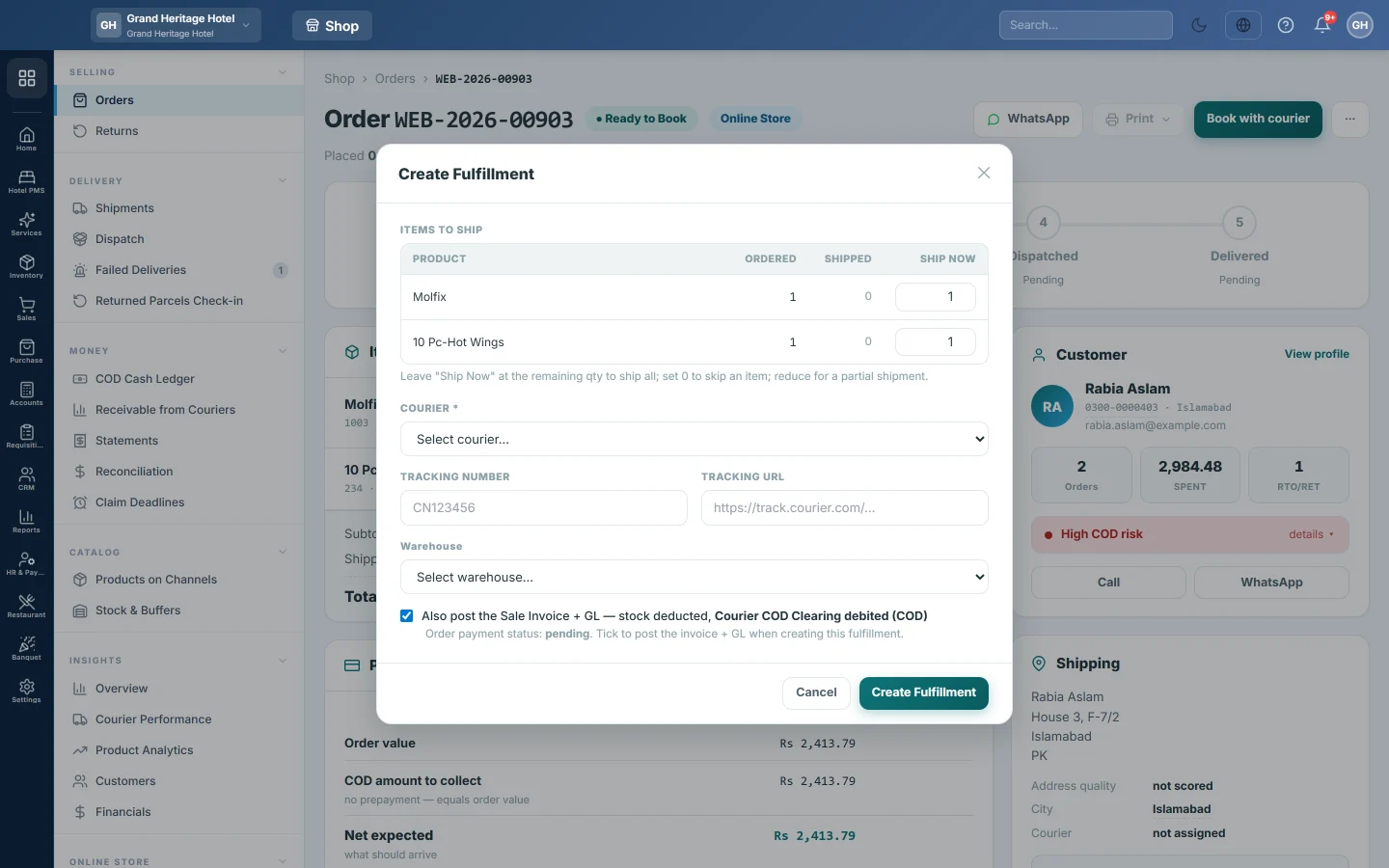
An online order becomes a sale when it leaves your warehouse. Create Fulfillment on the order's page books the courier and posts the sale invoice together, so stock and the books always match what was shipped.
Before you begin
- The order is verified and sits on Ready to Book. See Verify a new order before booking.
- A courier account exists. Live booking works only for couriers with a booking link. See Courier Accounts.
- For a prepaid order, the gateway or bank that received the money exists as a payment method. See Payment Methods.
- Your role needs the permission to fulfil online shop orders. See Users & Roles.
Where to find it
Open Online shop → Selling → Orders and click the order number. On the order page, click Book with courier. For your own delivery rider, click ⋯ and then Book without courier (own rider).
Ship the order and post the invoice
- Under ITEMS TO SHIP, check Ship Now on each line. It starts at the quantity still to ship. Set 0 to skip a line, or lower it to ship part of the order.
- Choose the COURIER.
- If the courier has live booking, tick Book on (courier name) now. Choose the Service, Overnight (air) or Overland (road), and Pickup from if the courier has several pickup offices. The tracking number comes back from the courier.
- Otherwise, type the TRACKING NUMBER and, if you have one, the TRACKING URL.
- Choose the WAREHOUSE.
- For a prepaid order, choose the PAYMENT METHOD that holds the money.
- Keep Also post the Sale Invoice + GL ticked.
- Click Create Fulfillment.
The message tells you the courier's tracking number and the number of the new sale invoice. The order moves on to Booked, and the invoice appears in Sales Invoices.
Ship part of an order
You can lower Ship Now to send part of an order first. The order page then shows how much of each line has shipped, and you open Create Fulfillment again for the rest.
What happens in the books
Create Fulfillment with Also post the Sale Invoice + GL ticked posts a sale invoice for the buyer:
- Cash on delivery. The courier's COD Clearing ledger is debited with the order total, not the customer's ledger, because the courier collects the cash.
- Prepaid. The invoice is marked paid, and the payment method's Clearing ledger is debited, because the gateway holds the money.
- Sales, tax and shipping are credited, and Cost of Goods Sold is debited against Inventory at average cost.
The clearing ledger is emptied when you record the courier's remittance or the gateway's payout. See Statements.
Common questions
The post-invoice box is greyed out. The order already has a sale invoice. This fulfillment only adds a tracking number.
It says a payment method is required. The order is paid, so you must choose the gateway or bank that received the money.
Why did the courier refuse the booking? Usually a city the courier does not serve, a wrong phone number or a missing weight. The red banner on the order page gives the courier's own reason.
The goods came back undelivered. While the parcel is in transit, click Mark RTO on the order page. It makes a sale return, brings the stock back and credits the clearing ledger. See Returned Parcels Check-in.
Can I see orders that shipped without an invoice? Yes. See Reconciliation.
Terima kasih. Jika masih butuh bantuan, kirim email ke info@eloerp.net.