Add jewellery stock by karat and weight
Tag a product with its karat so it sells by weight at today's rate, then buy it into stock by weight on a purchase invoice.
A piece of gold jewellery is sold by weight at the karat's rate, not at a catalogue price. You tell EloERP this by tagging the product with its karat. Then you buy it into stock by weight, so the stock is held in weight too.
Before you begin
- Selling by weight is switched on in Settings, and the karat exists on Karat / Purity.
- Record the rate on Today's Rate. A purchase line is priced from it.
- You know how to enter a purchase. See Invoices.
Where to find it
Products are on Inventory → All Products: click Add Product, or open an existing product. Purchases are on Purchases → Invoices.
Tag a product with its karat
- Fill in the product's name, category and unit as usual. See All Products.
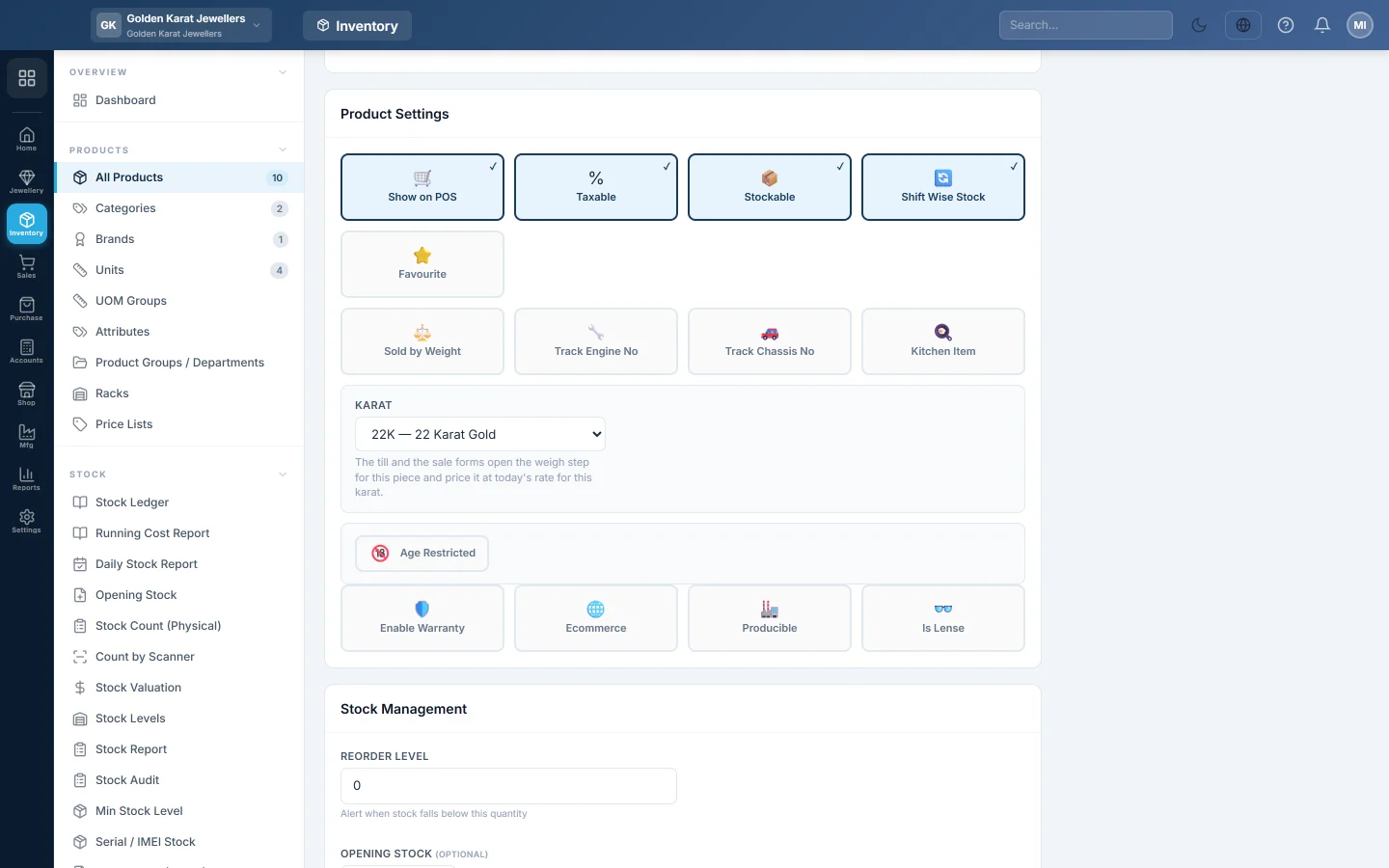
- Under Product Settings, find Karat.
- Pick the karat, for example 22K — 22 Karat Gold. Leave Not sold by weight for goods sold by the piece, such as a gift box.
- Save the product.
A tagged product opens the weigh step on the till and on the sale forms, and is priced at today's rate for its karat. The product's sale price is not used.
Buy it into stock by weight
- Open Purchases → Invoices and click + New Invoice.
- Pick the supplier in SUPPLIER / CASH and the WAREHOUSE.
- In Items, add the tagged product. The Weight & Karat column picks its karat and today's rate for you.
- Type the quantity as the number of pieces. A fraction there is a weight typed in the wrong box.
- In Weight & Karat, type the weight in the T, M and R boxes (or grams). With stone weight on, type the Gross and the Less stone weight; the net metal shows below.
- Optionally type the Hallmark / cert no.
- Click Making & charges to add the supplier's making or polish on that line.
- Check the line total, then click Create.
What happens in the books
The invoice posts like any purchase: stock is debited and the supplier's ledger is credited with the total. For a karat-tagged product, the stock goes in by weight, in the smallest unit such as ratti. The cost is per ratti, so the cost of a piece sold later follows its weight.
Common questions
The Weight & Karat column is missing. Selling by weight is off in Settings, or you opened the form before it was switched on. Reload the page.
Can I type the supplier's rate instead of today's rate? No. The line uses the rate on Today's Rate. Record the supplier's rate there first if it differs.
The Stock Report shows a large number for my chain. Karat products are counted in the smallest unit, such as ratti. 96 ratti is one tola. See Weight & Valuation for the weight in tola.
Can I enter opening gold stock in pieces? Avoid it. Stock for a karat product moves by weight, so pieces and weight would mix. Enter opening gold on a purchase invoice by weight.
Gracias. Si todavía necesita ayuda, escriba a info@eloerp.net.