Sell a piece by weight with making charges
Bill a gold piece by its weight at today's karat rate plus making and polish, on a sale invoice or at the POS till, and take old gold in exchange.
A gold piece is billed by its weight at today's rate for its karat, plus making and polish. The rate is frozen on the line, so the bill never changes when tomorrow's rate is set.
Before you begin
- Record Today's Rate for the karat.
- The product is tagged with its karat and is in stock. See Add jewellery stock by karat and weight.
- Set default making and polish rates on Making & Polish.
- You know how to make an ordinary invoice. See Sales Invoices.
Where to find it
Open Sales → Sales Documents → Sales Invoices and click + New Invoice. At the counter, use the POS Terminal. See POS Terminal.
Bill a piece on a sale invoice
- Pick the customer, or Cash Sale.
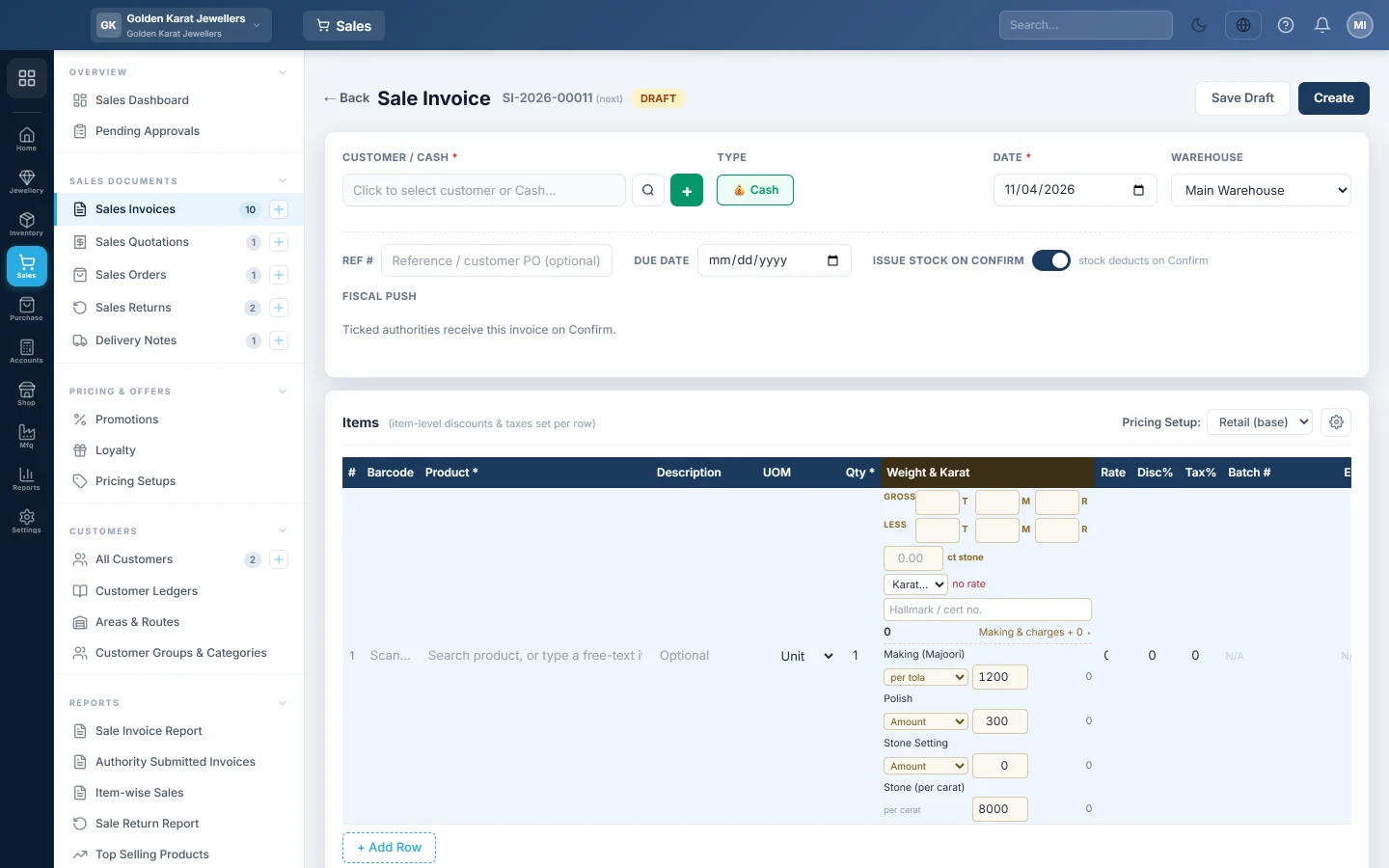
- In Items, add the tagged product, for example 22K Chain. Its karat and today's rate fill in for you.
- Leave the quantity at 1. It counts pieces.
- In Weight & Karat, type the weight in the T, M and R boxes (or in grams). With stone weight on, type the Gross and the Less stone weight, and the stone carats.
- Check the rate shown, for example Rs 230,000 / Tola. The metal value appears beside it.
- Optionally type the Hallmark / cert no.
- Click Making & charges. Check each charge's rate; the amount shows on the right. Making and polish can be switched to Amount, % of metal or per tola for this piece.
- Check the line total: metal plus charges. Discount and tax then apply as on any line.
- Click Create.
The print shows the weight as written, such as 1 T · 5 M · 3 R, with the karat, rate and each charge under the line.
Sell a piece at the POS till
- Tap the tagged product. The Weigh panel opens by itself.
- Type the Weight as the scale shows it. With stones, also type Less stone weight and the Stone carats.
- Tap the Karat. Its rate shows on the button.
- Optionally type the Hallmark / certificate no.
- Under Making & polish, check each charge.
- Read Metal, Making & polish and Line total, then tap Add to bill.
- Take payment as usual.
Each tagged piece is its own line, so tapping the product again weighs a second piece. To re-weigh a line, tap its 💍 button.
Take old gold in exchange
- Make and save the sale invoice for the new piece, as a credit invoice for the customer.
- Take the customer's old gold in on Old Gold and click Confirm.
- Click Settle, choose Against a sale and pick the invoice.
- Take the rest of the balance on the invoice with Add Payment.
Or settle the old gold with Pay the customer and ring up the new piece as an ordinary cash sale.
What happens in the books
- The customer's ledger, or cash for a cash sale, is debited with the bill total.
- Sales Revenue is credited with the metal value. Each making or polish charge is credited to its own income account, or to Sales Revenue if it has none.
- Cost of Goods Sold is debited and Inventory is credited for the weight sold, at the average cost per smallest unit.
Common questions
The line says no rate. No rate is recorded for that karat. Set it on Today's Rate, then pick the karat again.
The bill was refused: a charge is below its default rate. Approval is on in Settings. Use the default rate, or ask a user with Sell Below Today's Rate / Reduce Making Charge to make the sale.
Can I give a discount on the gold rate? No. The rate comes from the rate book. Reduce the making charge, or give an invoice discount.
The customer returns the piece. Make a sale return against the invoice. The weight, metal and charges come back as they were billed. See Sales Returns.
Obrigado. Se ainda precisar de ajuda, escreva para info@eloerp.net.