Dispense a prescription
Give the medicines on a doctor's prescription, pick the batch, bill and collect at the counter or charge a ward or ER bill, and part-dispense when stock is short.
Dispensing gives the medicines on a prescription and takes them out of stock. For an OPD patient you bill and collect at the counter; for a ward or ER patient the medicines are charged to their running bill.
Before you begin
- The prescription is in the queue on Dispensing & Stock. An OPD prescription arrives when the doctor signs the consultation.
- Your role has the pharmacy dispense permission. A discount needs the Apply Discount on HIMS Bills permission. See Users & Roles.
- To collect money, your cash shift is open on Cash Register. Without it a banner says No cash shift is open and Dispense & Collect stays greyed out. A bill to a panel needs no shift.
- Payment methods such as Cash and card are set up. See Payment Methods.
Where to find it
Open Pharmacy → Work → Dispensing & Stock and click Dispense on the prescription.
Choose what to give
- Read the header: Rx number, patient, MRN, doctor, department and date.
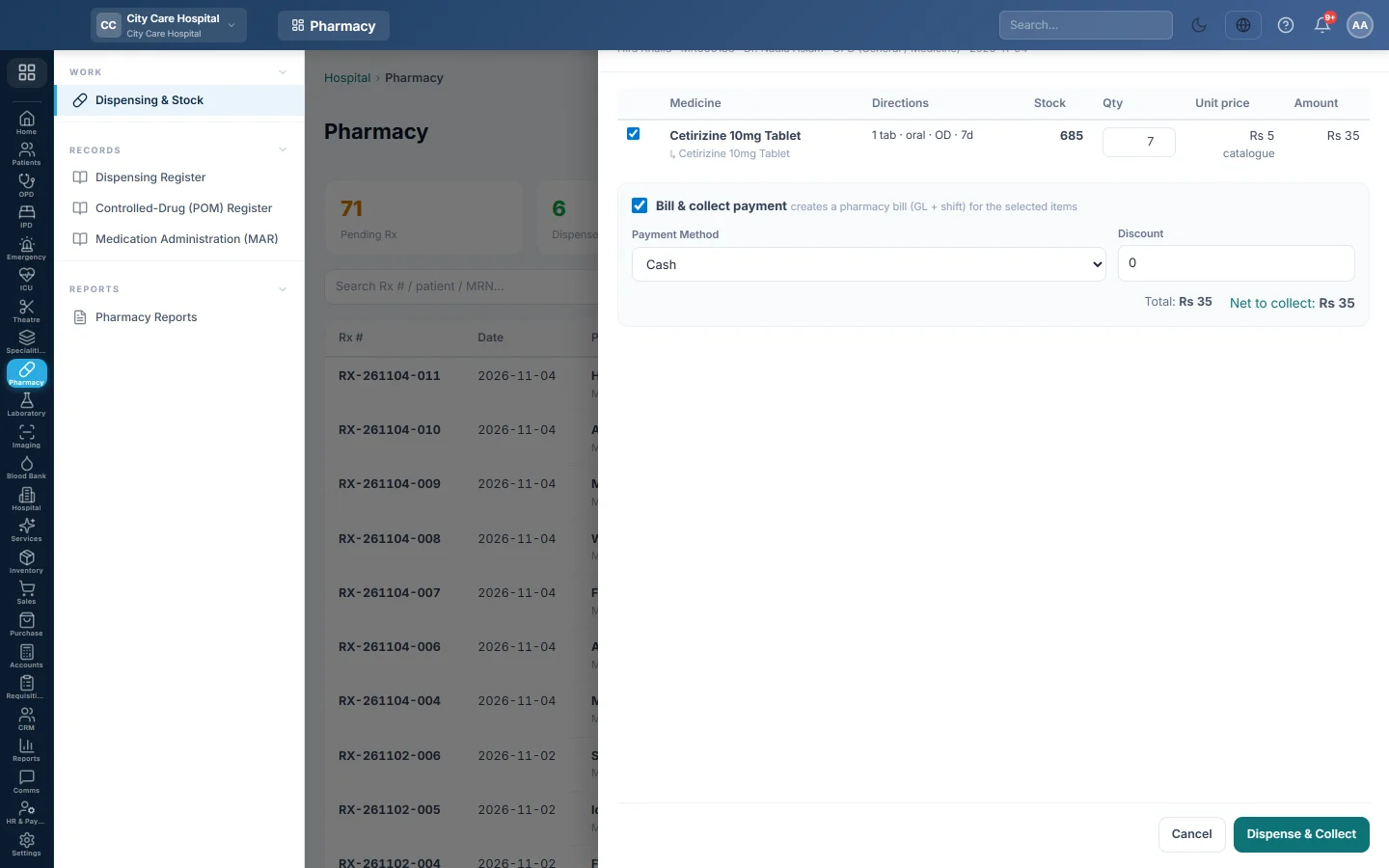
- Keep the tick on each line you are giving now. Untick a line the patient does not want or you do not have.
- Check Qty on each line. It starts at the prescribed quantity, or what is still left of it.
- For a batch-tracked medicine, leave Batch: earliest expiry (FEFO) or pick a batch. The list shows only unexpired batches in this store.
- Check Stock and Unit price. Stock is what this branch's store holds, not your other branches. Under the price, tariff means a hospital Pharmacy tariff, catalogue means the product's sale price.
- If a red Recorded allergy box shows, check the allergy with the doctor or the patient. Then tick I have checked the allergy with the prescriber or the patient and will dispense these medicines. The dispense button stays greyed out until you do.
Dispense an OPD prescription at the counter
- Keep Bill & collect payment ticked.
- For a patient registered under a panel or insurer, tick Bill to panel name to put the bill on the panel's account. Nothing is collected, so no cash shift is needed.
- Otherwise choose the Payment Method and type a Reference # for a card or transfer.
- Type a Discount in rupees if you are allowed to.
- Check Total, Discount and Net to collect.
- Click Dispense & Collect.
A message shows the bill number and amount, for example Bill PHR-… — Rs 450, and the patient's 80 mm slip prints. The bill is listed on Hospital Bills, where you can reprint it.
To give the medicines without a bill, untick Bill & collect payment and click Dispense (no bill). The stock still goes out.
Dispense a ward or ER prescription
A ward prescription shows Ward prescription with the admission number; an ER one shows ER prescription with the ER number. There is no payment box.
- Choose the lines and quantities as above.
- Click Dispense to admission or Dispense to ER bill.
Each line is added to the stay's or the visit's charges at the pharmacy price. The patient pays at discharge. Every line must have a price.
Give part now, the rest later
- Lower the Qty, or untick lines you cannot give yet.
- Leave Close this prescription — the rest will not be given unticked.
- Dispense.
The prescription becomes Part-dispensed and stays in the queue. Next time the line shows how much was given and how much is left. To finish without giving the rest, tick Close this prescription before you dispense; it is then marked Dispensed.
What happens in the books
- Counter bill: a pharmacy bill voucher debits the cash or bank account of the payment method with the net amount. Pharmacy Revenue is credited with the total, and a discount is debited to Discount allowed. On a panel bill, the panel's receivable is debited instead of cash.
- Ward or ER: nothing posts at dispensing. The lines become charges on the stay or visit and post with its final bill.
- Stock: each linked, stock-managed medicine leaves this branch's store. A second voucher debits Cost of Goods Sold and credits Inventory at average cost.
Common questions
The button is greyed out. Check for an unpriced line, a closed shift, an allergy box not yet ticked, or a ward or ER bill that is already done. The drawer says which.
Can I print a receipt here? The 80 mm slip prints by itself when you dispense with a bill. For an A4 copy or a reprint, open the bill on Hospital Bills.
The patient brought back a medicine bought at the counter. On Hospital Bills, click Refund some lines on the pharmacy bill and tick the medicine. It goes back into stock and the money is paid from your drawer. See Refund one line of a bill.
A ward patient did not use all the medicines. Return them before the final bill. See Take back unused ward medicines.
Why does an allergy box show before I dispense? The patient has a recorded allergy that matches a medicine on the prescription. You must tick the box to confirm you checked it before anything is given. When you dispense anyway, the prescribing doctor is told.
Teşekkür ederiz. Hâlâ yardıma ihtiyacınız varsa info@eloerp.net adresine yazın.