Discharge a patient
Discharge an inpatient - work the discharge checklist, write and sign the summary, settle the final bill against the deposit, print the discharge summary and gate pass, and free the bed.
Discharging closes the stay. You check what the hospital requires, settle the bill against the deposit, and the bed goes for cleaning.
Before you begin
- Your role needs the discharge permission. See Users & Roles.
- To collect a balance, your cash shift is open. See Cash Register.
- The steps the hospital requires are set under Discharge checklist on Wards & Beds.
Where to find it
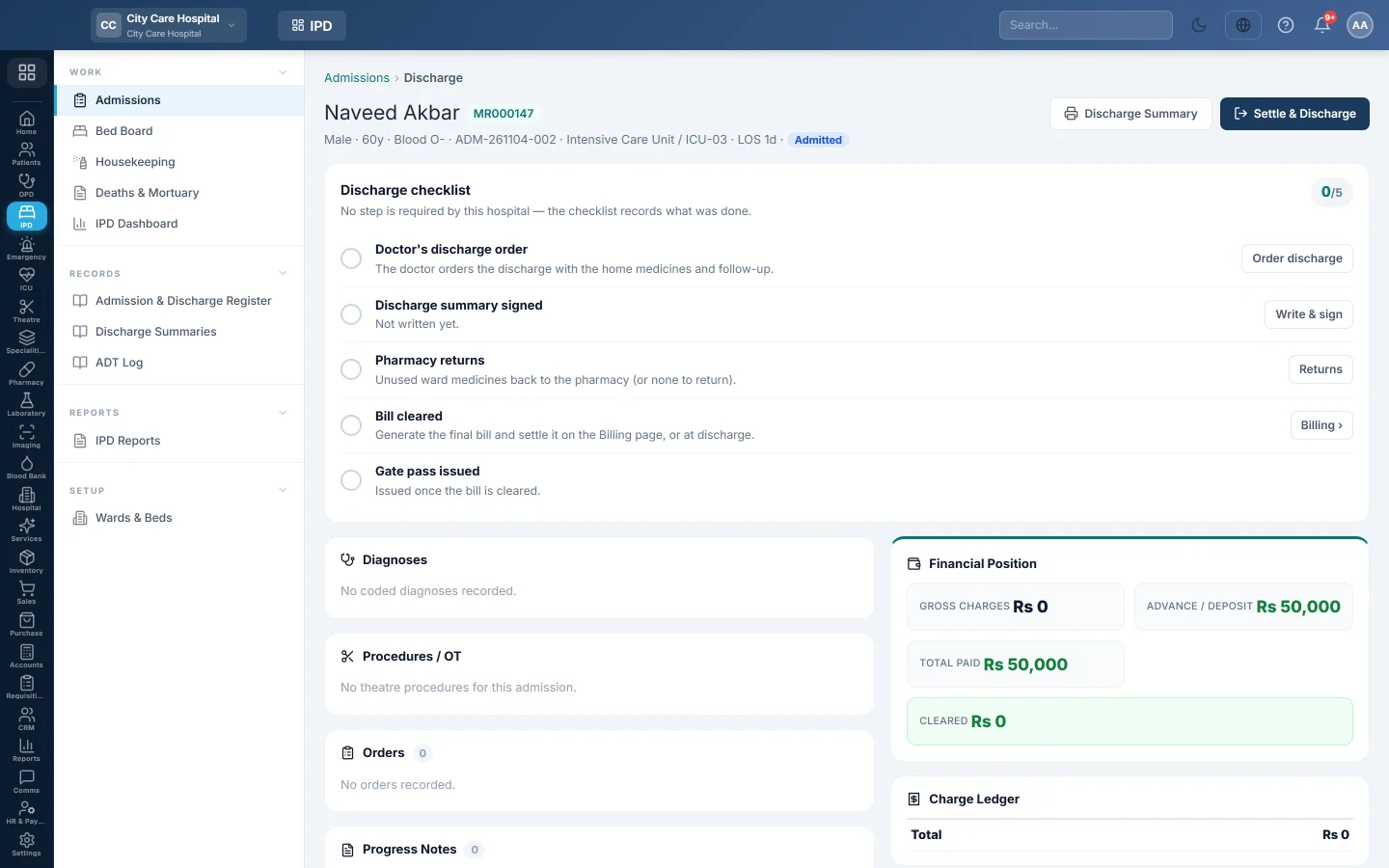
Open Inpatients (IPD) → Work → Admissions and click Discharge on the patient. The discharge worksheet opens.
Read the worksheet
- The header: the patient, admission, ward and bed, and the LOS.
- Discharge checklist: each step, with Required on those the hospital insists on.
- The clinical side: Diagnoses, Procedures / OT, Orders, Progress Notes and Ward Movements (ADT).
- The money side: Financial Position (Gross Charges, Advance / Deposit, Total Paid and Balance Due), the Charge Ledger and Payments & Deposits.
Work the checklist
- Doctor's discharge order: the doctor clicks Order discharge, picks the Discharge type, adds the Medicines to go home on, and the Follow-up date and note.
- Discharge summary signed: write the Clinical course and advice, then Sign summary. A signed summary is locked.
- Pharmacy returns: enter unused ward medicines and click Return & credit. They go back to stock and are credited to the stay.
- Bill cleared: generate the final bill on the Billing page, or settle it in the next step.
- Gate pass issued: once the bill is cleared, click Issue gate pass.
Steps that are not required can be skipped. The checklist still records what was done.
Settle and discharge
- Click Settle & Discharge.
- Check the banner. It shows the Balance to collect, or says the deposit covers all charges.
- Choose the Discharge Type: Recovered, Referred, LAMA, DAMA, Absconded or Expired.
- If there is a balance, choose the Payment Method and a Reference No.
- If the summary is not signed yet, type the Discharge Summary / Advice.
- Click Collect Rs … & Discharge, or Confirm Discharge when nothing is due.
The bed goes to Housekeeping for cleaning. Click Discharge Summary on the worksheet to print the summary for the patient.
What happens in the books
Discharge makes the IPD final bill for all charges not yet billed. Its voucher:
- Debits Patient Advance Deposits with the deposit used, and cash or bank with what was collected now.
- Debits Accounts Receivable - Patients with anything left to pay later, or the panel's receivable for a panel patient.
- Debits the discount account with any discount.
- Credits revenue: bed charges to IPD Room / Bed Revenue (or the ward's own ledger), and other charges to their department or service revenue.
A deposit larger than the bill can be refunded from the Billing page with Refund deposit.
Common questions
The patient died. Choose Expired. The death goes to Deaths & Mortuary for the certificate and the release of the body. The checklist never holds up a death.
The patient left without telling anyone. Choose Absconded. For a patient leaving against advice, choose LAMA or DAMA.
Discharge says the nursing assessment is missing. The hospital requires it. Record it on the chart's Admission assessment tab.
Can the family pay part now and the rest later? Yes, on the Billing page: Generate Final Bill, then collect less than the balance. The rest stays on the patient's account.
Gracias. Si todavía necesita ayuda, escriba a info@eloerp.net.