Foodpanda Payouts
Match Foodpanda's settlement statement to your Foodpanda orders, post the money received with the commission and deductions, and void a payout posted by mistake.
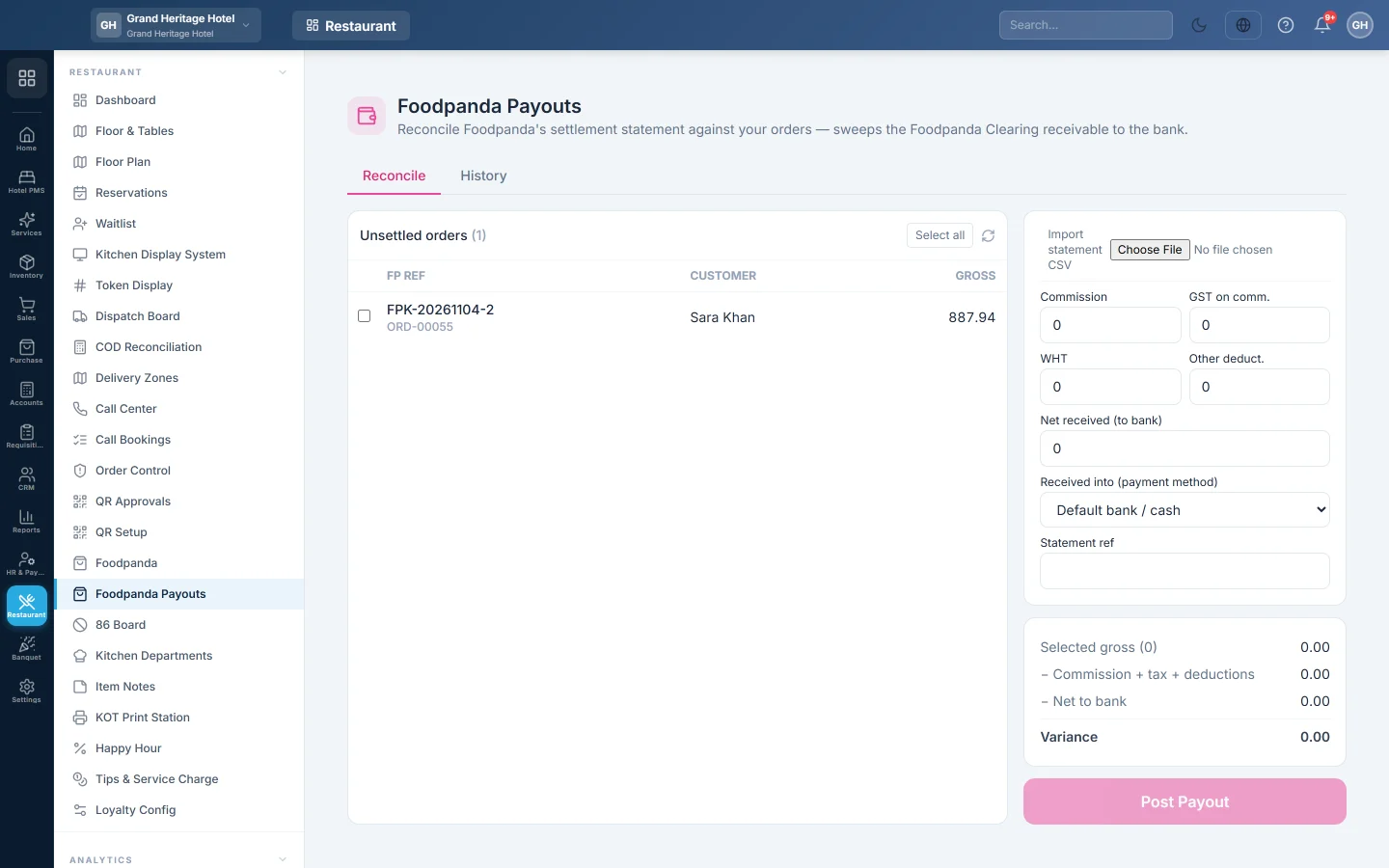
Foodpanda pays you every few days, after taking its commission and other deductions. On this screen you tick the orders the statement covers, enter the statement's figures and post the payout, which clears what Foodpanda owed you for those orders.
Before you begin
- The Foodpanda channel is switched on and its ledgers exist, see Foodpanda.
- Your role needs Reconcile & Post Foodpanda Payouts; voiding needs Void Foodpanda Order / Settlement. See Users & Roles.
- Have Foodpanda's settlement statement at hand, on paper or as a CSV file.
- The bank or cash account the money arrives in exists in your Chart of Accounts.
Where to find it
Open Restaurant → Restaurant → Foodpanda Payouts. The screen has two tabs: Reconcile and History.
Post a payout
- On Reconcile, find the orders on the statement under Unsettled orders. Tick each one, or click Select all. Orders you refunded or marked RTO are not listed: they owe nothing, and EloERP refuses to settle them.
- To fill the figures from a file instead, click Import statement CSV and choose Foodpanda's statement. Matching orders are ticked and Commission and Net received (to bank) are filled in. You are told if any row has no matching order.
- Type or check the statement's figures: Commission, GST on comm., WHT and Other deduct., such as marketing fees or penalties.
- Type Net received (to bank), the amount Foodpanda actually paid.
- Choose Received into (payment method), the bank or cash account. Default bank / cash uses your first bank ledger.
- Type the Statement ref.
- Check the summary. Variance should be zero or close to it.
- Click Post Payout.
The message says Foodpanda payout posted — clearing swept. The orders leave Unsettled orders and show as Settled on the Foodpanda screen.
When the variance is too large
The Variance is the selected orders' Selected gross minus everything on the statement. A small difference, up to Rs 50 or 0.5% of the gross, whichever is larger, posts without a question.
A larger one usually means a mistyped figure or a missing order. Recheck first. If the statement really differs, tick Override & post anyway and type the Reason for the variance (required). Net received can never be more than the selected gross.
Void a payout
- Open History. It lists each payout with its Gross, Commission, Net, Variance, # Orders and Status.
- Click the void button on a posted payout and confirm.
The payout's entries are reversed and its orders go back to Unsettled orders, ready to post again.
What happens in the books
EloERP posts a Foodpanda settlement voucher:
- The bank or cash account is debited with Net received (to bank).
- Foodpanda Commission Expense is debited with the Commission.
- GST on comm. is debited to your input tax account, WHT to WHT Receivable, and Other deduct. to Foodpanda Other Deductions. EloERP creates the last two ledgers when first needed.
- Any variance goes to Aggregator Settlement Variance.
- Foodpanda Clearing is credited with the selected orders' gross, so what Foodpanda owed for them comes back to zero.
The balance left in Foodpanda Clearing is what Foodpanda still owes you for unsettled orders.
Common questions
An order on the statement is not in the list. It was not entered on Foodpanda, or it is already in a payout. Enter it first, or check History.
The payment method list is empty. You have no cash or bank ledgers yet. The payout posts to the default bank ledger; add one in the Chart of Accounts to choose.
Foodpanda refunded an order after I settled it. Void the payout, refund the order on Foodpanda, then post the payout again. The refunded order no longer appears in Unsettled orders, in the CSV preview or in the payout.
An order I refunded is on the statement. It stays out of the list, because its sale was already reversed. The amount shows up in the Variance; tick Override & post anyway and give the reason, or take it up with Foodpanda.
Can I see what Foodpanda owes me? Open Foodpanda Clearing in Ledger Statement.
Спасибо. Если помощь всё ещё нужна, напишите на info@eloerp.net.