Agent Commission Terms
Set what each travel agent earns, as a percentage of revenue or an amount per night, for the Agent Commission statement.
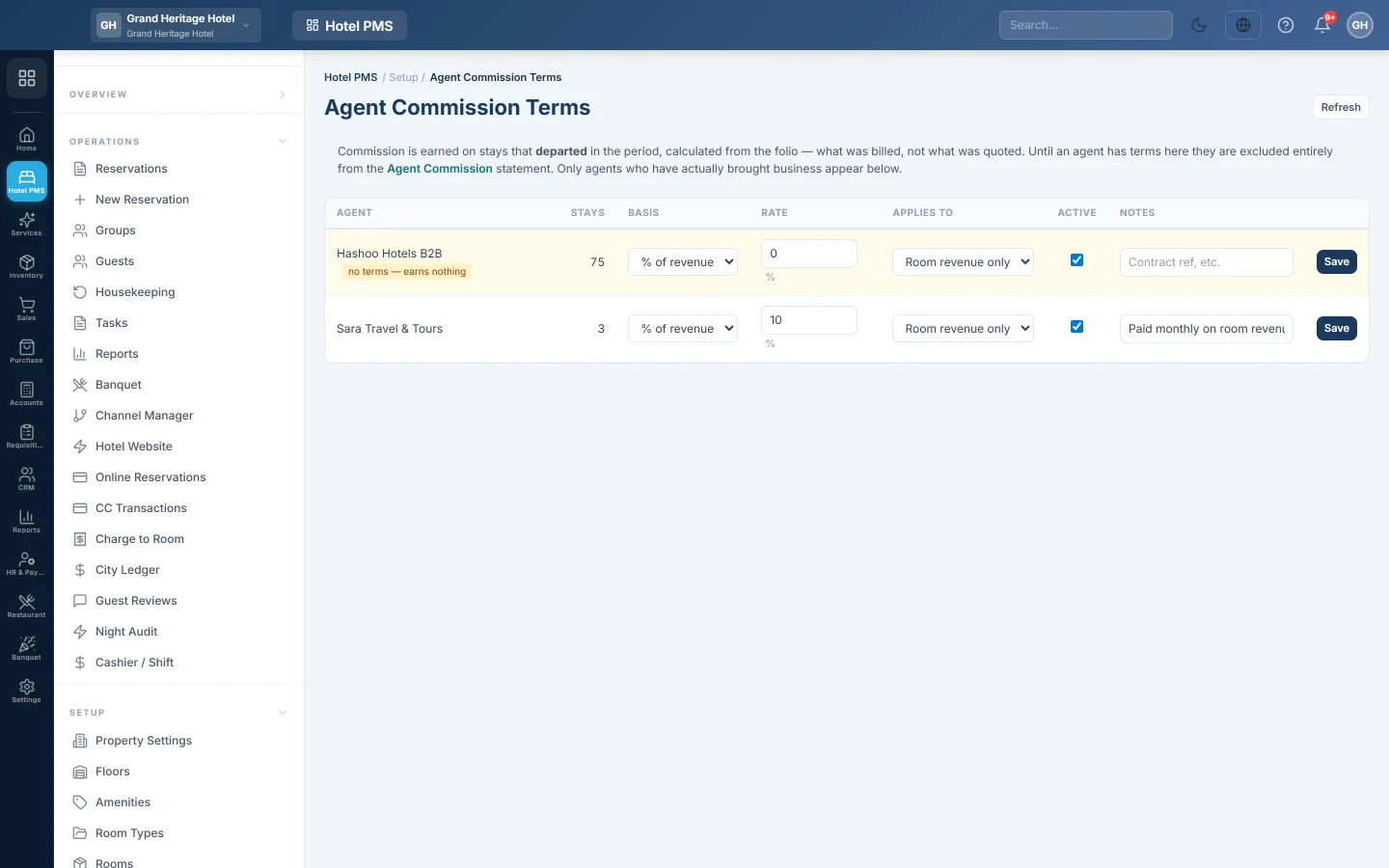
Agent Commission Terms sets what each travel agent earns on the stays they bring you. The Agent Commission statement in the hotel reports uses these terms to work out what you owe each agent.
Before you begin
- The agent is a customer in EloERP, and is set as the Travel agent on their bookings.
- Your role needs the hotel reports permissions. See Users & Roles.
Where to find it
Open Hotel → Setup → Agent Commission Terms.
Set an agent's terms
The table lists only agents who have brought you at least one stay, with the number of Stays. An agent without terms shows no terms — earns nothing.
- Find the agent in the list.
- Under Basis, pick % of revenue or Per night.
- Enter the Rate, for example 10 for 10%, or the amount per night.
- For a percentage, pick what it Applies to: Room revenue only or All folio revenue.
- Keep Active ticked and add Notes, such as the contract reference.
- Click Save. saved appears next to the button.
A percentage above 100 is refused.
How commission is worked out
Commission is earned on stays that departed in the report period. It is worked out from the folio, so it follows what was really billed, not what was quoted. An agent without terms is left out of the statement completely.
Common questions
The page says No reservation has been attributed to a travel agent yet. No booking has an agent on it. The page fills in as soon as one does.
Where do I set the agent on a booking? On the New Reservation form, under Source & Notes, search the Travel agent box by name or phone and pick the customer. Click Change to pick another.
Does the commission post to my books? No. The statement tells you what is owed; pay the agent with a payment voucher, see Payment Voucher (PV).
What does Refresh do? It reloads the list, for example after new stays departed.
Terima kasih. Jika masih butuh bantuan, kirim email ke info@eloerp.net.