City Ledger
Follow the money companies owe for their staff's stays, collect payments against single folios, raise one invoice for many stays, watch credit limits and give companies a link to their own statement.
The City Ledger is for stays that a company pays later, known as bill to company (BTC). It lists every company folio that still owes money, groups checked-out stays into one invoice per company, records the payments that come in, and watches each company's credit limit.
Before you begin
- The company is a customer with a ledger, and a credit limit if you use one. See All Customers.
- Stays reach the city ledger when a folio billed to the company is settled with money still owed. See Bill a stay to a company account.
- Your role needs the folio permissions. See Users & Roles.
Where to find it
Open Hotel → Operations → City Ledger.
Read the ledger
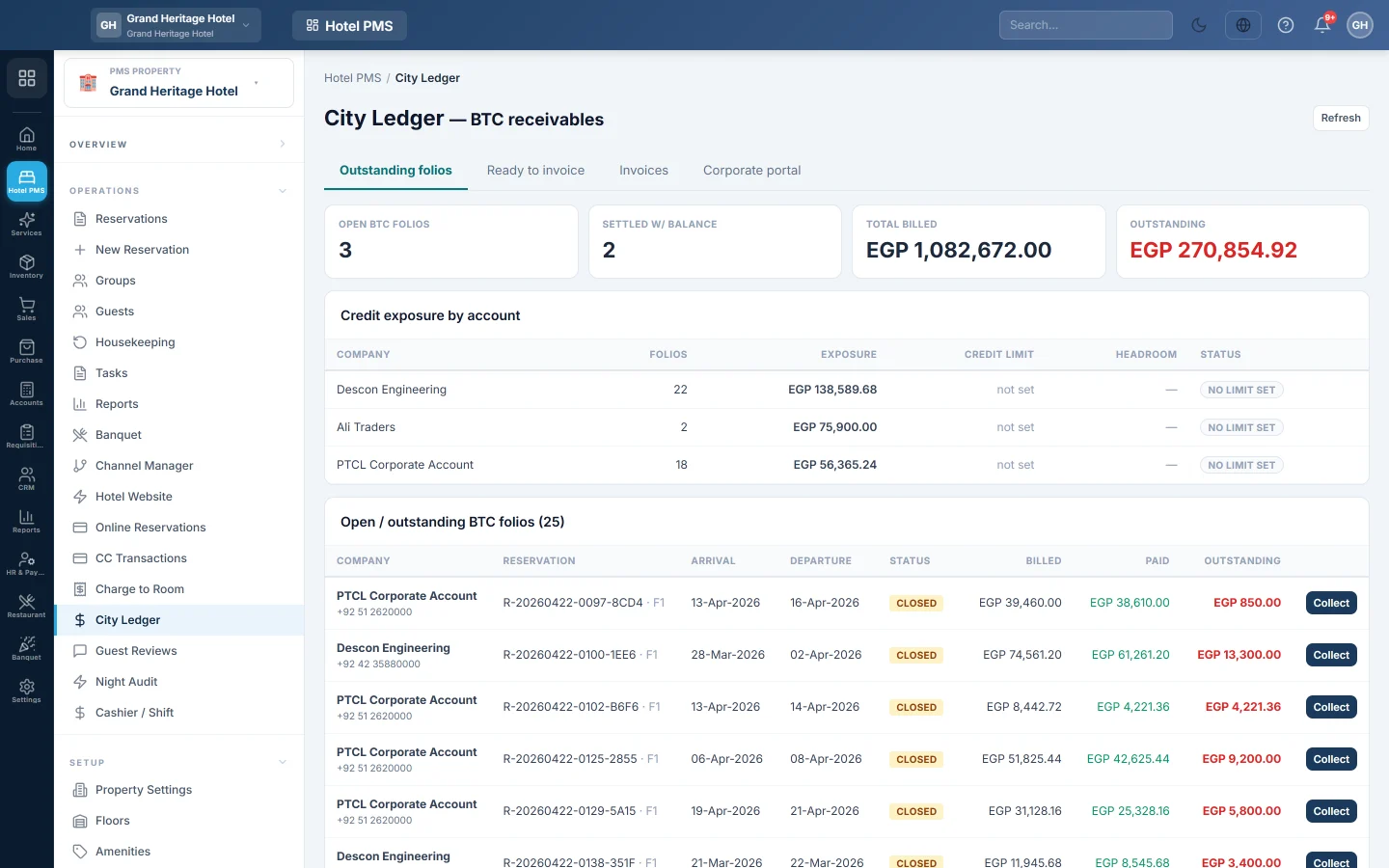
The Outstanding folios view shows:
- Totals for Open BTC folios, Settled w/ balance and Total billed.
- Credit exposure by account: what each company owes against its Credit limit, the Headroom left, and Over limit when it has gone past it.
- Open / outstanding BTC folios: each folio with the company, the reservation, the dates, what was Billed and the Balance. Click a row to open the stay.
Collect a payment on one folio
- Find the folio in Open / outstanding BTC folios and click Collect.
- In Record collection, enter the amount, pick the Method and type the Reference (optional), for example the cheque number.
- Click Post collection.
The amount cannot be more than what is outstanding.
Raise one invoice for many stays
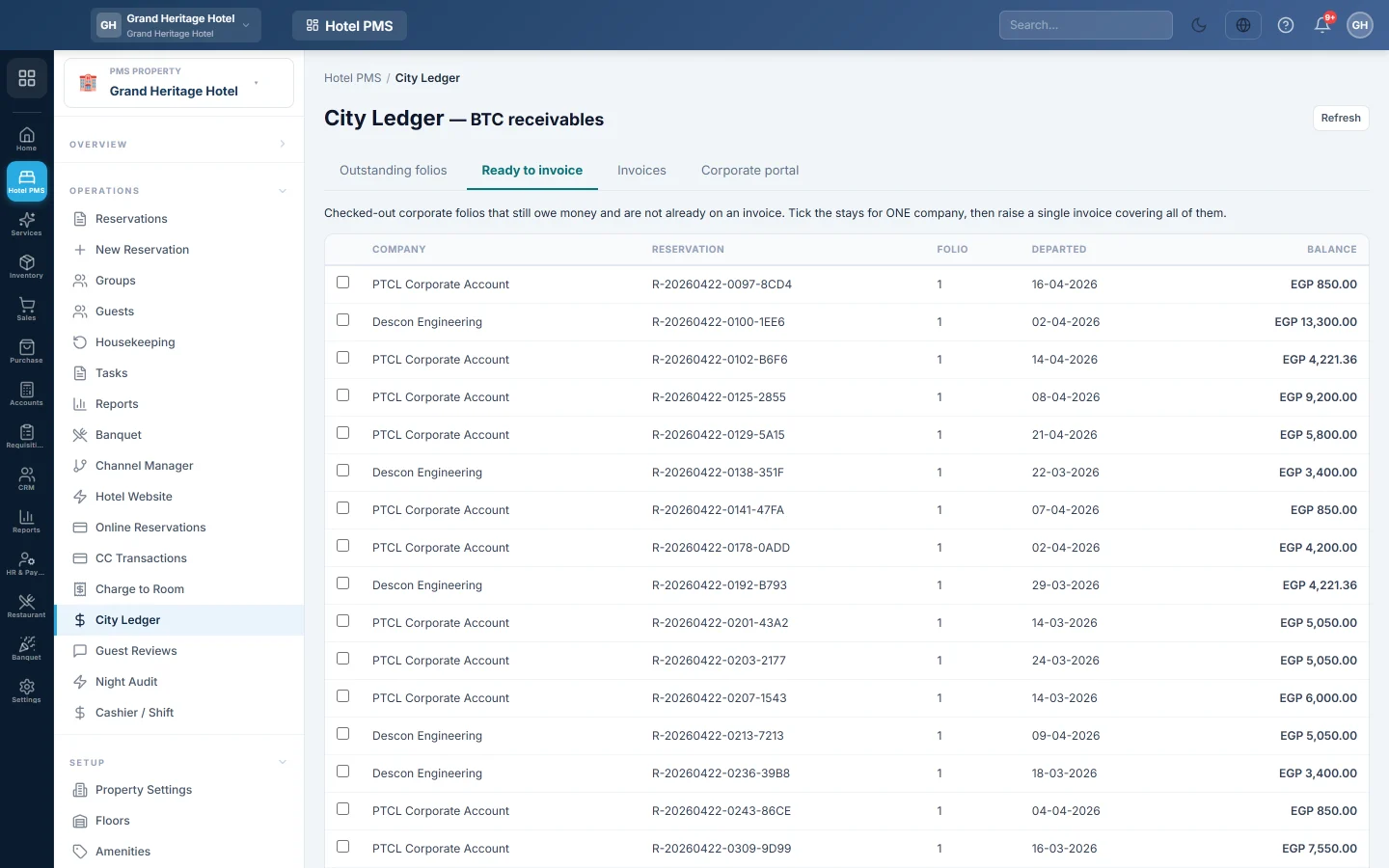
- Click Ready to invoice. It lists checked-out company folios that still owe money and are not on an invoice yet.
- Tick the stays of one company.
- Set Due in a number of days, for example 30.
- Click Raise invoice.
Open Invoices to see them by status: Open, Part paid, Paid or Void. Click View to print an invoice, or Collect to record a payment against it; the payment is spread over its stays. To withdraw an invoice, void it and give a Reason; its stays go back to Ready to invoice.
Give a company its own statement link
- Click Corporate portal.
- Click Issue link next to the company and then Copy link.
- Send the link to the company's accounts person.
The company sees its own statements without a password. Click Revoke the moment the contact leaves that company.
What happens in the books
Settling a company folio with a balance debits the company's ledger with what it owes. Raising an invoice posts nothing more; it groups debts that already exist. Each collection debits the cash or bank account of the method and credits the company's ledger.
Common questions
A company stay is not in Ready to invoice. The guest has not checked out yet, the folio is not billed to the company, or the stay is already on an invoice.
How do I set a company's credit limit? On the company's customer record, see All Customers.
Where is the ageing of what companies owe? In the city ledger reports, such as the city ledger aging, in PMS Reports Hub.
Obrigado. Se ainda precisar de ajuda, escreva para info@eloerp.net.