Channel Manager
Sell your rooms on online travel agencies such as Booking.com, Agoda, Expedia and Airbnb, keep their rooms, rates and restrictions in step with the hotel, and receive their bookings, requests, messages and reviews in one place.
The Channel Manager connects your hotel to online travel agencies (OTAs) such as Booking.com, Agoda, Expedia and Airbnb. Once a channel is connected and switched on, EloERP sends it your rooms, prices and restrictions, and its bookings arrive as reservations on your tape chart.
Before you begin
- Online distribution must be switched on for your property by your service provider. Until then the page shows Not connected yet.
- You need your own account with each OTA, and its details, such as your hotel ID there.
- Your room types and rate plans are set up, see Set up your hotel: rooms and rates.
- Your role needs the channel permissions. See Users & Roles.
Where to find it
Open Hotel → Operations → Channel Manager.
Read the status
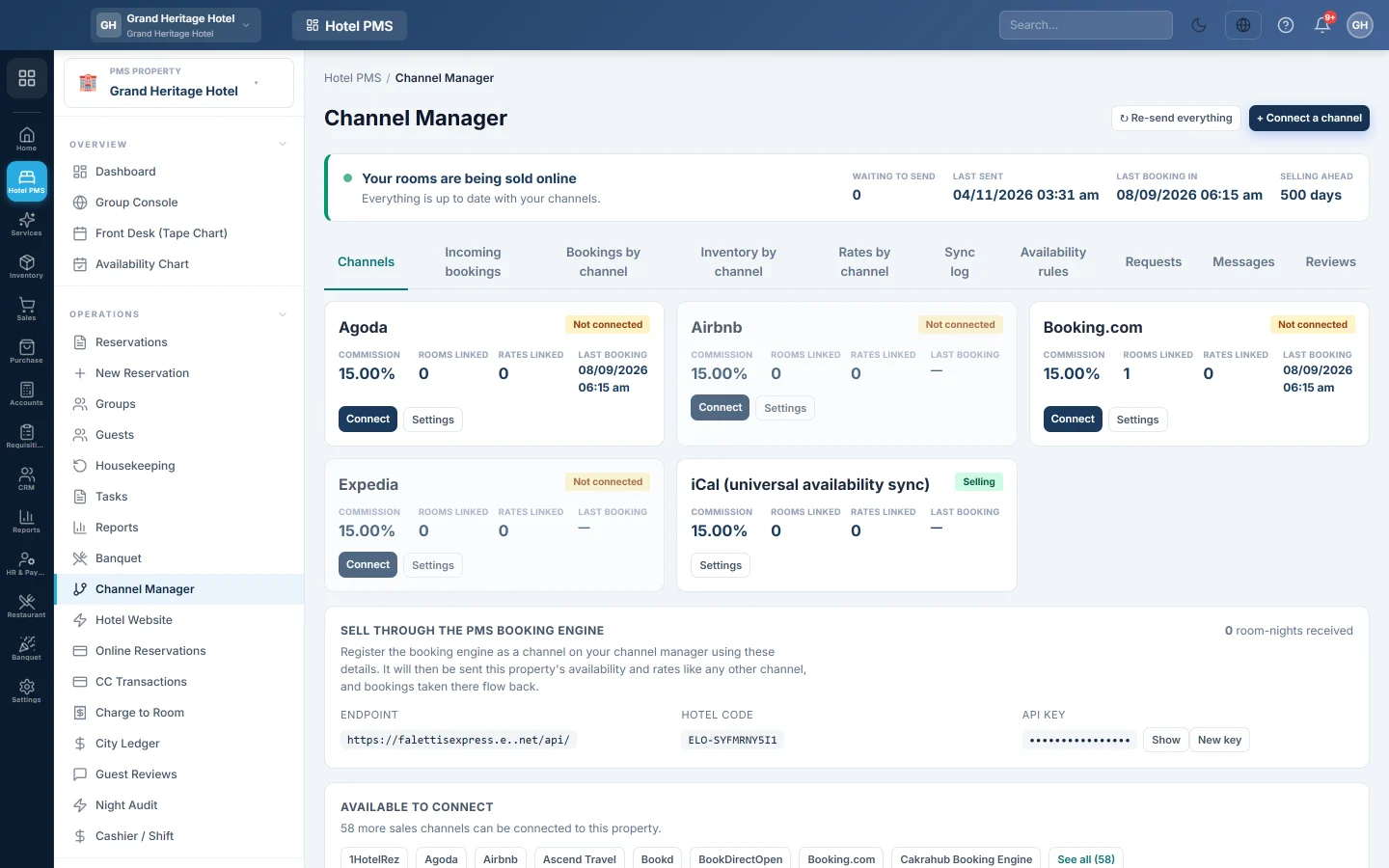
The top card shows whether sync is healthy, the Channels needing attention, the changes Waiting to send, when data was Last sent, the Last booking in and how many days ahead you are Selling ahead. ↻ Re-send everything sends every rate and room count again for the whole selling period; use it after a big change or when a channel looks out of step.
The tabs
| Tab | What it is for |
|---|---|
| Channels | One card per channel, with its commission, rooms and rates linked, last booking and actions. |
| Incoming bookings | Bookings received from channels, including any that failed or need a room or rate matched. |
| Bookings by channel | Bookings, nights, revenue, ADR and net to hotel per channel; Export CSV for a spreadsheet. |
| Inventory by channel | Rooms open to sell per night, and Check against channel manager to find nights that differ. |
| Rates by channel | Your price and restrictions per night; click a night or use Bulk update to change them. |
| Sync log | Everything sent, with its reference and period. |
| Availability rules | Rules that hold rooms back from a channel, cap what it sees, or stop selling there for a while. |
| Requests | Booking requests and enquiries that wait for your answer. |
| Messages | Conversations with guests from the channels. |
| Reviews | Guest reviews from the channels, with a reply box. |
Connect a channel
Click + Connect a channel and follow the steps. See Connect the channel manager.
Work a channel card
- Switch on starts sending rooms and rates; Pause stops sending but keeps the connection.
- Pull past bookings fetches bookings the channel took before it was connected here.
- Adjust rates sends this channel your rates raised or lowered by a percentage or amount, for example 10% more to cover its commission. Your own rates do not change.
- Settings shows the name, the Commission % used for net-to-hotel figures, and the rooms and rates linked.
A card that says Bookings received — not connected has sent bookings but was never set up here. Connection lost — connect again needs the connect steps again.
Hold rooms back from a channel
- Open Availability rules and click + Add a rule.
- Enter a Name, for example Keep 2 rooms for walk-ins.
- Pick what it does: Stop selling, Hold back rooms or Never show more than, and the number of Rooms.
- Tick the Channels, Room types and days it applies to; none ticked means all.
- Tick Rule is on and click Save rule.
Your real availability does not change; only what the channels see.
Answer requests and messages
On Requests, click Accept or Decline for a request to book. It waits 24 hours for your answer. For an enquiry, Pre-approve lets the guest book those dates at your price, and Special offer sends a price for the whole stay. On Messages, pick a conversation, write a reply and click Send.
Sell your own booking engine through another channel manager
The card for selling through your own booking engine shows an Endpoint, Hotel code and API key. Give these to a channel manager that supports open channels, and your booking engine becomes one of its sales channels. New key replaces the key.
Common questions
The page says Not connected yet. Online distribution is not switched on for this property. Contact your service provider.
A booking came in but is not on the tape chart. Open Incoming bookings. A booking whose room or rate is not matched waits there; match it and click Try again.
Prices on the OTA are wrong. Check Rates by channel, the channel's rate adjustment, and the Rate Plans grid. Then click ↻ Re-send everything.
How fast do changes reach the channels? Within about a minute of a change to a rate grid, the Availability Chart or a booking.
Do I pay the OTA's commission here? No. The commission is the channel's; EloERP records it as an expense owed to the channel when the stay's folio is settled, so your reports show the net to hotel.
شكرًا لك. إذا كنت لا تزال بحاجة إلى مساعدة، راسلنا على info@eloerp.net.