Accounting Preferences
Set voucher approval limits, choose how corrections change the ledger, check that every posting account exists, and switch on cheque management and customer-cum-supplier parties.
Accounting Preferences holds the rules for your books: which vouchers need approval, what happens to ledger entries when a document is corrected, and two optional features, cheque management and customer-cum-supplier parties.
Before you begin
- You need a role that can edit accounting settings. Only an Administrator can change Corrections.
- Set up your chart of accounts first. See Chart of Accounts.
Where to find it
Open Settings → Accounting → Accounting Preferences.
Set voucher approval limits
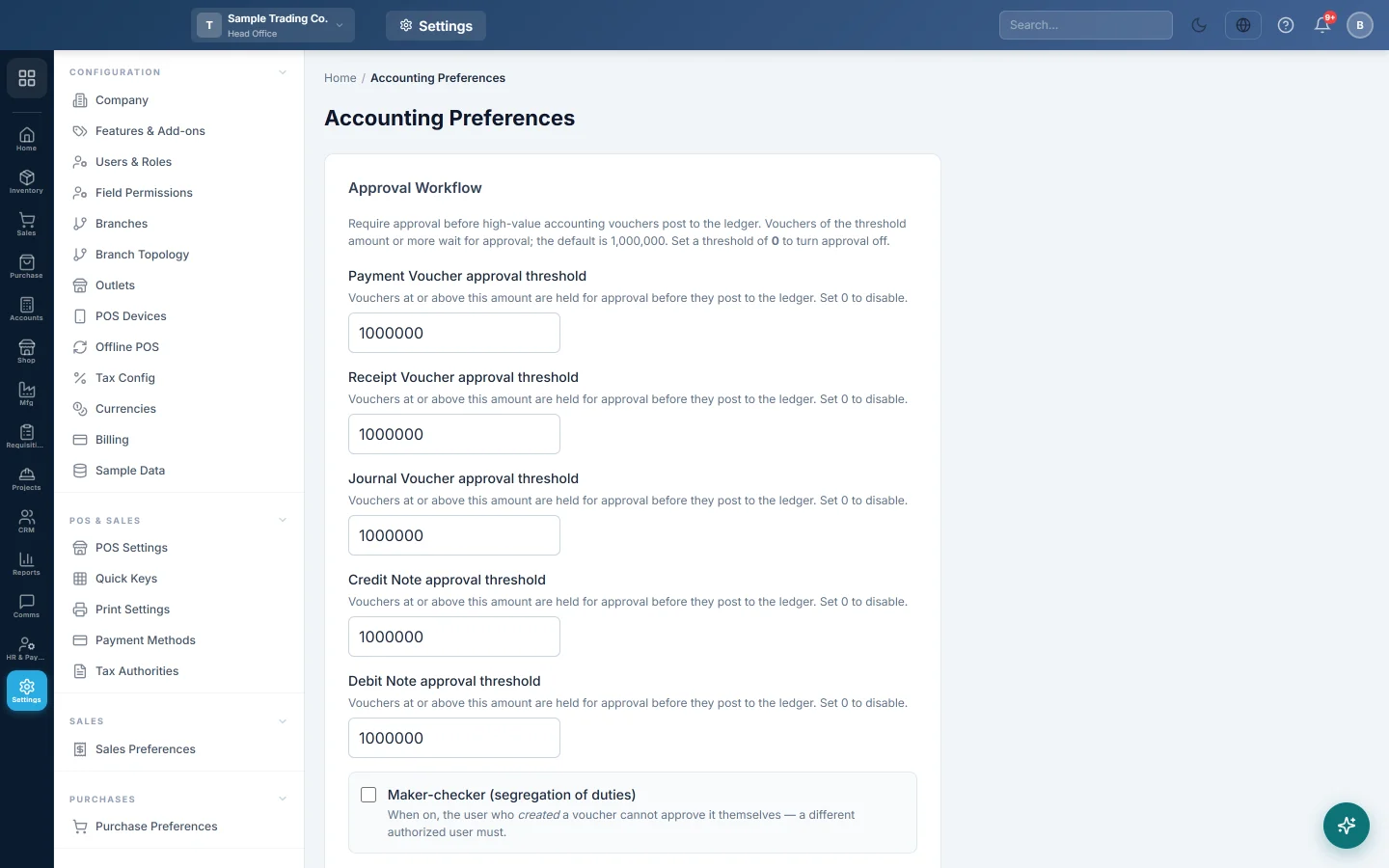
- Under Approval Workflow, type an amount for each voucher: Payment Voucher approval threshold, Receipt Voucher approval threshold, Journal Voucher approval threshold, Credit Note approval threshold and Debit Note approval threshold.
- Vouchers of that amount or more are held for approval before they post. Type 0 to switch approval off. The default is Rs. 1,000,000.
- Tick Maker-checker (segregation of duties) if the person who created a voucher must not approve it.
- Click Save Preferences.
Choose how corrections are made
Corrections decides what happens to ledger entries when a posted invoice, return or voucher is cancelled, edited or deleted.
| Choice | What you see in the ledgers |
|---|---|
| Delete the old entries (recommended) | The old entries leave the ledgers, so statements show only what is true now. A full copy of each removed entry is kept in the deletion archive. |
| Keep them and post reversing entries | The old entries stay, and a reversing voucher dated on the day of the change cancels them. Every step stays visible, but ledgers get longer. |
Choose one and click Save. Either way, the change is checked against closed financial years and recorded in the audit log. Removed entries can be looked up in Deleted entries.
Check posting health
Posting health lists the accounts that invoices, returns and payments post to, and shows All found or the number missing.
- If an account shows Missing, add an account with the code shown in the Chart of Accounts.
- Read Skipped postings in the last 30 days for documents that saved without their ledger entries.
- Once everything shows All found, tick Refuse to save a document whose ledger entries cannot be posted.
With it off, a document saves and the skip is recorded. With it on, the user sees which account is missing and the document does not save until it is set up.
Switch on cheque management
- Under Cheque Management, tick Enable Cheque Management. This adds the Cheque Register under Accounts → Banking, and a cheque panel on payment and receipt vouchers and invoice payments.
- Tick Hold cheques in a clearing account until they clear if the bank balance should move only when a cheque clears. Received cheques wait in Cheques in Hand, issued ones in Cheques Issued.
- Tick Require a deposit step before a received cheque can clear to follow received → deposited → cleared.
- Set Warn me this many days before a cheque is due. Use 0 to be told only when a cheque is overdue.
- Click Save Cheque Settings.
See Cheque Register.
Allow customer-cum-supplier parties
For businesses you both sell to and buy from. Tick Allow a party to be both a customer and a supplier. A Customer-cum-Supplier panel then appears on the customer and supplier forms. A linked party has one account: its sale invoices and purchase bills post to the same ledger, so what each side owes nets off, and open invoices and bills can be set off against each other.
Switching it off later only stops new links. Parties already linked keep sharing one account.
Common questions
Large payment vouchers stay unposted. They are at or above the approval threshold. An approver must approve them, or you can raise the threshold.
Which correction mode should I pick? Most businesses keep Delete the old entries (recommended). Choose reversing entries if your auditor wants every step left in the ledgers.
A document saved but is missing from the ledger. An account it posts to is missing. Check Posting health and add the account.
Cheque Register is not in the Accounts menu. Tick Enable Cheque Management and save. Your plan must include banking.
Teşekkür ederiz. Hâlâ yardıma ihtiyacınız varsa info@eloerp.net adresine yazın.