Sales Preferences
Set the amounts above which sale quotations, orders, invoices, returns and delivery notes need approval, turn on maker-checker, and choose whether sale returns confirm on save.
Sales Preferences decides when a sale document needs a manager's approval before it posts, and how sale returns are confirmed. Use it to keep large sales and refunds under control.
Before you begin
- You need a role that can view and edit Sales Preferences.
- The people who approve need the approve permission for each document type. See Users & Roles.
Where to find it
Open Settings → Sales → Sales Preferences.
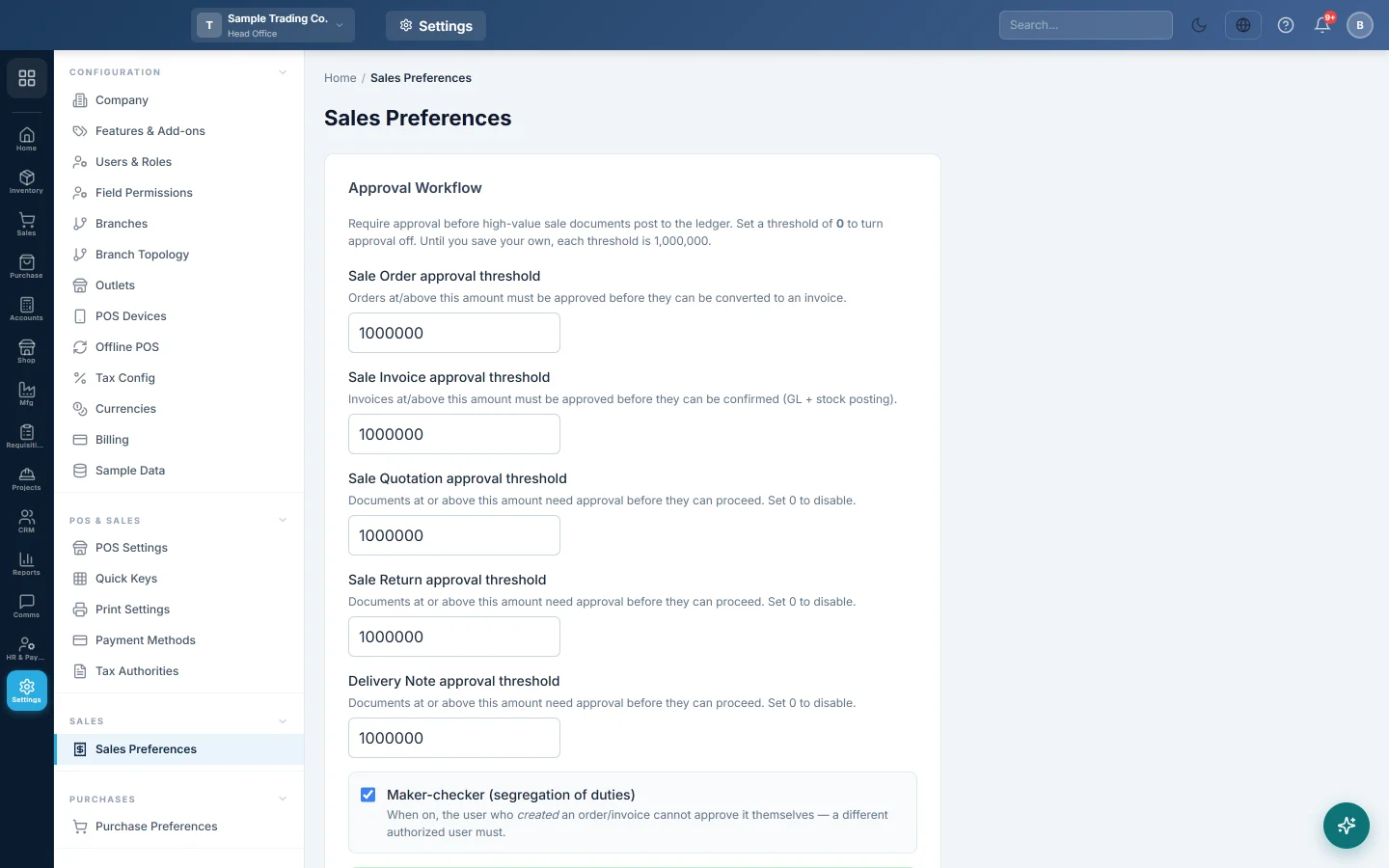
Set the approval thresholds
- Under Approval Workflow, type an amount for each document:
- Sale Order approval threshold: orders at or above it must be approved before they can be turned into an invoice.
- Sale Invoice approval threshold: invoices at or above it must be approved before they can be confirmed, which posts stock and the ledger.
- Sale Quotation approval threshold, Sale Return approval threshold and Delivery Note approval threshold: documents at or above the amount need approval before they can go further.
- Type 0 to switch approval off for that document.
- Click Save Preferences.
Documents waiting for approval are listed under Pending Approvals.
Turn on maker-checker
Tick Maker-checker (segregation of duties) and click Save Preferences. The user who created an order or invoice can then no longer approve it; a different authorised user must.
Confirm sale returns on save
Tick Auto-confirm Sale Returns on save and click Save Preferences.
| Setting | What happens when staff save a sale return |
|---|---|
| On | The return is confirmed at once: the stock goes back and the refund posts in one step, and the receipt can be printed straight away. |
| On, return at or above the Sale Return threshold | The return is not auto-confirmed. It stays a draft until it is approved. |
| Off | Staff must click Confirm Return before it posts. |
An unconfirmed return can never be printed.
Common questions
Large invoices get stuck as drafts. They are at or above the Sale Invoice approval threshold. An approver must approve them on Pending Approvals, or you can raise the threshold.
I am the only user. Can I still use approvals? Yes, but leave Maker-checker (segregation of duties) off, or nobody can approve your documents.
Do the thresholds apply per branch? No. They apply to the whole company.
The cashier cannot print a sale return. It is not confirmed yet. Click Confirm Return, or turn on Auto-confirm Sale Returns on save.
Teşekkür ederiz. Hâlâ yardıma ihtiyacınız varsa info@eloerp.net adresine yazın.