Billing
See your current plan, trial or renewal dates, how many branches, users and products you use against your limits, and who to contact to change plan or pay.
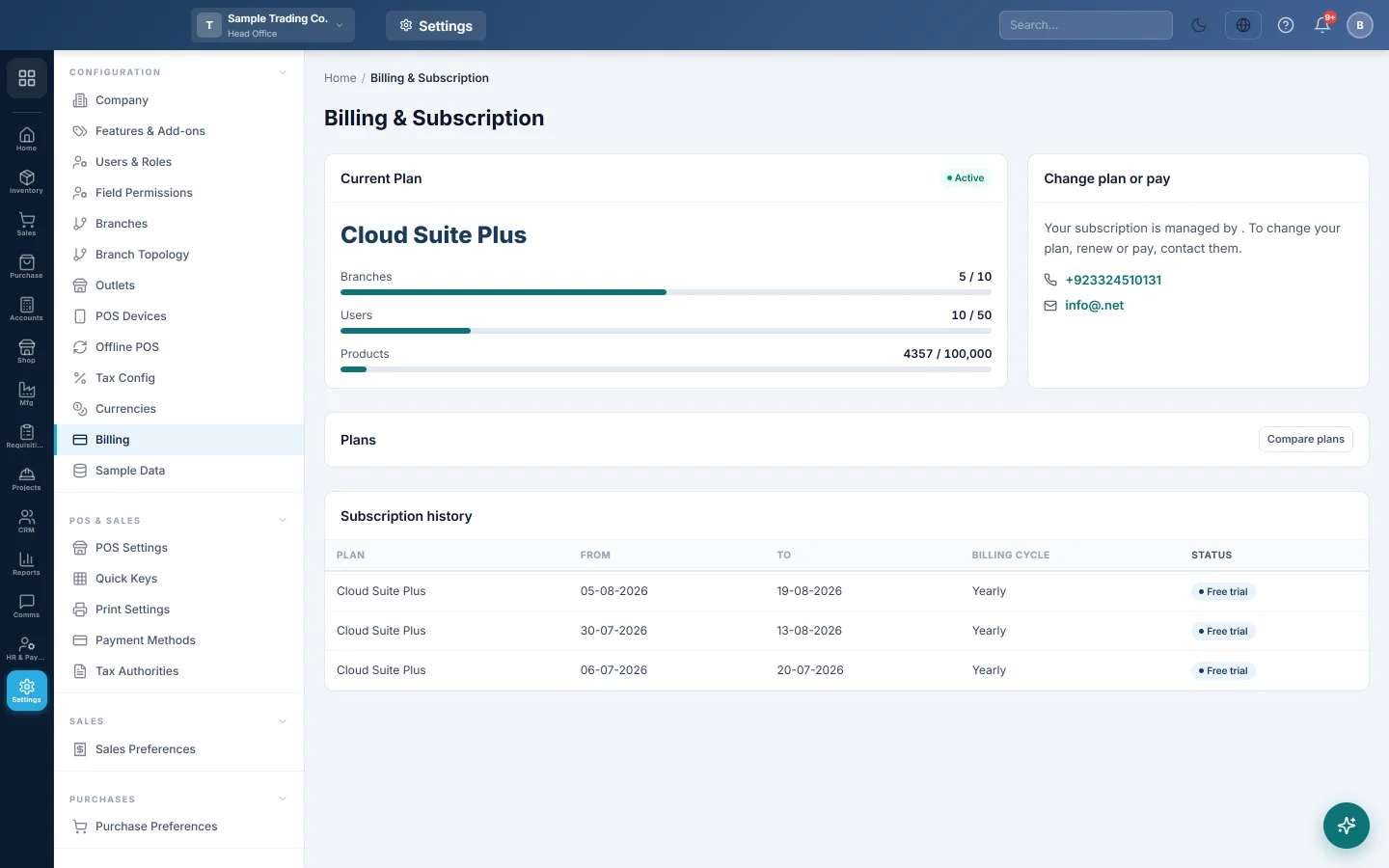
The Billing & Subscription page shows your plan as it is on record: its status, its dates, what you use against its limits and the history of your subscription. It is a read-only page; plan changes and payments go through your service provider.
Before you begin
- You need a role with the View Billing or Manage Billing permission to open the page.
Where to find it
Open Settings → Configuration → Billing.
Read your current plan
The Current Plan card shows:
| Part | What it tells you |
|---|---|
| Plan name and badge | Your plan, and its status: Free trial, Trial ended, Active, Suspended or Inactive. |
| Price | The amount and cycle on record, for example per month or per year. It is shown only when there is one to show. |
| Free trial ends | The last day of your trial, while you are on one. |
| Active since / Next renewal | When the paid plan started and when it is next due. |
| Branches, Users, Products | How many you use, against your plan's limit. The bar turns orange at 75% and red at 90%. no limit means the plan has none. |
Compare plans
- On the Plans card, click Compare plans.
- Read each plan's limits for branches, users and products. Your own plan is marked Your plan.
- Click Hide to close the list.
Only the plans of your own product are listed.
Change your plan or pay
The Change plan or pay card names who manages your subscription, with their phone and email.
- Click the phone number to call, or the email address to write.
- Tell them which plan you want, or ask to renew or pay.
When you bought EloERP through a reseller, the card names that reseller. Prices and plan names are then theirs. If they choose not to show prices, the page shows plans and limits without prices.
Subscription history
The Subscription history table lists each period on record: Plan, From, To, Billing cycle and Status. An Amount column appears when amounts are on record for you.
Common questions
Can I upgrade from this page? No. Contact the people named on the Change plan or pay card. Your plan is changed on their side.
The users meter is red. What happens? You are at 90% or more of your plan's user limit. Ask for a bigger plan before you need more users.
Why are there no prices on my page? Your subscription is managed by a reseller who does not show prices here, or no amount is on record for you. Ask them for a quote.
My trial has ended. What now? Contact the people named on the Change plan or pay card to choose a plan and pay.
Which users count towards the limit? Active users. Deactivated users are not counted.
Teşekkür ederiz. Hâlâ yardıma ihtiyacınız varsa info@eloerp.net adresine yazın.