Offline POS
The manager's view of offline till syncing, listing the sales that were held back for review and the voids or returns still waiting for their sale to arrive.
When an offline till uploads its sales, most of them post straight away. A few need a manager's eye, and some voids or returns arrive before the sale they belong to. This page lists both, so nothing is lost and you can clear what blocks a shift close.
Before you begin
- You need a role with the permission to manage POS devices.
- At least one till must be paired and syncing. See POS Devices. Until then the page says Offline POS isn't installed on this branch yet.
Where to find it
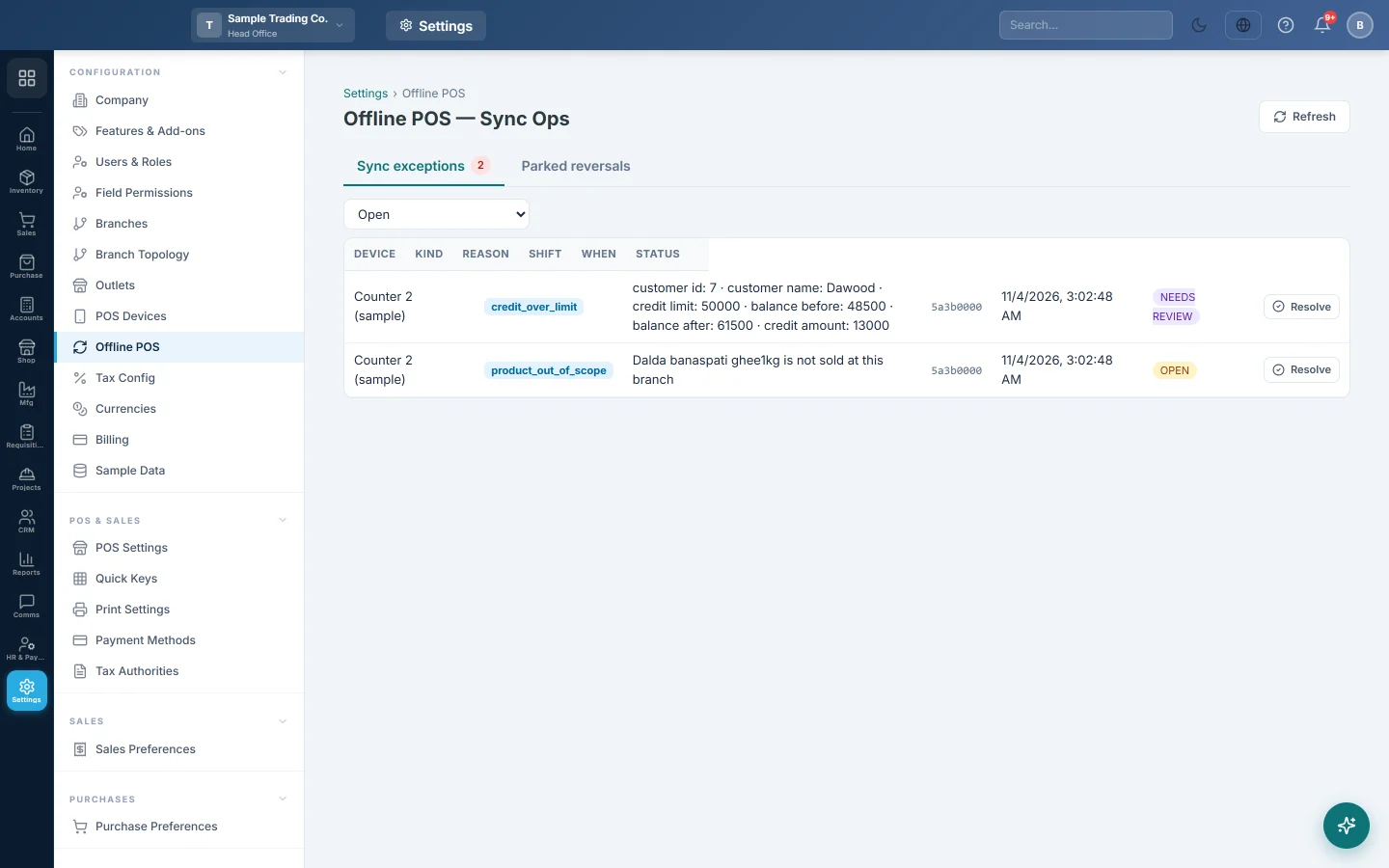
Open Settings → Configuration → Offline POS. The page title is Offline POS — Sync Ops.
Review sync exceptions
A sync exception is a sale the server did not post as it arrived. There are two kinds:
- Held back: the server refused the sale and the till still holds it. Typical reasons are a sale that arrived after its shift's Z-report, a sale whose shift has not synced yet, or a sale dated in a closed financial year. Held-back rows stop the shift's Z-report from closing.
- Needs review: the sale is already in the books, but a manager should look at it. Examples are an offline credit sale over the customer's limit, a discount over the cashier's limit, totals that do not add up, or an installment plan to set up from the invoice.
- Open the Sync exceptions tab. The red number counts both kinds.
- The list opens on Open, which shows both kinds. Use the filter for Held back, Needs review, Resolved or All.
- Read the Device, Kind, Reason, Shift and When of each row.
- Decide what the row needs (see below), then click Resolve.
Resolve a held-back sale
If the sale should be in the books, fix the cause instead of resolving it. For example, reopen the financial year or let the shift sync. The till then sends the sale again by itself and it posts.
Resolve a held-back sale only when it should not be in the books, for example a sale rung by mistake.
- Click Resolve on the row.
- Type the reason and confirm.
The sale is discarded: the till removes it at its next sync, it is never recorded in the books, and it no longer stops the shift's Z-report. Who discarded it, when and why stay on the row under Resolved and in the audit log.
Resolve a sale that needs review
Click Resolve and confirm. This only marks the sale as reviewed. It is already in the books, so nothing else changes.
While a shift has held-back sales, its Z-report cannot be finalised. See Z-Report (End of Shift).
Check parked reversals
A reversal is a void or a return made on the till. It parks here when the sale it reverses has not synced yet.
- Open the Parked reversals tab.
- Choose a filter: Pending (parked + dead), Parked, Dead, Resolved or All.
- Read the Target sale, Attempts, First seen and Last tried of each row.
- For a Dead row (it stopped retrying), click Re-queue. It retries on the next sync from the device.
A parked reversal applies itself as soon as its sale arrives. It is never applied to a missing sale and never lost.
Common questions
The cashier cannot close the shift. Open Sync exceptions and filter on Held back. Fix the cause so the sale posts, or discard it with Resolve if it should not be in the books.
Does Resolve delete the sale? On a held-back row, yes: the sale is discarded and never posted, and its record stays on the row with the reason. On a needs-review row, no: the sale is already posted and Resolve only marks it as reviewed.
A return stays in Parked reversals. Its sale has not reached the server yet. Make sure the till that rang the sale is online and syncing, then click Re-queue if the row is Dead.
Why is the page empty? No till has synced yet, or there is nothing to review. No exceptions — clean. means all uploaded sales posted.
Спасибо. Если помощь всё ещё нужна, напишите на info@eloerp.net.