Features & Add-ons
Choose your industry and switch on the optional features (batch and expiry, IMEI, credit, installments, dine in and more) that show extra fields and options in the forms.
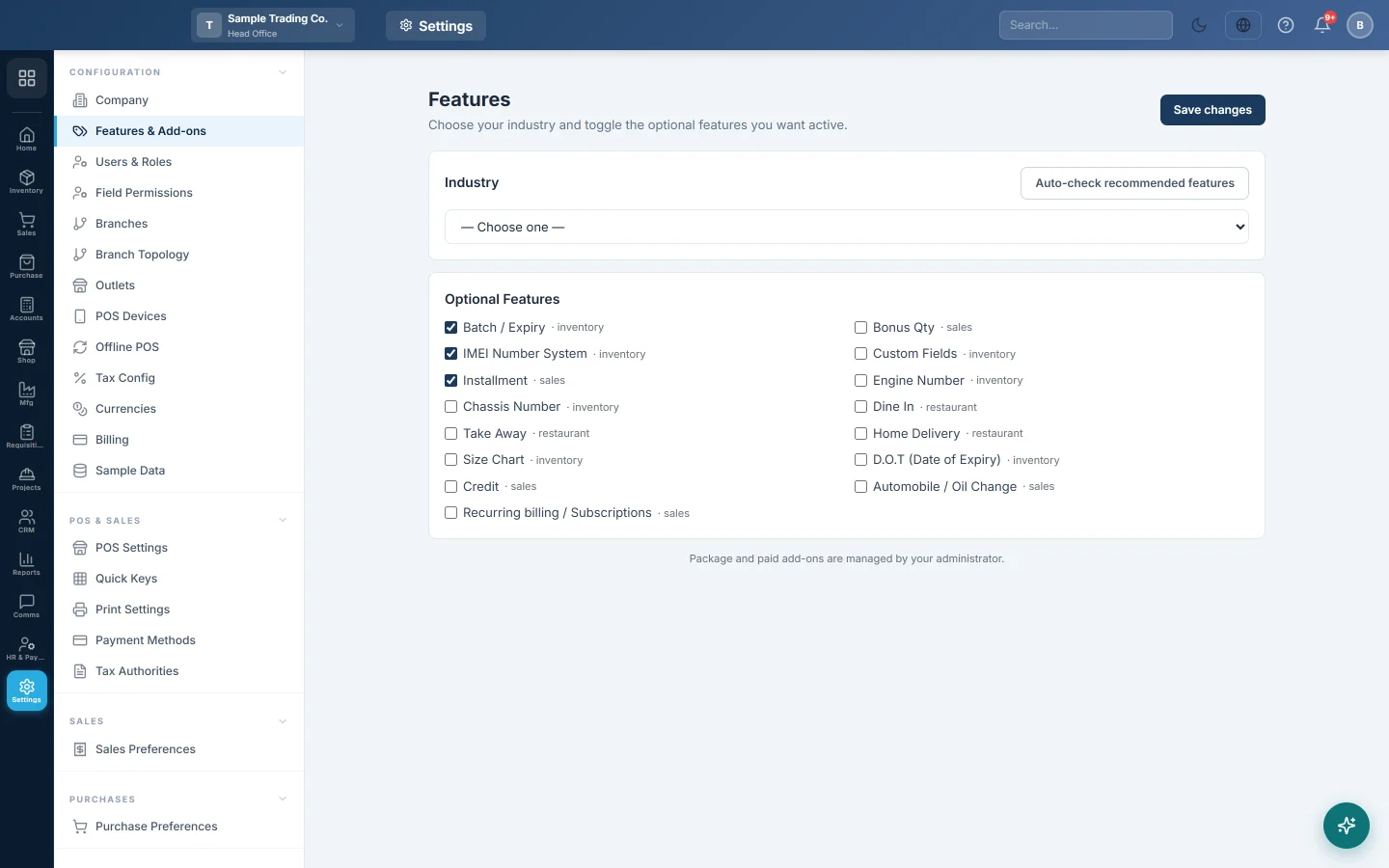
The Features page sets your industry and switches optional features on or off. A feature you switch on adds its fields and options to the forms that use it, such as IMEI numbers on products or the Installment tab on sales invoices.
Before you begin
- You need a role with the Edit Features & Add-ons permission to save. View Features & Add-ons only opens the page.
- Your plan and paid add-ons (for example Manufacturing or HRM & Payroll) are set by your service provider, not on this page.
Where to find it
Open Settings → Configuration → Features & Add-ons.
Choose your industry
- Under Industry, pick your business type from the list.
- Click Auto-check recommended features to tick the features usually needed for that industry.
- Untick any you do not want.
- Click Save changes.
The recommended features are only ticked for you. Nothing is saved until you click Save changes.
Switch features on or off
- Under Optional Features, tick each feature you want. The module it belongs to is shown next to its name.
- Untick the ones you do not use.
- Click Save changes. ✓ Saved appears, and the menus refresh at once.
Some of the features and where they show up:
| Feature | What you see when it is on |
|---|---|
| Batch / Expiry | Batch and expiry tracking options on the product form. |
| D.O.T (Date of Expiry) | The expiry tracking option on the product form, without batches. |
| IMEI Number System | The IMEI option on the product form, for phones and devices. |
| Credit | The Credit invoice type on sales invoices, and credit fields on customers and suppliers. |
| Installment | The Installment invoice type on sales invoices. |
| Dine In | The Dine In order type on the POS terminal. |
| Automobile / Oil Change | Vehicle and oil-change fields on the sales invoice. |
Common questions
I ticked a feature but nothing changed. Check that you clicked Save changes. Then open the form the feature belongs to, for example the product form for Batch / Expiry.
How do I get a module that is not in my menu, like Manufacturing? Modules and paid add-ons come with your plan. Ask your service provider; see Billing for who to contact.
Are the features the same in every branch? The ticks are kept per branch. The page saves them for the branch your user belongs to.
Does switching a feature off delete data? No. Switching off hides the fields and options. Records already saved keep their data.
Obrigado. Se ainda precisar de ajuda, escreva para info@eloerp.net.