Attendance
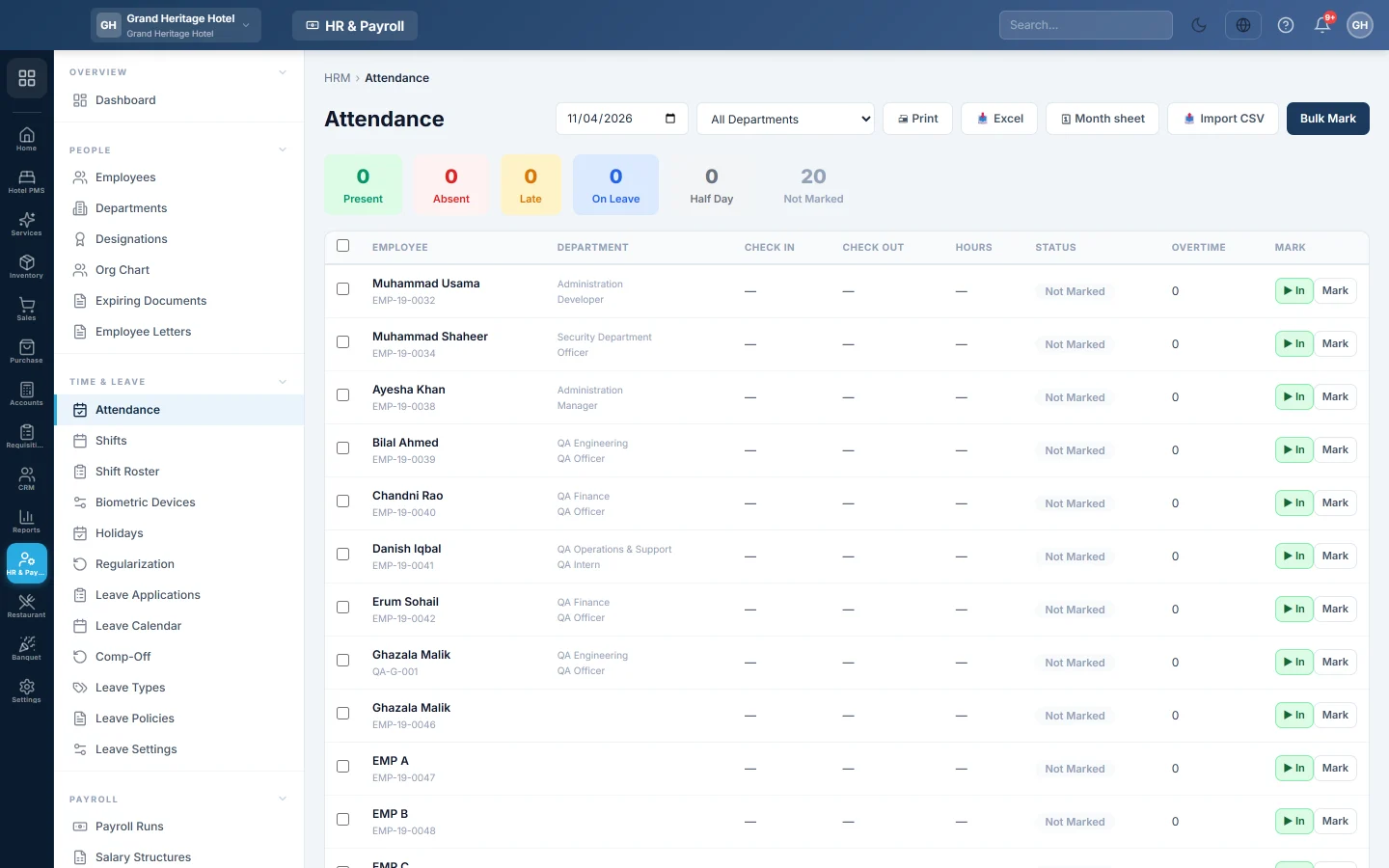
Mark daily attendance one by one or in bulk, punch staff in and out, import a CSV from a machine or tracker, or type hours into the month sheet.
Attendance records who came to work each day and when. Payroll reads it to deduct absences and half days and to pay overtime, so keep it complete before you run payroll.
Before you begin
- Add your employees. See Employees.
- Set up Shifts so late arrivals and hours are worked out, and Holidays so they are not counted as working days.
- The rules for late fines, overtime and short hours are in Statutory & Tax Slabs.
Where to find it
Open HR & Payroll → Time & Leave → Attendance.
Mark one employee
- Pick the date at the top. Pick a department to shorten the list.
- Click Mark on the employee's row (Edit if already marked).
- Choose the Status: Present, Absent, Late, Half Day or On Leave.
- Optional: enter Check In and Check Out times and Notes.
- Click Save.
For staff clocking in at the desk, click In when they arrive and Out when they leave. The time is recorded at once.
Mark many employees at once
- Tick the employees, or tick none to mark everyone on the list.
- Click Bulk Mark (or Bulk Mark Selected).
- Choose the Status for All and, optionally, a Check In Time (optional).
- Click Apply to All.
The counts at the top show how many are Present, Absent, Late, On Leave, on Half Day and Not Marked.
Import attendance from a file
- Click Import CSV.
- Click Download template and copy your machine's or tracker's export into its columns. employee_no and date are required. check_in, check_out, status, notes and hours are optional.
- If the file comes from a tracker in another time zone, pick it under Export timezone.
- Choose the file under Upload CSV and click Import.
- Read the result: how many days were created, updated and skipped.
A row for an employee and date that already exists is updated, not duplicated. Several rows for the same employee and date are added together as sessions, so breaks are left out.
Use the month sheet
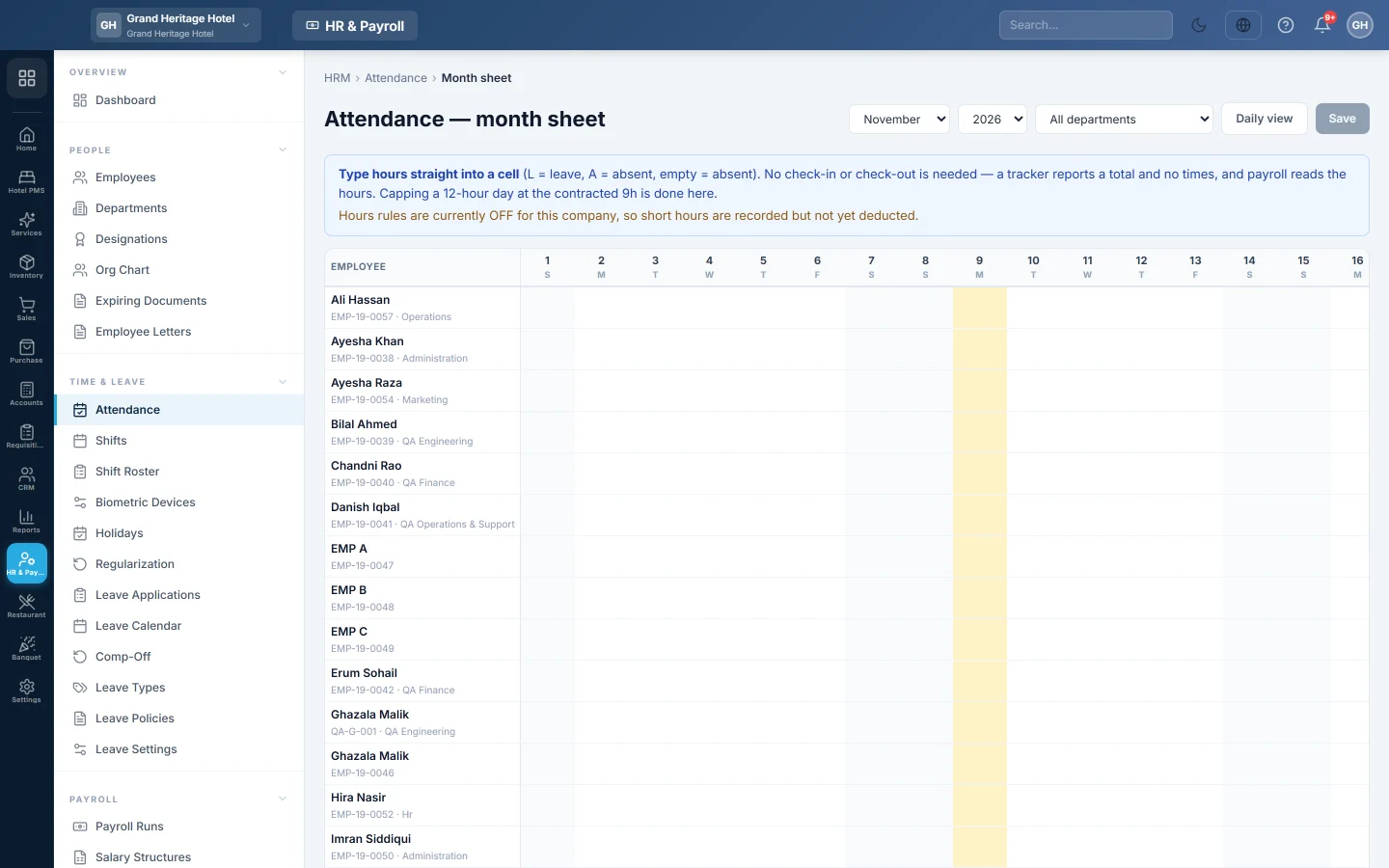
- Click Month sheet.
- Pick the month and year, and a department if you like.
- Type the hours worked straight into each day's cell. Type L for leave and A for absent. An empty working day counts as absent.
- Click Save. The button shows how many cells changed.
The columns on the right total each person's month: Req (hours required), Spent (hours on working days), Day-off hrs (hours worked on a day off or holiday), Total (both together), Less, Leave, Abs, Half days and Off. Daily view takes you back.
Each person's own day off, from their shift, is shaded in their row. A day off they came in on is tinted teal. To pay for those hours, see Pay for work on a day off.
How attendance affects pay
| What happens | Effect on pay |
|---|---|
| Absent on a working day | One day's pay is deducted. |
| Half day | Half a day's pay is deducted. |
| Approved paid leave | No deduction. The day shows as On Leave. |
| Approved unpaid leave | Deducted like an absence. |
| Late arrival or early leaving | Fined only if fines are switched on in Statutory & Tax Slabs. |
| Overtime | Paid only if overtime is allowed for the employee and switched on for the company. |
A day's pay is set in Statutory & Tax Slabs, for example salary ÷ working days in the month.
Common questions
Someone forgot to punch out. How do I fix it? Edit the day here, or have them raise a request on Regularization for HR to approve.
Do I have to mark attendance every day? No. You can type paid days straight into a payroll run instead. Without attendance, payroll cannot work out absences, lates or overtime by itself.
Why does the month sheet say hours rules are off? Short hours are recorded, but not deducted until hours rules are switched on in Statutory & Tax Slabs.
Can I print the day's attendance? Yes. Click Print, or Excel to download it.
Terima kasih. Jika masih butuh bantuan, kirim email ke info@eloerp.net.