Dashboard
See your leads, open deals, win rate and the follow-ups due, and jump to adding a lead or opening the pipeline.
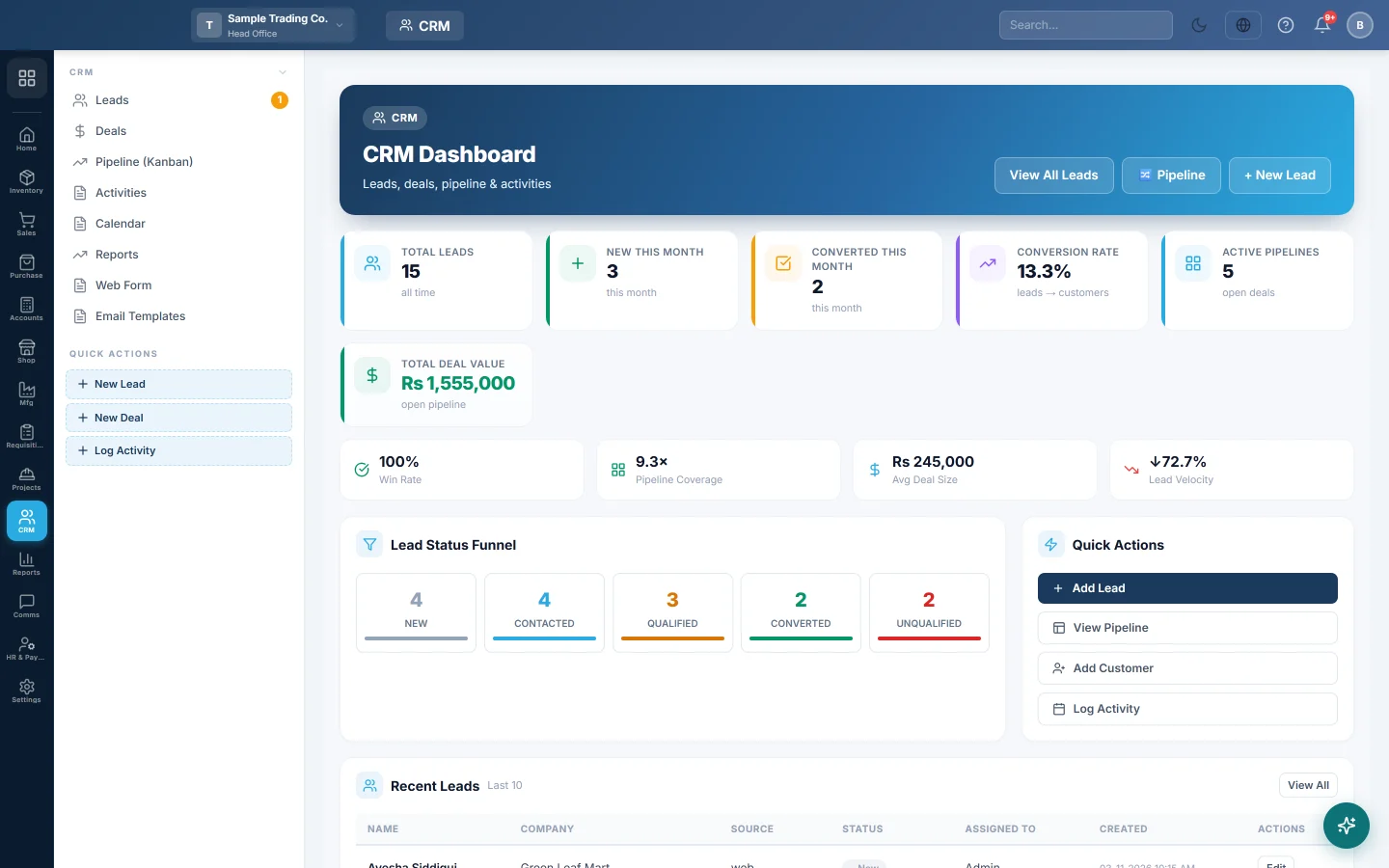
The CRM dashboard is the start page for sales follow-up. It shows how many leads you have, how many became customers, what your open deals are worth and which activities are waiting.
Before you begin
- The CRM module must be on for your company. If CRM is not in the module rail, ask your provider to switch it on.
- Your role needs the CRM view permissions. See Users & Roles.
- The figures are for the branch selected in the top bar.
Where to find it
Open CRM → CRM → Dashboard. It is also under Home → Module Dashboards → CRM Dashboard.
Read the cards
| Card | What it shows |
|---|---|
| Total Leads | Every lead in this branch. |
| New This Month | Leads added this month. |
| Converted This Month | Leads turned into customers this month. |
| Conversion Rate | Converted leads as a share of all leads. |
| Active Pipelines | Open deals, meaning deals not yet won or lost. |
| Total Deal Value | The value of those open deals. |
| Win Rate | Won deals as a share of deals that closed, won or lost, in the last 90 days. |
| Pipeline Coverage | Open pipeline value against last month's sales. Strong is 3 times or more, Watch is 1 to 3, Low is under 1. |
| Avg Deal Size | The average value of a deal won in the last 90 days. |
| Lead Velocity | New leads this month against last month, up or down. |
Lead Status Funnel counts leads at each step. Recent Leads lists the last 10 leads; click a row to open that lead. Upcoming Activities lists pending calls, meetings and tasks scheduled from now on. Overdue ones are not listed here; find them on Activities.
Start work from the dashboard
- + New Lead or Add Lead opens a blank lead. See Leads.
- Pipeline or View Pipeline opens the deal board. See Pipeline (Kanban).
- Add Customer opens the new customer form in Sales.
- Log Activity opens Activities.
Common questions
Why are all the cards zero? No leads or deals exist in this branch yet. Switch branch in the top bar if your leads were added in another branch.
Do won deals count as sales? No. A deal is a forecast. Sales count only when you make and confirm an invoice. See Win a deal and bill the customer.
Where are the detailed figures? On Reports: lead sources, pipeline by stage, salesperson results, forecast and lost deals.
Obrigado. Se ainda precisar de ajuda, escreva para info@eloerp.net.