Settings
Company-wide rules for recurring billing, including invoice status, run hour, defaults for new plans, pay instructions, ledgers, deferred revenue, webhook and MikroTik router.
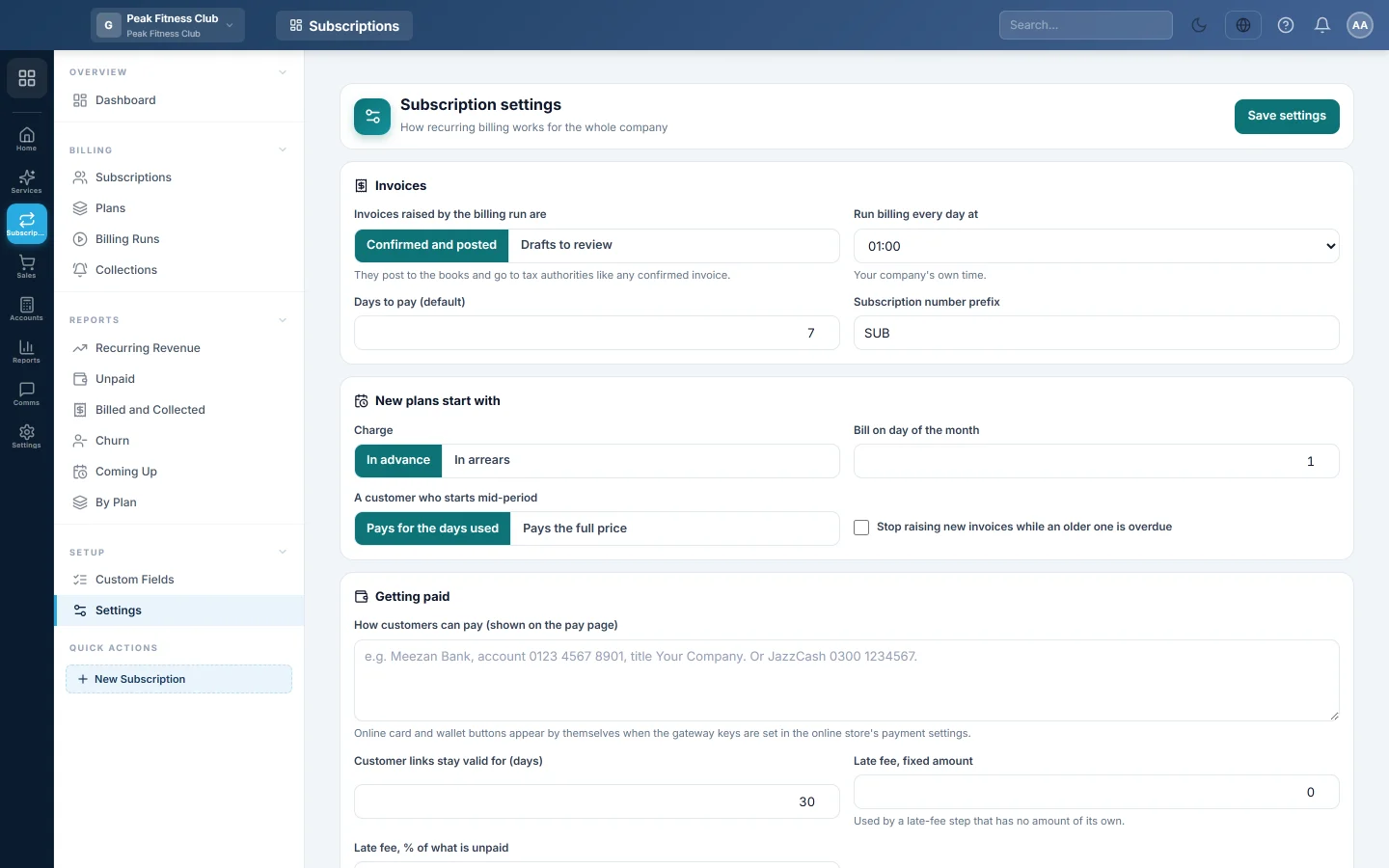
Subscription settings decide how recurring billing works for the whole company. They cover when billing runs, whether invoices post at once, where revenue goes, and how EloERP tells your router or system to switch customers off and on.
Before you begin
- Your role needs permission to manage Subscriptions settings. See Users & Roles.
- For card and wallet payments on the pay page, set up the gateway keys in the online store's payment settings first. See Online Store.
Where to find it
Open Subscriptions → Setup → Settings. Change what you need, then click Save settings at the top.
Invoices
| Setting | What it does |
|---|---|
| Invoices raised by the billing run are | Confirmed and posted: they post to the books and go to tax authorities like any confirmed invoice. Drafts to review: someone confirms each one in Sales first. |
| Run billing every day at | The hour the daily run starts, in your company's own time. |
| Days to pay (default) | Days from the invoice to its due date, for plans without their own. Starts at 7. |
| Subscription number prefix | The start of every subscription number. Starts as SUB. |
New plans start with
These are only the starting values of a new plan. Each plan can change them.
- Charge: In advance or In arrears.
- Bill on day of the month.
- A customer who starts mid-period: Pays for the days used or Pays the full price.
- Stop raising new invoices while an older one is overdue.
Getting paid
- How customers can pay (shown on the pay page): your bank or mobile wallet details, for customers who pay by transfer.
- Customer links stay valid for (days): how long a pay link or statement link works. Starts at 30.
- Late fee, fixed amount and Late fee, % of what is unpaid: used by a late-fee step in Collections that has no amount of its own.
Online card and wallet buttons appear on the pay page by themselves once the gateway keys are set.
Accounting
- Subscription revenue goes to: the income ledger credited by subscription invoices. Starts as Subscription Revenue.
- Late fees go to: the income ledger for late fees. Starts as Late Fee Income.
- Defer revenue: tick it for yearly or quarterly plans billed in advance. Invoices then credit the Unearned revenue ledger (a liability, starting as Unearned Subscription Revenue). Each month, the share earned moves to Subscription Revenue.
Connect your own system
EloERP sends a signed message to your Webhook address when a subscription is activated, suspended, resumed, paused or cancelled, and when an invoice is raised or paid.
- Type the Webhook address.
- Optional: type a Signing secret. Each message is signed with an HMAC-SHA256 of the body in the X-Subs-Signature header.
- Click Save settings, then Send a test to check the address answers.
Switch customers off and on at a MikroTik router
For internet providers. When a subscription is suspended, paused or cancelled, the customer's account is switched off at the router and their session is ended. When it is resumed or paid, it is switched back on. The account is found by the subscription's Reference.
- Tick Switch customers off and on at my MikroTik router.
- Type the Router address (RouterOS 7 REST API), the API user and the API password.
- Under Accounts are, choose PPPoE secrets or Hotspot users.
- Leave Check the router's certificate ticked unless your router uses a self-signed certificate.
- Click Test the connection, then Save settings.
What happens in the books
- A subscription invoice debits the customer's ledger with the total. It credits the revenue ledger chosen here with the amount before tax, and the tax account with the tax.
- A late-fee invoice credits the late-fee ledger chosen here. It carries no tax.
- With Defer revenue on, invoices credit the unearned revenue ledger. One journal each month, dated the last day of the month, debits it and credits Subscription Revenue with the share earned.
- Customer payments post a receipt to the customer's ledger like any other payment.
Common questions
Can I review invoices before they post? Yes. Choose Drafts to review. The run then leaves each invoice as a draft in Sales until someone confirms it.
I changed the billing hour. When does it take effect? From the next day's run. To bill now, click Run billing now on Billing Runs.
Do I need a webhook? No. Leave it empty if no router or app needs to know when to switch customers off.
The router test fails. What should I check? That the router runs RouterOS 7 with the REST API on, that the address is reachable from the internet, and that the API user may change PPP or hotspot users.
Terima kasih. Jika masih butuh bantuan, kirim email ke info@eloerp.net.