Unpaid
Who owes what on subscription invoices, split by how late it is, customer by customer.
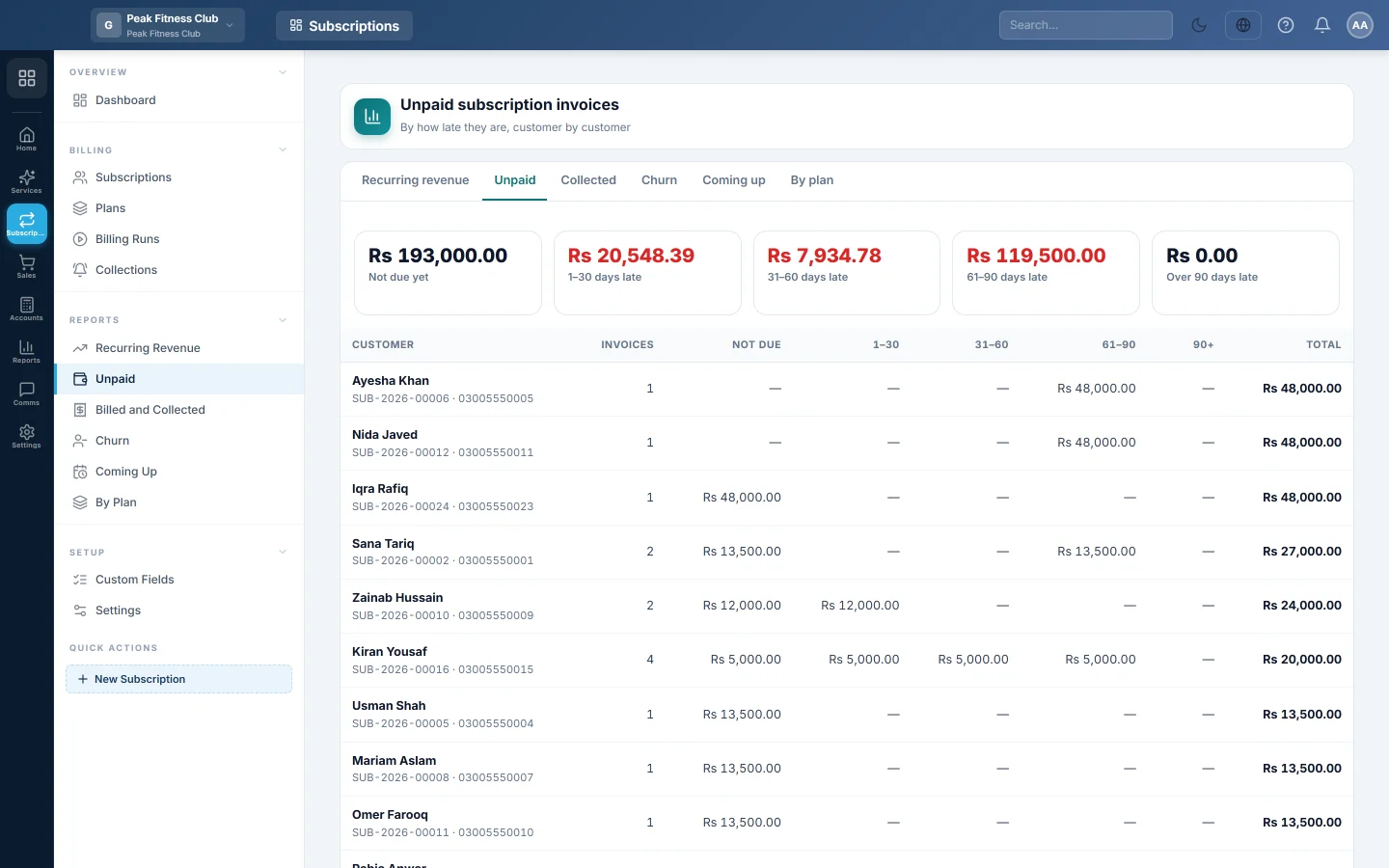
The Unpaid report lists every subscriber who still owes money on a subscription invoice. It splits what they owe by how many days late it is, so you know whom to call first.
Before you begin
- Your role needs permission to view Subscriptions reports. See Users & Roles.
Where to find it
Open Subscriptions → Reports → Unpaid. The tabs at the top switch between all six Subscriptions reports.
Run the report
- Open the report. It always shows what is unpaid today.
- If you have more than one branch, pick a branch or leave All branches.
Read the report
The tiles at the top total every unpaid invoice by lateness, counted from its due date:
- Not due yet
- 1–30 days late
- 31–60 days late
- 61–90 days late
- Over 90 days late
A late amount shows in red. The table has one row per customer, with the most owed first. It shows the number of open Invoices, the amount in each bucket and the Total. Click a row to open that customer's subscription.
Follow up
- Send a pay link: open the subscription and click Customer link. See Subscriptions.
- Let reminders do the work: set up the ladder in Collections.
- Record a payment against the invoice in Sales, as for any customer. See Sales Invoices.
Common questions
Which invoices are included? Confirmed and part-paid subscription invoices with something still owed, including late fees. Drafts and cancelled invoices are not.
Why does a customer show "Not due yet"? Their invoice is raised but its due date has not passed. Days to pay on the plan or in Settings sets the due date.
Does this match the customer's ledger? It shows subscription invoices only. The customer's ledger also includes any other sales and opening balances. See Customer Ledgers.
A customer has two subscriptions. Which one opens? The row groups all their invoices and opens the first subscription found. Use All subscriptions of this customer on that page to reach the others.
Merci. Si vous avez encore besoin d’aide, écrivez à info@eloerp.net.