Collections
Set the ladder of reminders, late fees and suspensions that runs on every unpaid subscription invoice as days pass.
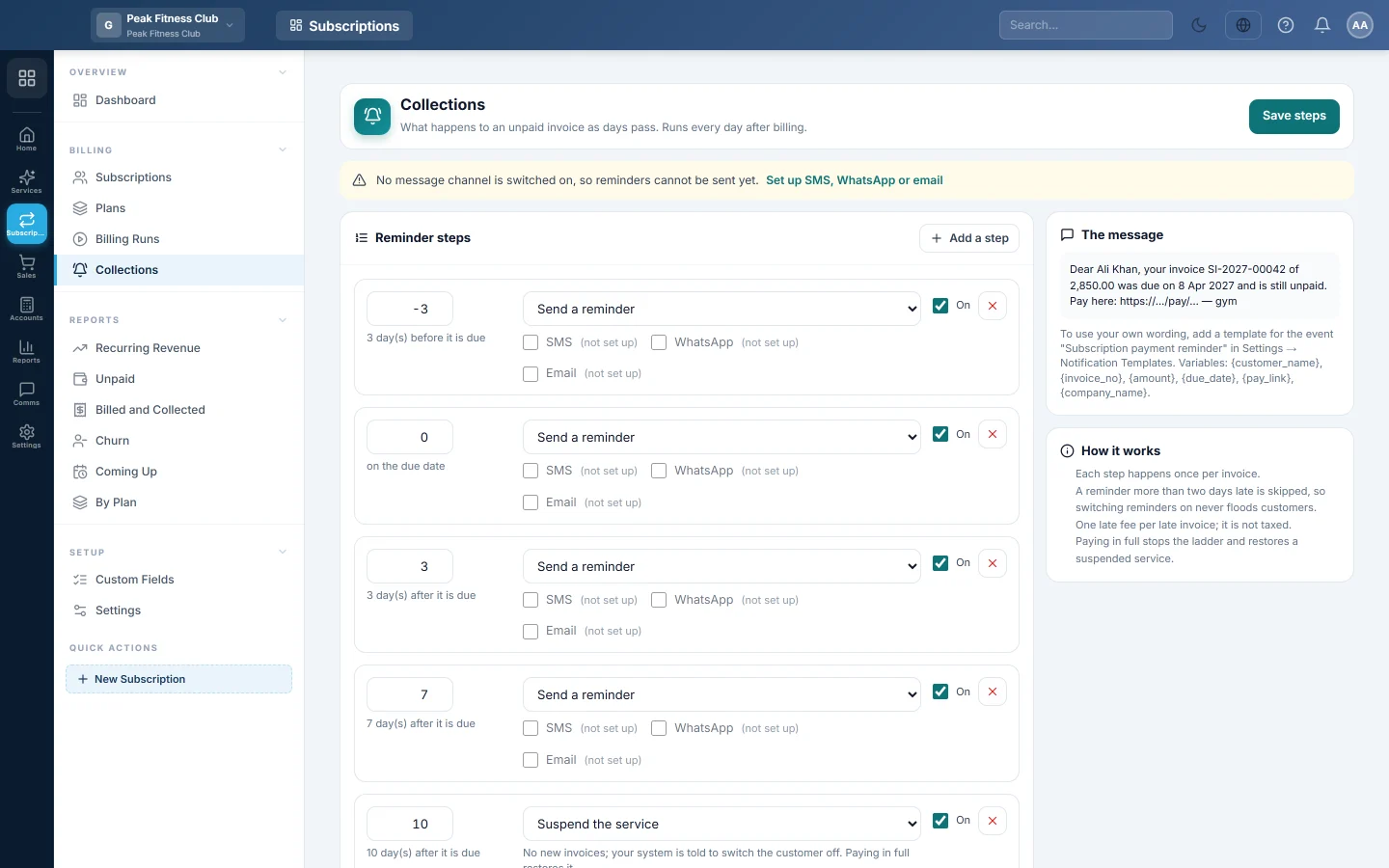
Collections decides what happens to an unpaid subscription invoice as days pass: a reminder before it is due, more after, then a late fee or a suspension. The steps run every day after billing.
Before you begin
- Set up at least one message channel (SMS, WhatsApp or email) in Notification Channels. Until then, a note at the top says reminders cannot be sent.
- Your role needs permission to manage collections. See Users & Roles.
Where to find it
Open Subscriptions → Billing → Collections.
The steps you start with
A new company gets this ladder, with every message channel off:
| Days | Step |
|---|---|
| -3 | Send a reminder, 3 days before it is due |
| 0 | Send a reminder on the due date |
| 3 | Send a reminder, 3 days after it is due |
| 7 | Send a reminder, 7 days after it is due |
| 10 | Suspend the service |
Nothing is sent until you tick a channel on a reminder step.
Change the steps
- On each reminder step, tick SMS, WhatsApp or Email. A channel marked "not set up" cannot send yet.
- To change when a step happens, type the days in its box. A minus number is before the due date, 0 is the due date, and a plus number is after it.
- To change what a step does, pick Send a reminder, Charge a late fee, Suspend the service or Cancel the subscription.
- For a late fee, type an Amount, a % of unpaid, or both.
- To add a step, click Add a step. To switch one off without deleting it, untick On. To delete it, click its remove button.
- Click Save steps.
What each step does
- Send a reminder sends the message on the channels you ticked, with a pay link.
- Charge a late fee raises one late-fee invoice for the late invoice. It is not taxed. A step with no amount of its own uses the late fee in Settings.
- Suspend the service stops new invoices and tells your router or system to switch the customer off. Paying in full restores the service by itself.
- Cancel the subscription ends it that day. Invoices already raised stay owed.
The How it works card sums up the rules:
- Each step happens once per invoice.
- A reminder more than two days late is skipped, so switching reminders on never floods customers.
- One late fee per late invoice.
- Paying in full stops the ladder and restores a suspended service.
Use your own wording
The The message card shows the wording that is used. To write your own, add a template for the event Subscription payment reminder in Notification Templates. You can use {customer_name}, {invoice_no}, {amount}, {due_date}, {pay_link} and {company_name}. Each one also works in double braces, such as {{customer_name}}, or in the @ form, such as @Customer_Name.
When your company has the customer portal, the built-in wording adds a line Statement: with the customer's private statement link, for each customer whose statement is online. Your own template is never changed: add Statement: @Statement_Link or @Portal_Link to it yourself. See Statement and portal links in messages.
See what was sent
Sent and done at the bottom lists every step that ran: when, the customer, the invoice, the step and the result. A result of Channel off means the channel was not set up when the step ran.
What happens in the books
Reminders and suspensions post nothing. A late fee is a separate sales invoice: the customer's ledger is debited and Late Fee Income is credited. The ledger can be changed in Settings.
Common questions
I switched reminders on today. Will old invoices get a flood of messages? No. A reminder more than two days past its day is skipped.
What if a plan has its own suspend rule? A plan with Suspend after days overdue filled suspends its subscribers after that many days, even without a suspend step. The other steps still run as usual.
How does a suspended customer get back on? They pay the invoice in full and the service is restored by itself. You can also click Resume on the subscription.
Can I charge a late fee twice on one invoice? No. One late fee is raised per late invoice, however many late-fee steps the ladder has.
Where do I set up the SMS or WhatsApp account? In Notification Channels.
Спасибо. Если помощь всё ещё нужна, напишите на info@eloerp.net.