Mortality & MRC
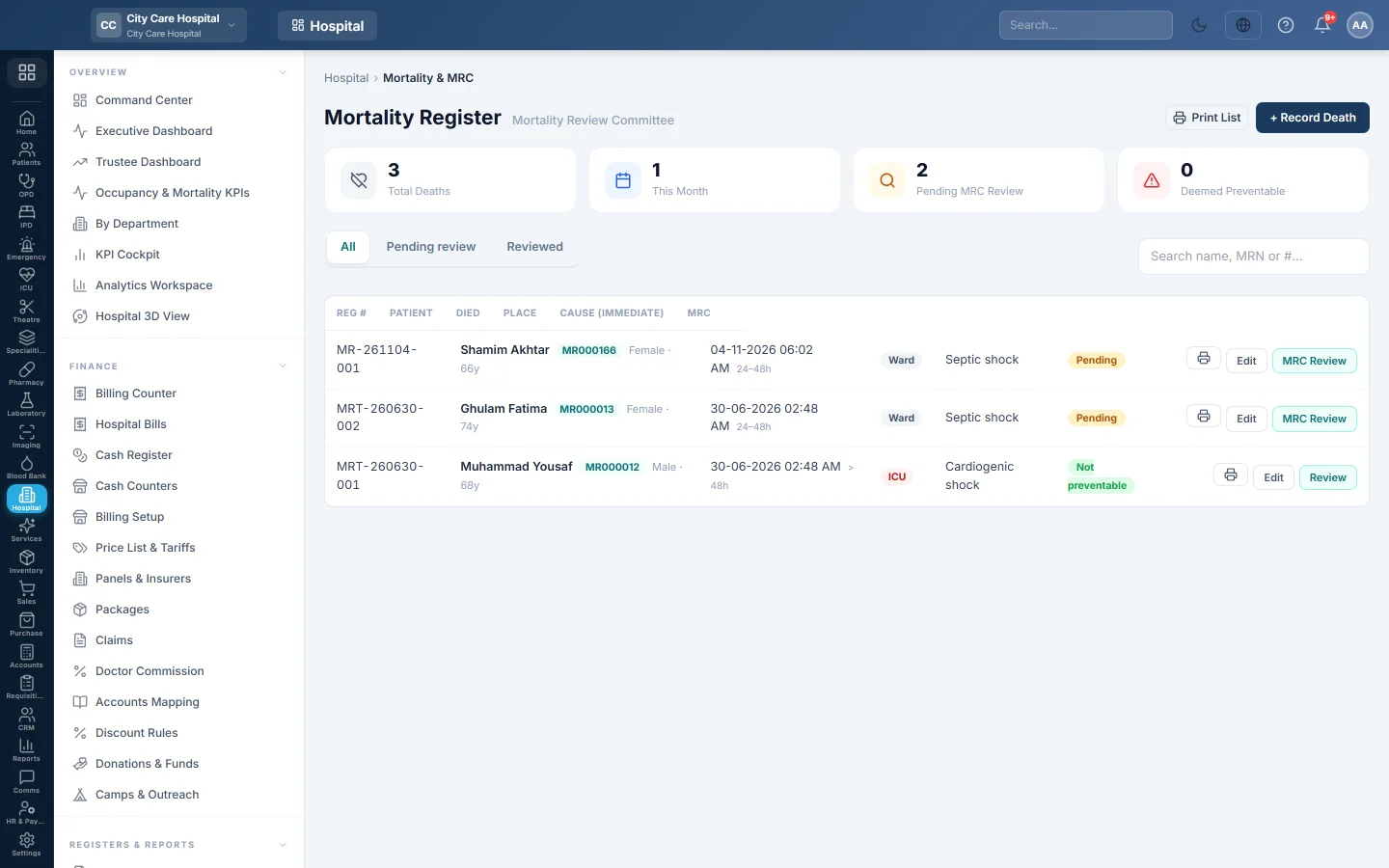
The hospital's mortality register with the cause of death in death-certificate order, and the Mortality Review Committee's verdict on whether each death was preventable.
Mortality & MRC keeps one record per death: when and where it happened, and the cause in death-certificate order. The Mortality Review Committee then reviews each death, decides whether it was preventable and records the actions.
Before you begin
- Recording needs the encounters create right or the mortality manage right. The MRC review needs Record / Review Mortality (MRC). Viewing needs the mortality view or admissions view right.
- Deaths in a ward are usually recorded first on Deaths & Mortuary. That also creates the record here.
Where to find it
Open Hospital → Registers & Reports → Mortality & MRC.
Read the register
The boxes show Total Deaths, This Month, Pending MRC Review and Deemed Preventable. Use All, Pending review and Reviewed to filter, and search by name, MRN or number. Print Death Notification prints the slip for a death.
Record a death
- Click + Record Death.
- Choose the Patient and the Date / Time of Death.
- Choose the Place: Ward, Emergency, Theatre, Cath-Lab, Brought Dead or Other.
- Choose the Timing: under 24 hours, 24–48 hours, over 48 hours or Post-op.
- Type the Admission Diagnosis.
- Under Cause of Death, type the Immediate cause, the Antecedent cause, the Underlying cause and any Contributing factors.
- Add the Severity at admission, ICU Interventions and Comorbidities.
- Click Record Death.
Click Edit on a row to correct it.
Review a death (MRC)
- Click MRC Review on the death.
- Choose the Preventability: Not preventable, Possibly preventable or Preventable.
- Choose the Protocol adherence: Adherent, Partial or Deviation.
- Write the Review Findings, such as the root-cause analysis.
- Write the Action Items, such as protocol changes.
- Click Save Review.
The row then shows Reviewed and the button reads Review.
Common questions
A ward death is not here. It was not recorded on Deaths & Mortuary, or was recorded for another date. Add it with + Record Death.
Who should do the MRC review? The committee chair or a senior consultant. Give Record / Review Mortality (MRC) only to committee members in Users & Roles.
I see no MRC Review button. Your role lacks Record / Review Mortality (MRC).
It says another member must review it. You certified this death or admitted the patient. Ask another committee member.
Where is the statutory death register? On Statutory Registers, tab Deaths. It reads these records.
Vielen Dank. Wenn Sie weitere Hilfe brauchen, schreiben Sie an info@eloerp.net.