Discount Rules
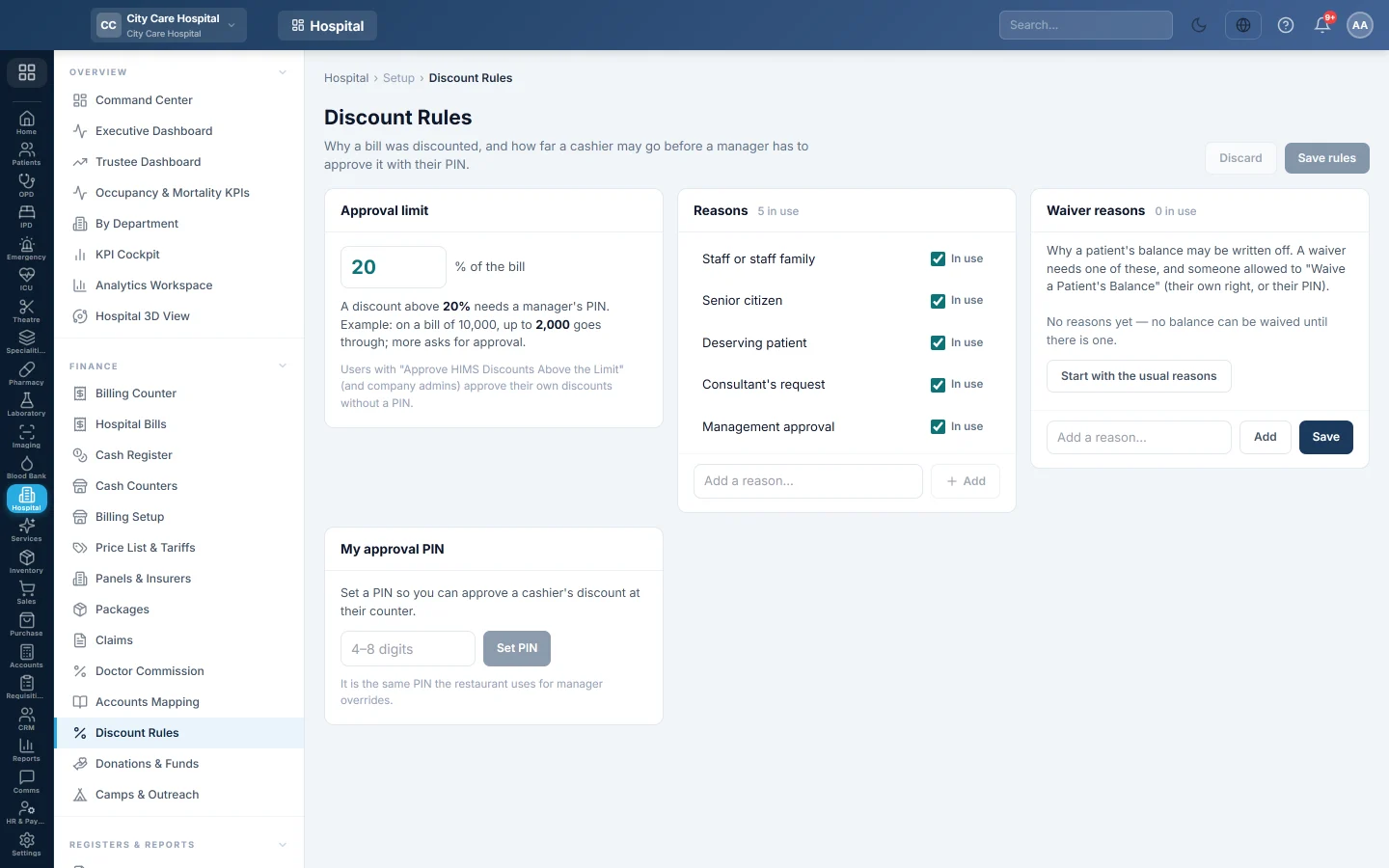
Set the reasons a cashier picks for a discount, the percentage above which a manager must approve with a PIN, the waiver reasons, and your own approval PIN.
Discount Rules control how far a cashier may discount a hospital bill. You list the reasons they choose from, set an approval limit, and managers set the PIN they type to approve a bigger discount at the counter.
Before you begin
- Changing the rules needs the HIMS pricing manage right.
- A cashier can discount only with the HIMS discount right. See Users & Roles.
Where to find it
Open Hospital → Finance → Discount Rules.
Set the approval limit
- Under Approval limit, type the percent of the bill, for example 10.
- Click Save rules.
A discount above that percent then needs a manager's PIN. The example under the box shows the amount on a bill of 10,000. Leave it empty for no approval step.
Add the reasons
- On an empty list, click Start with the usual reasons, or type one in Add a reason… and click Add.
- Edit a reason's text in place.
- Untick In use to hide a reason from cashiers.
- Click Save rules.
With no reasons, cashiers can discount without giving one. Once reasons exist, every discount asks for one.
Waiver reasons
Waiver reasons works the same way for writing off a balance. No balance can be waived until a waiver reason exists.
Set your approval PIN
Managers who may approve discounts see My approval PIN.
- Type 4 to 8 digits.
- Click Set PIN, or Change PIN to replace it. Remove clears it.
It is the same PIN the restaurant uses for manager overrides.
At the counter
When a cashier collects a discounted bill, EloERP asks for a Reason and, above the limit, a Manager PIN. The manager types their PIN and clicks Approve and save. The bill records the reason and who approved it.
Common questions
The cashier cannot see the Discount box. Their role lacks the HIMS discount right.
The PIN was refused. The approval expired or was already used, or the PIN belongs to someone without the approve right. Ask the manager again.
Is the follow-up discount a cashier discount? No. The follow-up share is hospital policy, set on Departments. It needs no reason or PIN.
Obrigado. Se ainda precisar de ajuda, escreva para info@eloerp.net.