Command Center
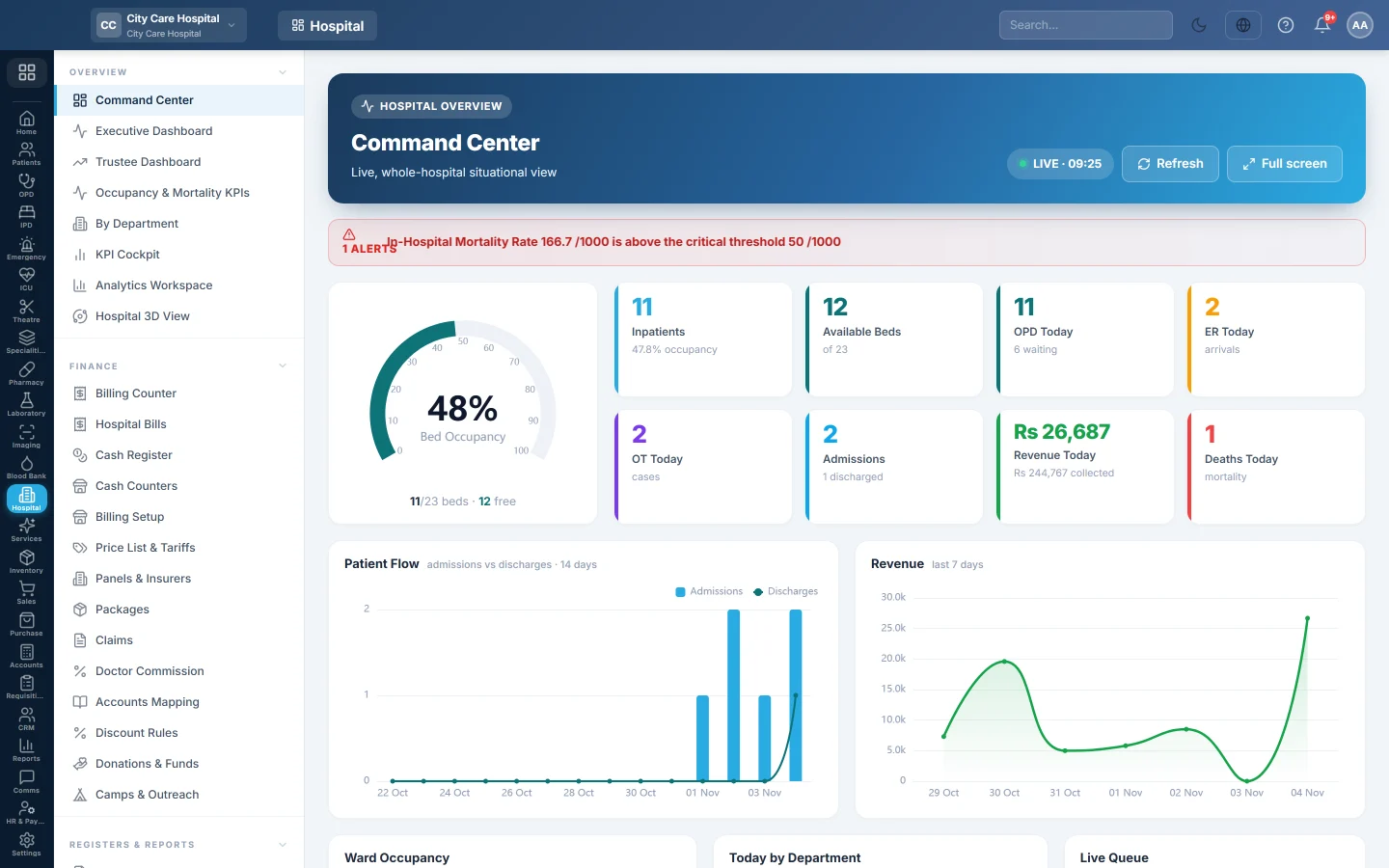
The hospital's live home screen. Beds, today's OPD, ER, theatre and admissions, revenue, the queue, ward occupancy and alerts, refreshed every 30 seconds and ready for a wall screen.
The Command Center is the hospital's home screen. It shows what is happening right now across the whole hospital and refreshes itself every 30 seconds.
Before you begin
- The numbers come from daily work: tokens, admissions, ER visits, theatre cases and bills. A new hospital shows zeros until work starts.
- Ward occupancy needs wards and beds. See Wards & Beds.
Where to find it
Open Hospital → Overview → Command Center. Hospital users who do not bill land here when they sign in.
Read the screen
The tiles across the top show today:
| Tile | What it shows |
|---|---|
| Inpatients | Patients in a bed, with the occupancy percent. |
| Available Beds | Free beds, of the total. |
| OPD Today | Consultations today, with how many are waiting. |
| ER Today | Emergency arrivals. |
| OT Today | Theatre cases. |
| Admissions | Admissions today, with discharges. |
| Revenue Today | Billed today, with what was collected. |
| Deaths Today | Deaths recorded today. |
Below them:
- Patient Flow: admissions against discharges over 14 days.
- Revenue: the last 7 days.
- Ward Occupancy: each ward's beds.
- Today by Department: consultations per clinic.
- Live Queue: tokens Waiting, Called and Served.
- Specialty Activity today, and Headline KPIs month to date: length of stay, mortality, ER door-to-triage and revenue.
- ALERTS runs along the top when something needs attention.
Put it on a wall screen
Click Full screen. The page switches to a dark theme for a lounge or nursing-station TV, with a clock and LIVE badge. Click Exit to leave. Click Refresh to update at once.
Common questions
The page says live data could not be loaded. Your session may have expired. Sign in again and click Retry.
Ward Occupancy says No wards configured. Add wards and beds on Wards & Beds.
Where is the detail behind a number? In the department screens and the Reports Library. For month and trend views, see Executive Dashboard.
شكرًا لك. إذا كنت لا تزال بحاجة إلى مساعدة، راسلنا على info@eloerp.net.