Lab Report Template
Design the printed lab report, with letterhead or pre-printed paper, title, accent colour, columns, signatories, barcode, QR code, Urdu labels and footer.
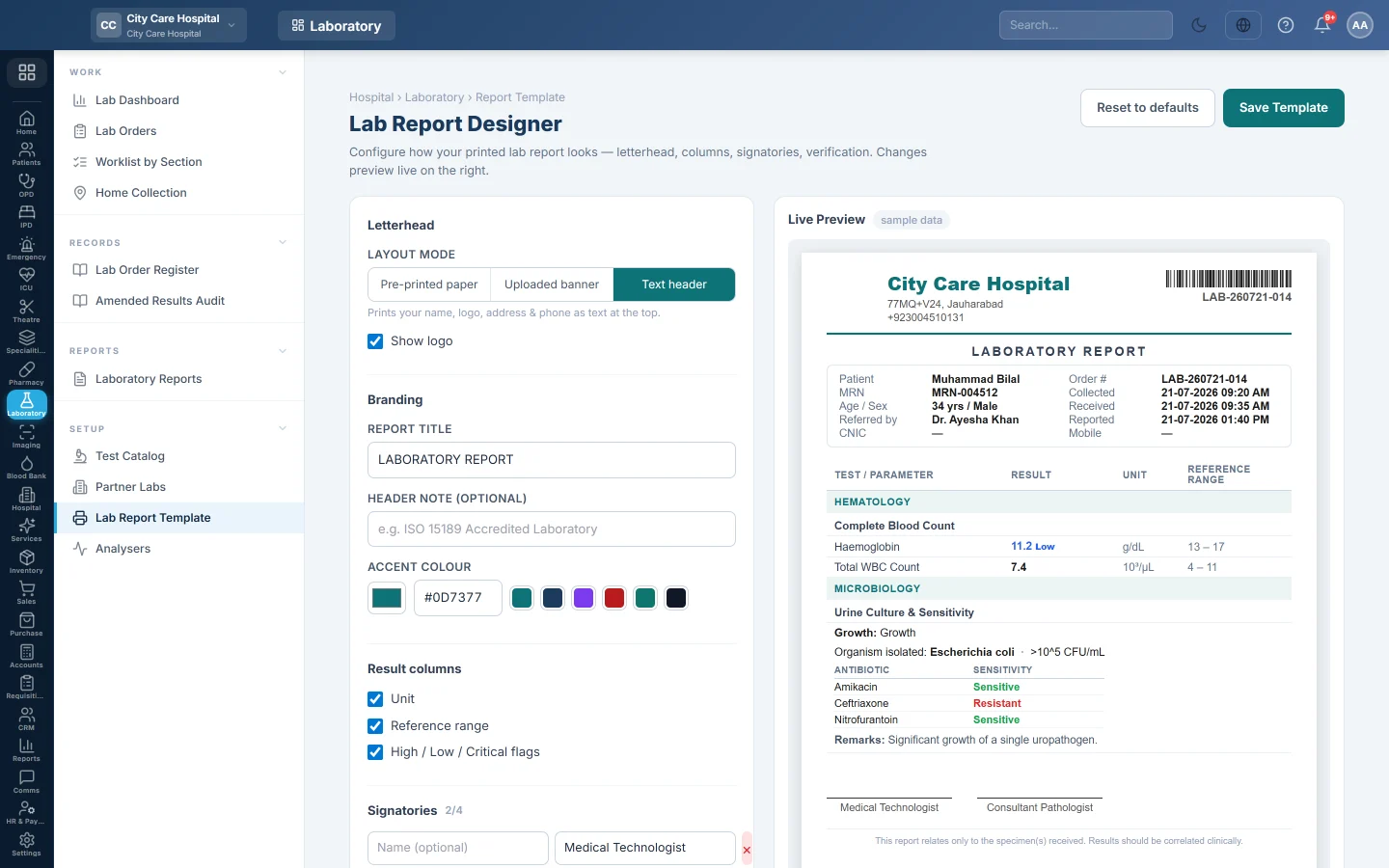
The Lab Report Designer sets how every printed lab report looks. Changes show at once in the Live Preview, using sample data.
Before you begin
- Changing the template needs Manage Lab Test Catalog or Manage Lab Orders / Workflow.
- The text header uses your company name, address and logo from Company.
Where to find it
Open Laboratory → Setup → Lab Report Template.
Choose the letterhead
Under Letterhead, pick a Layout mode:
- Text header: prints your name, address and, with Show logo, your logo.
- Uploaded banner: prints your own artwork across the top and bottom. Under Header & Footer Images, click Upload for the Header image and Footer image. A wide strip, about 1000×160 px, works best.
- Pre-printed paper: prints nothing in the header and footer, for paper that already carries them. Measure your paper and type Top blank space (mm) and Bottom blank space (mm).
Set the rest of the report
- Under Branding, type the Report title and an optional Header note, and pick the Accent colour.
- Under Result columns, tick Unit, Reference range and High / Low / Critical flags as you want them.
- Under Signatories, fill in the name and Designation of up to four signers, for example a medical technologist and a consultant pathologist. Click + Add signatory for another.
- Under Verification & barcode, tick Order-number barcode and, if you want it, QR verification code.
- Under Footer, tick Bilingual (add Urdu labels) if needed, and type the Accreditation strap and Disclaimer text.
- Click Save Template.
Reset to defaults puts every setting back to the starting layout on screen. Click Save Template to keep it. Uploaded header and footer images are saved as soon as you upload them.
Common questions
The preview does not match my printer. The preview uses sample data. Print a real report to check the margins. See Print a lab report.
My logo does not show. Choose Text header and tick Show logo, and check the logo is set on Company.
Does the template change old reports? Yes. Reports print with the current template, including reprints of old orders.
Teşekkür ederiz. Hâlâ yardıma ihtiyacınız varsa info@eloerp.net adresine yazın.