Procedure Register
List every urology procedure in a period with side, setting, urologist and outcome, and print or export it.
The Urology Procedure Register lists every urological procedure in the period, with the side, where it was done and how it ended.
Before you begin
- Your role has the permission to view hospital reports. See Users & Roles.
- Procedures are registered on Procedures & Stents.
Where to find it
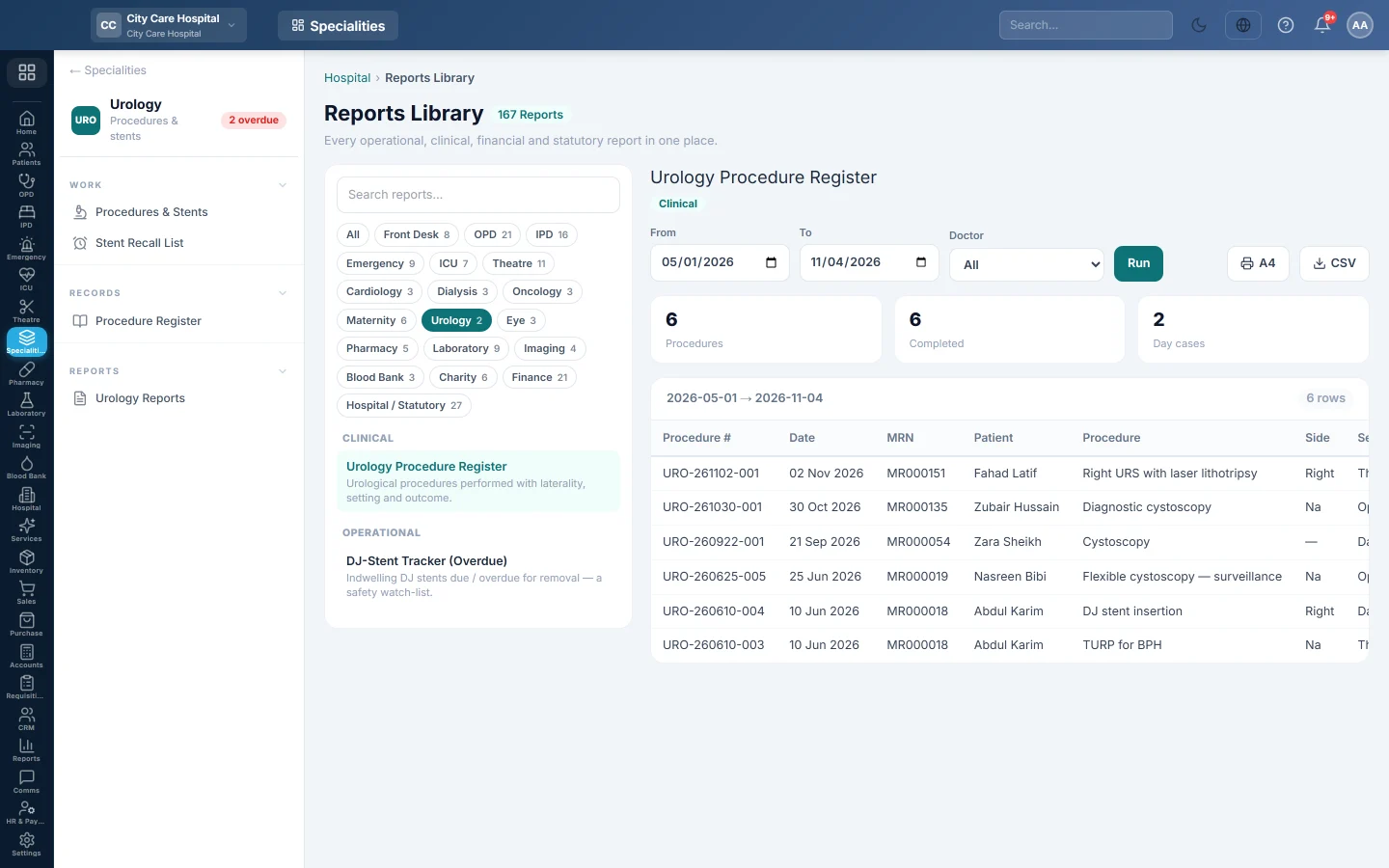
Open Specialities → Urology → Records → Procedure Register. It opens in the Reports Library and runs for the current month.
Run the register
- Set From and To. The register uses each procedure's date.
- Narrow it if you like:
- Doctor: procedures of one urologist.
- Click Run.
The summary shows the number of Procedures, how many were Completed and how many were Day cases. The table lists Procedure #, Date, MRN, Patient, Procedure, Side, Setting, Urologist and Outcome. Long results are paged, 50 rows at a time.
Print or export
- Click A4 to print the register on your letterhead.
- Click CSV to download every row with the same filters, for Excel.
Common questions
Where are the DJ stents? On Procedures & Stents and the Stent Recall List.
Outcome shows Abandoned. The procedure was registered with outcome Abandoned. It still counts as a procedure.
شكرًا لك. إذا كنت لا تزال بحاجة إلى مساعدة، راسلنا على info@eloerp.net.