Stent Recall List
A call list of every DJ stent still in a patient, sorted by removal date, so the overdue ones are called in first; print it for the phone.
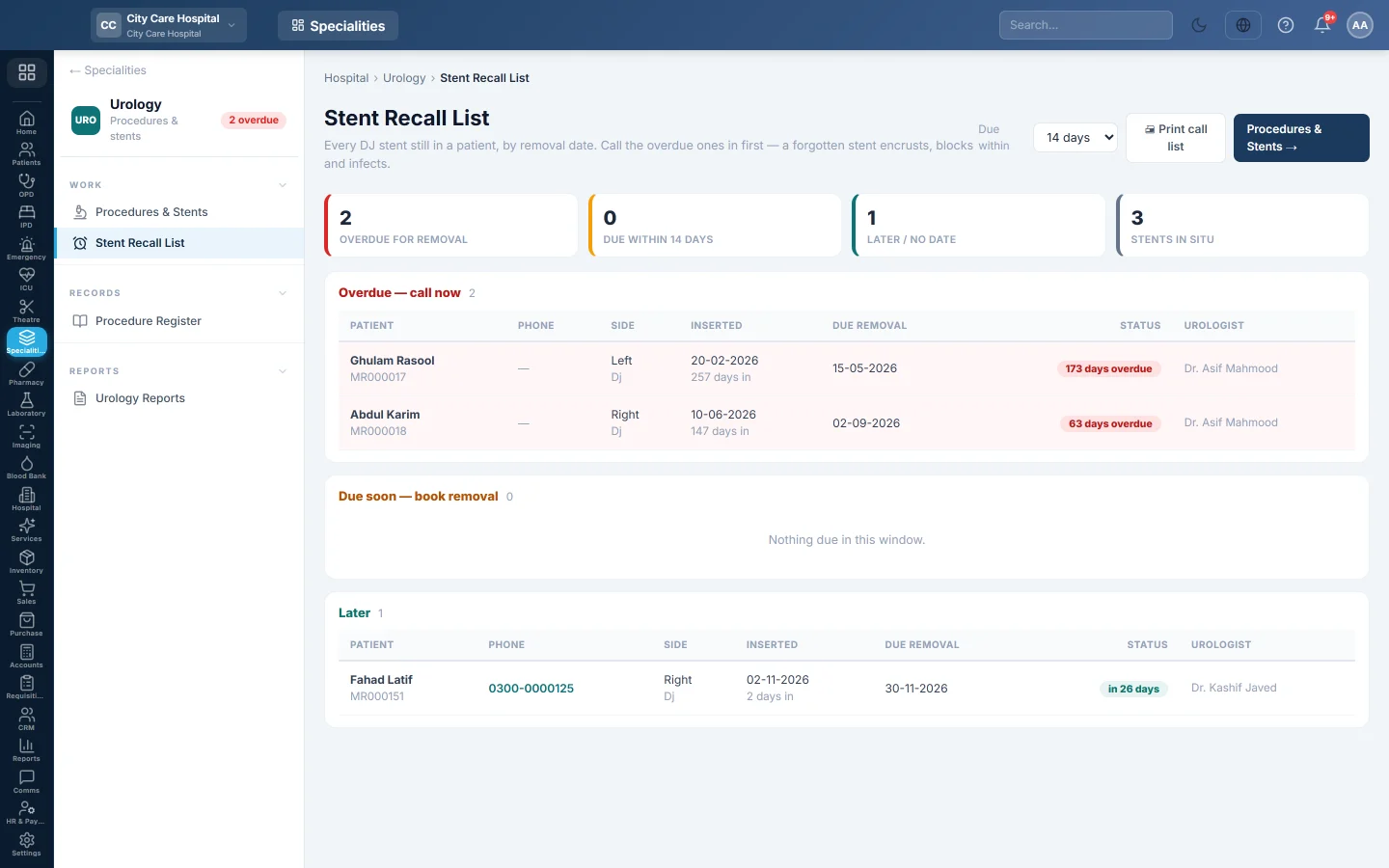
The Stent Recall List shows every DJ stent still in a patient, by removal date, with the patient's phone. Call the overdue ones in first.
Before you begin
- Stents are on the register on Procedures & Stents.
- Your role needs View Urology.
Where to find it
Open Specialities → Urology → Work → Stent Recall List.
Work the list
- Under Due within, pick 7, 14 or 30 days.
- Read the tiles: Overdue for removal, Due within the chosen days, Later / no date and Stents in situ.
- Work down the lists. Each row shows the Patient, Phone, Side, Inserted date, Due removal date, status, urologist and how many days the stent has been in.
- Click Print call list to print it for the person making the calls.
When the patient comes in and the stent is out, mark it removed on Procedures & Stents.
Common questions
A removed stent is still listed. It was not marked removed. Click Mark Removed on Procedures & Stents.
A stent shows no due date. It was added without a dwell time. It appears under Later / no date.
Can patients get a reminder message? Yes, when your hospital has set up message alerts for overdue stents.
谢谢。 如果仍需帮助,请发邮件至 info@eloerp.net。