ANC Register
List every antenatal visit in a period with gestation, blood pressure, haemoglobin, risk and the next visit date.
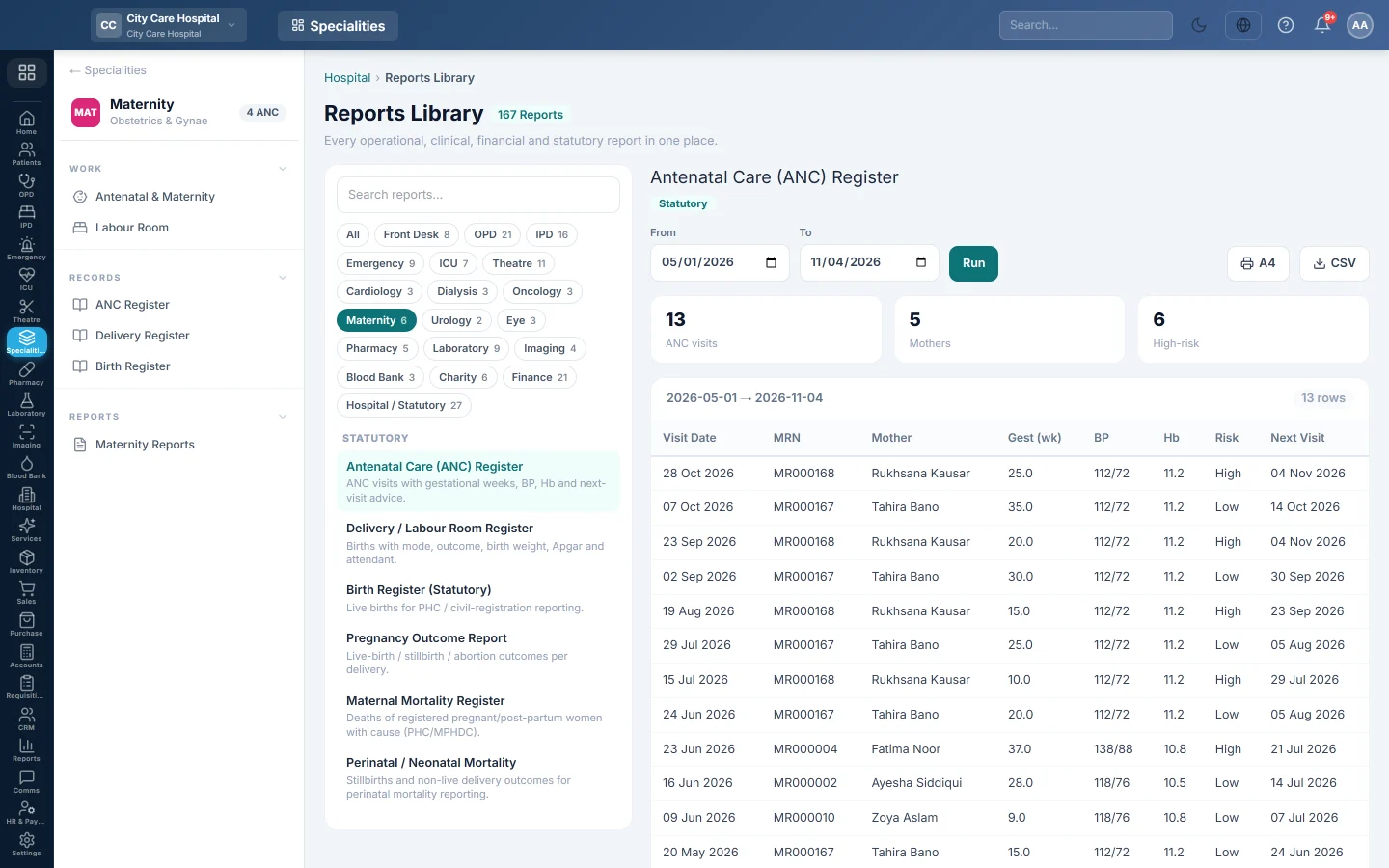
The Antenatal Care (ANC) Register lists every antenatal visit in the period: the mother, her weeks of pregnancy, blood pressure, haemoglobin, risk level and when she is due back.
Before you begin
- Your role has the permission to view hospital reports. See Users & Roles.
- Visits are recorded on each pregnancy in Antenatal & Maternity.
Where to find it
Open Specialities → Maternity → Records → ANC Register. It opens in the Reports Library and runs for the current month.
Run the register
- Set From and To. The register uses each visit's date.
- Click Run.
The summary shows the number of ANC visits, the Mothers seen and how many are High-risk. The table lists Visit Date, MRN, Mother, Gest (wk), BP, Hb, Risk and Next Visit. Long results are paged, 50 rows at a time.
Print or export
- Click A4 to print the register on your letterhead.
- Click CSV to download every row with the same filters, for Excel.
Common questions
A mother is counted as high-risk on every visit. Risk is set on the pregnancy, not the visit. Change it on the pregnancy record.
Where are the births? See Delivery Register and Birth Register.
Obrigado. Se ainda precisar de ajuda, escreva para info@eloerp.net.