Patient Roster
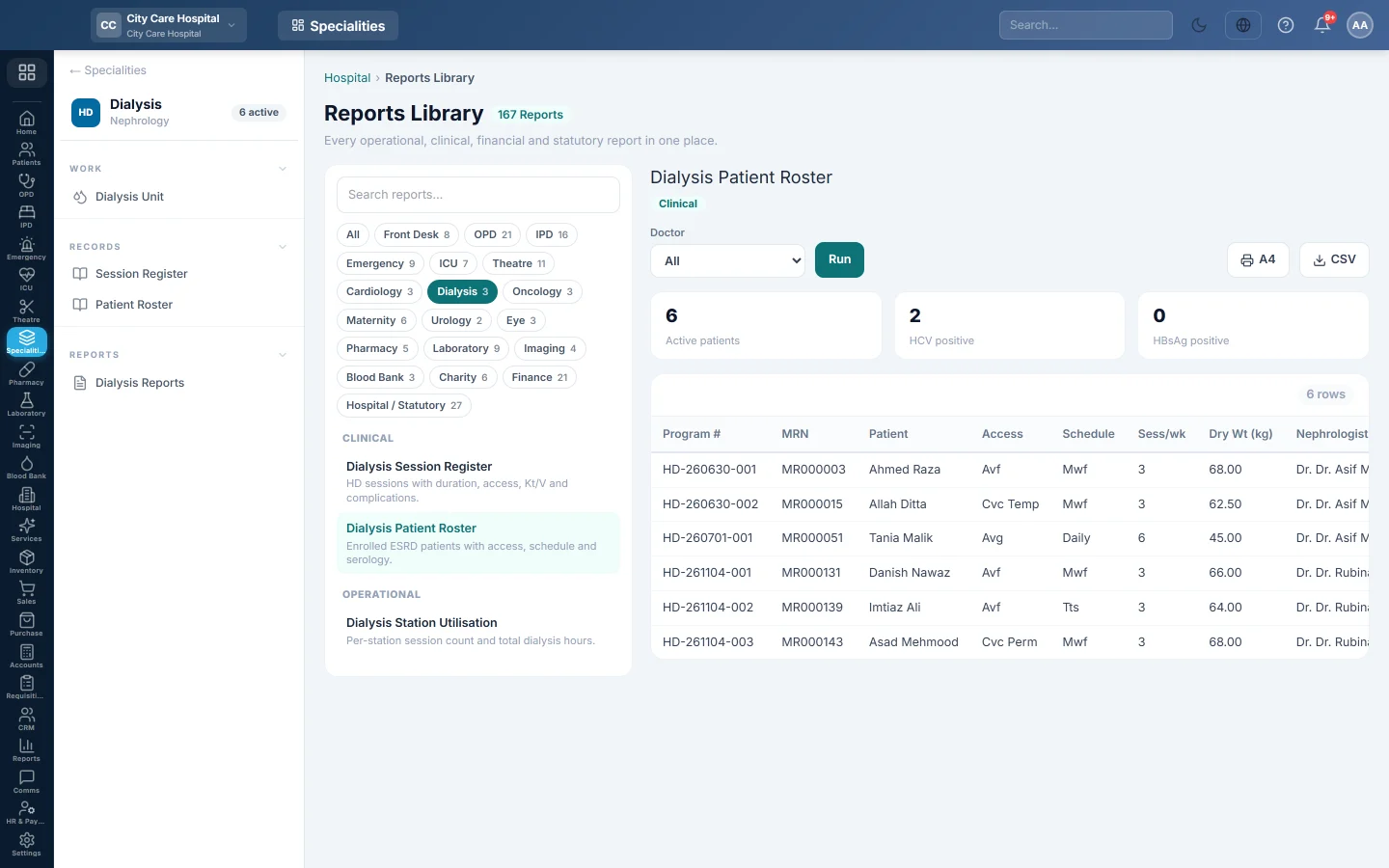
List the patients currently on the dialysis programme with their access, schedule, sessions per week, dry weight and nephrologist.
The Dialysis Patient Roster lists every patient active on the haemodialysis programme today, with their access, schedule and dry weight.
Before you begin
- Your role has the permission to view hospital reports. See Users & Roles.
- Patients are enrolled in the Dialysis Unit.
Where to find it
Open Specialities → Dialysis → Records → Patient Roster. It opens in the Reports Library.
Run the register
- Narrow it if you like:
- Doctor: patients of one nephrologist.
- Click Run.
The summary shows the number of Active patients, with HCV positive and HBsAg positive counts. The table lists Program #, MRN, Patient, Access, Schedule, Sess/wk, Dry Wt (kg), Nephrologist and Start Date. Long results are paged, 50 rows at a time.
Print or export
- Click A4 to print the register on your letterhead.
- Click CSV to download every row with the same filters, for Excel.
Common questions
A patient is missing. Their programme is no longer active. Find them on the Dialysis Unit list with the status filter.
Where do I see each patient's virology? In the Virology column of the programme list on the Dialysis Unit.
Gracias. Si todavía necesita ayuda, escriba a info@eloerp.net.