Dialysis Unit
Run the haemodialysis unit, enrolling patients on a programme, planning their sessions, recording each session on a station, and billing per session or by monthly package.
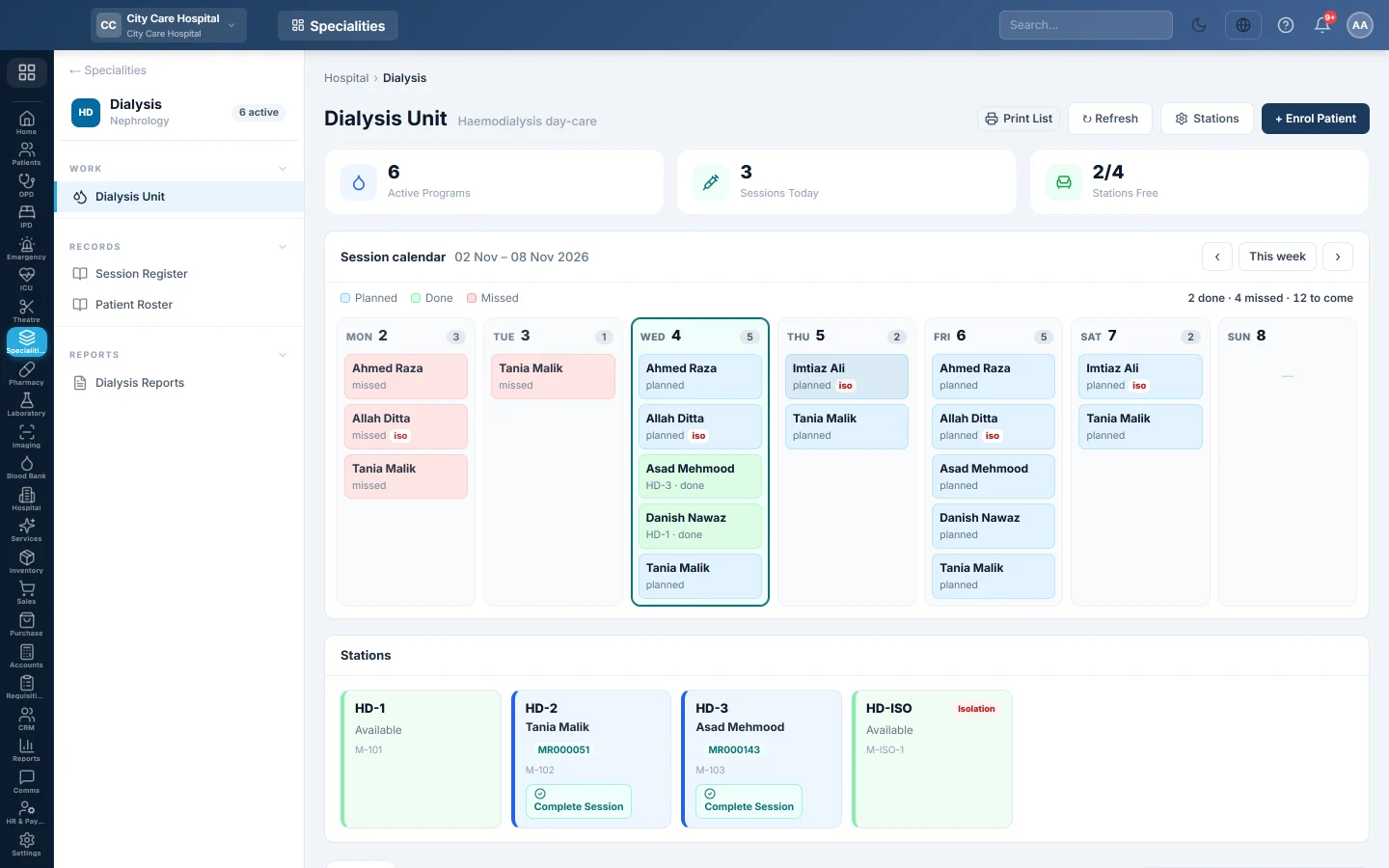
The Dialysis Unit is the haemodialysis day-care. Each chronic patient has a programme with their access, schedule and dry weight. Sessions are recorded on a station, and each is billed on its own or in a monthly package.
Before you begin
- The Dialysis department is switched on for your hospital, and the nephrologists exist. See Doctors.
- The patient is registered. See Register Patient.
- Session and package prices are set in the price list. See Price List & Tariffs.
- Your role needs Manage Dialysis Programs / Sessions; taking payment needs the billing permission.
Where to find it
Open Specialities → Dialysis → Work → Dialysis Unit.
Add your stations
- Click Stations.
- Type the Code, Name and Machine #, and pick the Type: General or Isolation.
- Click Add Station. Click Edit on a row to change one.
Keep at least one Isolation machine: a patient who is HBsAg or HCV positive can only be dialysed on one.
Enrol a patient
- Click + Enrol Patient.
- Pick the Patient and the Nephrologist, and check the Blood Group.
- Pick the Access (AV Fistula, AV Graft or Temp CVC) and type the Access Site.
- Pick the Schedule, such as Mon/Wed/Fri, and type the Dry Weight.
- Choose Billing: Per session, or Monthly package — billed once a month.
- Set the Virology (infection control) results: HBsAg, HCV and HIV.
- Click Enrol.
EloERP plans the patient's sessions ahead from the schedule. They appear on the Session calendar.
Record a session
- Open the patient's programme from the list.
- Click + Record Session.
- Pick the Station. Isolation stations are marked iso.
- Type the Duration, Pre Wt and Post Wt, UF Target and UF Achieved, the Dialyser, Blood Flow, Heparin, Access Used and Pre BP and Post BP.
- Choose the Status: In progress while the patient is on the machine, or Completed.
- Note any Complications, then click Save Session.
An in-progress session holds its station. Click Complete Session on the station tile, or Complete on the session, when it ends.
Bill a session
On a completed session, click Collect. The price comes from the price list and cannot be typed. Pick the payment method and click Collect Charge. For an admitted patient, the charge joins their admission bill instead.
Patients on a monthly package show In package. Their bill posts once a month; see Monthly package bills on the programme.
Change the schedule or end the programme
- Click Schedule & billing on the programme to change the days or the billing. Future sessions are re-planned; sessions already run are kept.
- Click Record outcome when a patient stops, is transplanted, transferred or dies. Future planned sessions are cleared and no more package bills post.
Common questions
A station stays busy after the patient left. Its session was never completed. Click Complete Session on the tile.
Save Session says to choose a station marked Isolation. The patient is HBsAg or HCV positive and the station picked is a general one. Pick an isolation station, or add one under Stations.
Collect says no price is configured. Add a dialysis session price to the price list first. See Price List & Tariffs.
Where are all sessions listed? See Session Register and Patient Roster.
谢谢。 如果仍需帮助,请发邮件至 info@eloerp.net。