ICU / CCU / NICU Board
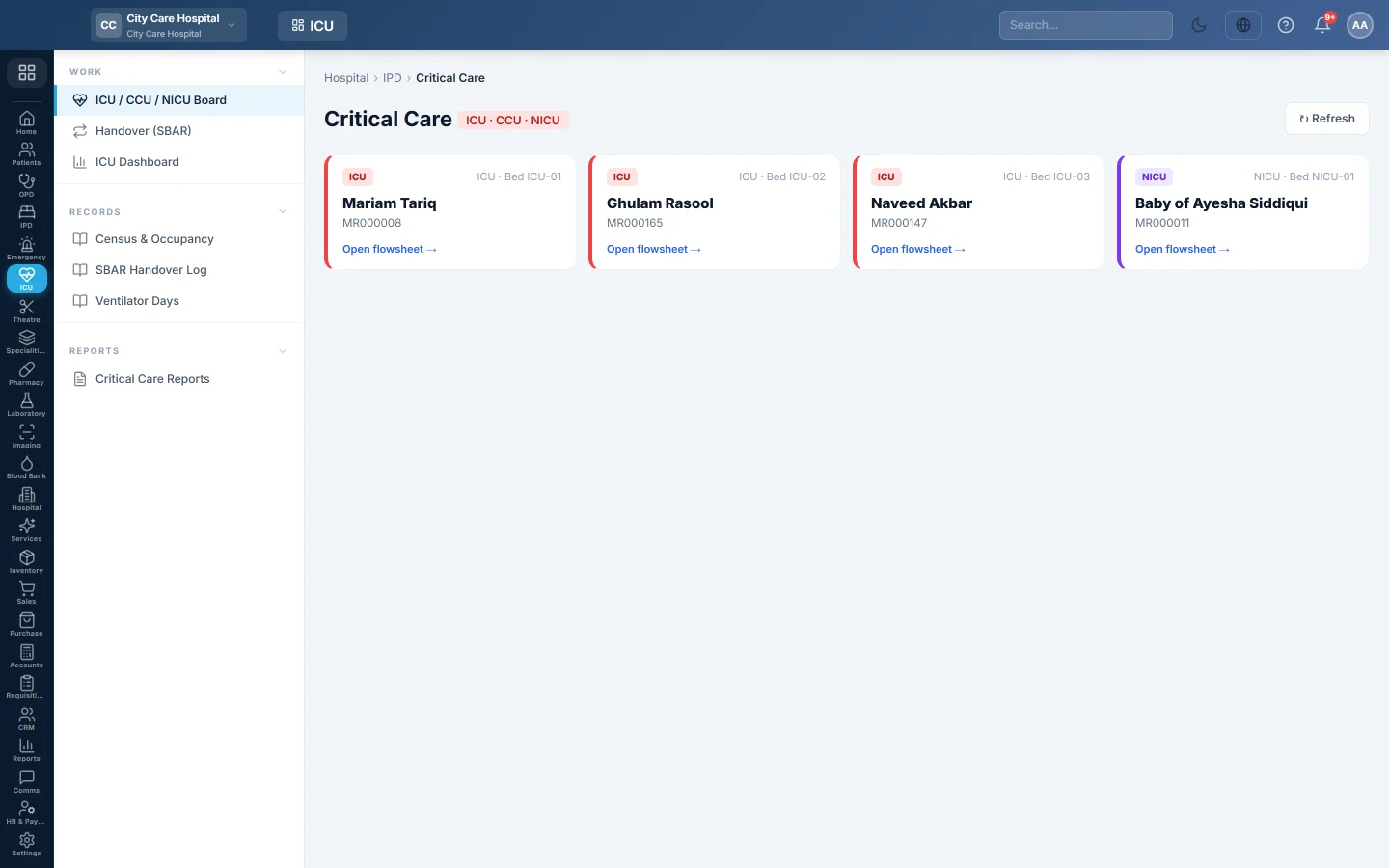
The critical-care board and flowsheet - every ICU, CCU and NICU patient, their observation rounds, severity scores, drips, intake and output, lines, neonatal profile, handovers and step-down.
The ICU / CCU / NICU Board lists every patient in a critical-care bed. Open a patient to chart observation rounds on their flowsheet, see their severity scores, and hand over or step them down to a ward.
Before you begin
- ICU, CCU or NICU wards exist with beds. See Wards & Beds.
- The patient is admitted to one of those beds. See Admit a patient.
- Charting needs the critical-care chart permission. See Users & Roles.
Where to find it
Open Intensive care → Work → ICU / CCU / NICU Board. The page is titled Critical Care.
Read the board
Each card shows the unit (ICU, CCU or NICU), the ward and bed, and the patient. Click a card, or Open flowsheet, to open the patient's flowsheet. When nobody is in a critical-care bed, the page says so and links to the bed board.
Read a patient's flowsheet
- The header shows the patient, the unit, the bed and the buttons Flowsheet (print), Billing, Step down, Handover and New Round.
- The tiles show Last HR, Last BP / MAP, Last SpO₂, the I/O Balance for the shift and 24 hours, and NEWS2 / qSOFA with the risk level.
- A red Deterioration alert asks you to screen for sepsis and escalate when the scores are high.
- Lines, tubes & catheters lists each line with the days in since it went in. A line past its review time is flagged.
- For a NICU baby, the Neonatal Profile shows the gestational age, birth weight, delivery, feeding and resuscitation at birth.
- Shift Handovers lists the SBAR handovers for this stay.
- The flowsheet table lists every round.
Chart an observation round
See Chart an ICU round and hand over for each field. In short:
- Click New Round.
- Fill in the vital signs, neurology, respiratory support and the cardiac or neonatal fields that apply.
- Add any drips under Infusions / Drips and fluids under Intake / Output.
- Click Save Round.
NEWS2 and qSOFA are worked out from the round's vitals.
Record a line
- Under Lines, tubes & catheters, choose the Type, Site, Side and Size.
- Set Put in at, or leave it blank for now.
- Click Record.
Click Remove when it comes out and give the reason.
Step down to a ward
- Click Step down.
- Choose the Ward and Bed.
- Write the SBAR handover for the ward: Situation, Background, Assessment, Recommendation and Pending tasks, and pick who is Taking over on the ward.
- Click Step down & sign handover.
Lines still in are listed so you can mention them in the handover.
Common questions
A patient in the ICU is not on the board. They are admitted to a bed in a ward whose type is not ICU, CCU or NICU. Transfer them, or correct the ward type on Wards & Beds.
New Round is missing. Your role cannot chart in critical care, or the patient is no longer admitted.
Where do I see all handovers for the day? On Handover (SBAR).
Teşekkür ederiz. Hâlâ yardıma ihtiyacınız varsa info@eloerp.net adresine yazın.