Admission & Discharge Register
The daily admission and discharge log - who was admitted, to which ward, by which doctor, and when and how they left.
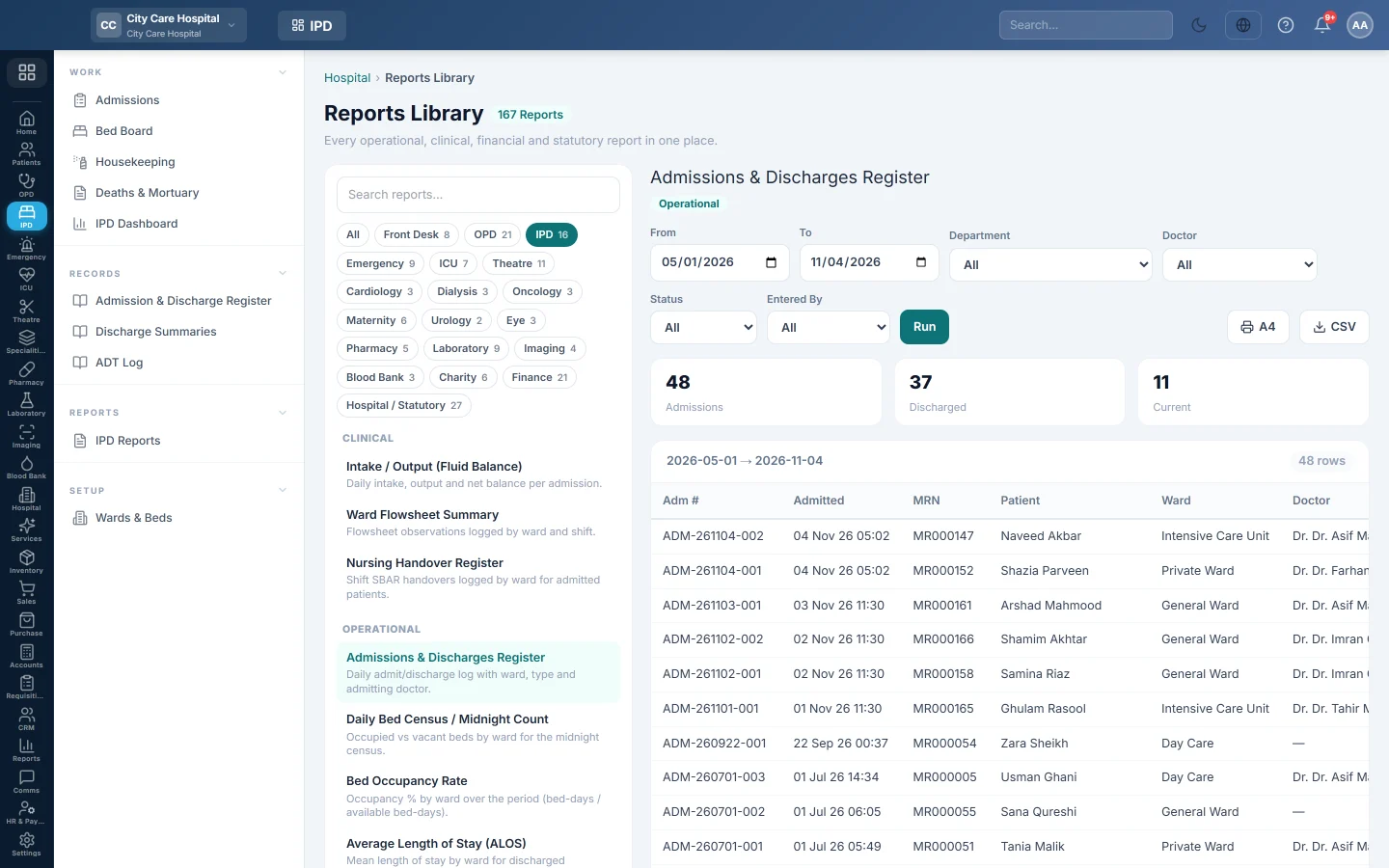
The Admission & Discharge Register lists every admission in a period, with its ward, doctor and how it ended. It is the IPD's statutory admission book.
Before you begin
- Your role needs the hospital reports permission. See Users & Roles.
- The report runs in the Reports Library.
Where to find it
Open Inpatients (IPD) → Records → Admission & Discharge Register. It opens as Admissions & Discharges Register.
Run the register
- Set From and To. The register lists admissions made in this period.
- Optionally pick a Department, a Doctor, a Status (Admitted or Discharged) or a user in Entered By.
- Click Run.
- Click A4 to print, or CSV to download every row.
What the report shows
The tiles count Admissions, Discharged and Current (still in the ward).
| Column | What it shows |
|---|---|
| Adm # | The admission number. |
| Admitted | Date and time of admission. |
| MRN, Patient | Who was admitted. |
| Ward, Doctor | The ward and the admitting doctor. |
| Type | Planned or Emergency. |
| Discharged | Date and time of discharge, or a dash. |
| Outcome | The discharge type, such as Recovered or LAMA, or In ward. |
| Entered By, Entered At | Who made the admission and when. |
Common questions
A patient discharged this month is missing. The register filters on the admission date. A patient admitted last month appears in last month's register. For discharges in a period, use Discharge Summaries.
What do LAMA and DAMA mean? LAMA is left against medical advice; DAMA is discharged against medical advice.
Where are transfers between wards? In the ADT Log.
Obrigado. Se ainda precisar de ajuda, escreva para info@eloerp.net.