Financials
A profit and loss view of your online selling, with fees, courier charges and refunds, a COD collection summary, and the true profit per product after returns.
Financials shows what your online selling earned in a period. The Financial Report tab is a profit and loss statement for your online orders. The Contribution Margin tab shows the profit per product after courier costs, tax and returns.
Before you begin
- Cost prices on your products must be right, or profit will be wrong. See All Products.
- Platform fees come from the fee rules on each channel. See Channels.
- Courier charges come from shipments. See Shipments.
- Your role needs the financial analytics permission.
Where to find it
Open Online shop → Insights → Financials. The first tab is Financial Report; the second is Contribution Margin.
Read the Financial Report
- Set Date From and Date To. It opens on the current month.
- Pick one channel in Platform, or leave All Platforms.
- Click Apply.
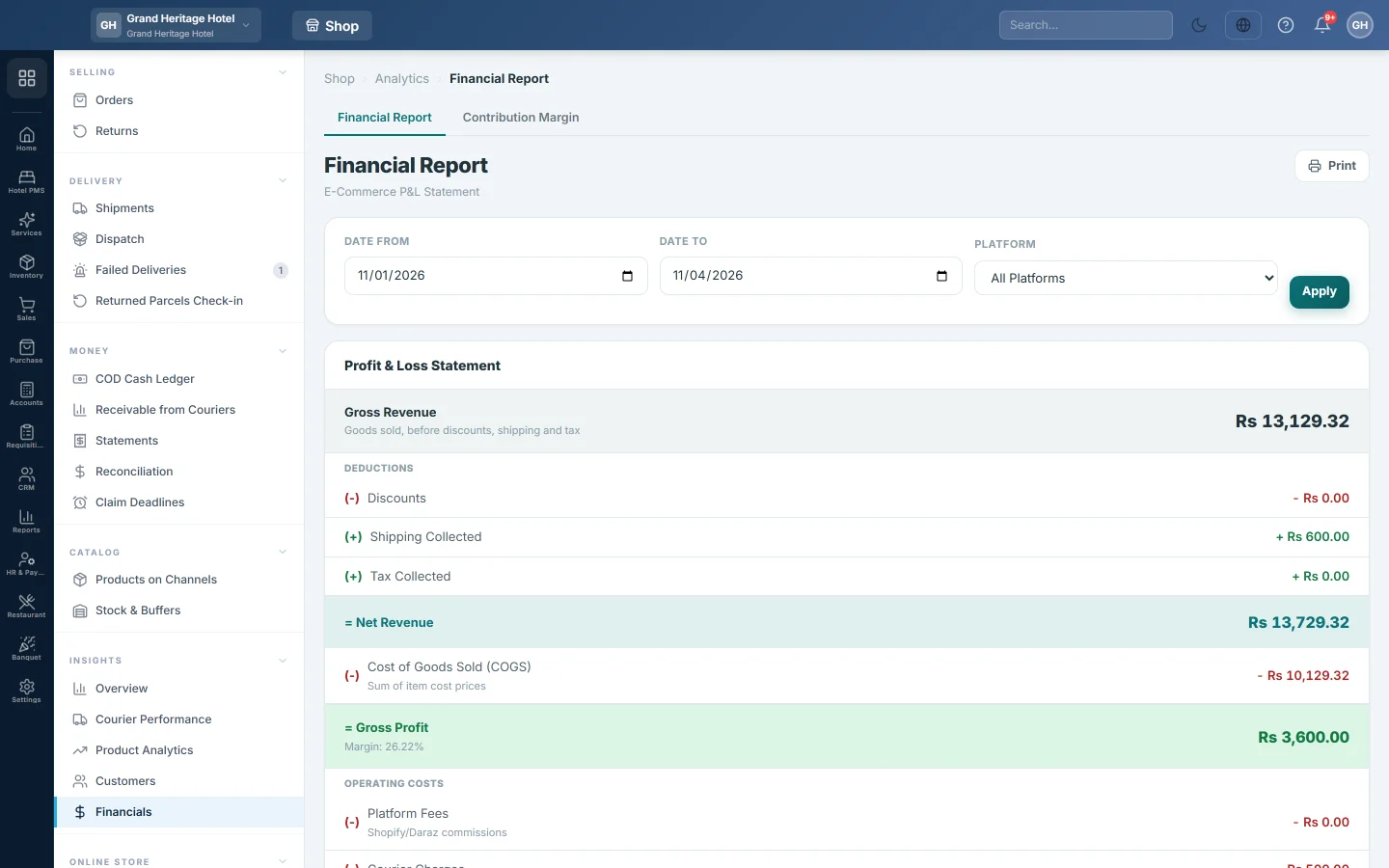
The Profit & Loss Statement reads from top to bottom:
- Gross Revenue: the goods value before discounts, shipping and tax. It is worked back from the order totals: net revenue plus discounts, less shipping and tax, so the lines always add up.
- less Discounts, plus Shipping Collected and Tax Collected, giving Net Revenue: the order totals, what customers were charged.
- Cost of Goods Sold (COGS): the cost price of the items sold, giving Gross Profit and its margin on net revenue.
- Operating Costs: Platform Fees, Courier Charges and Returns & Refunds, giving Net Profit and the net margin, also on net revenue.
Monthly Breakdown splits revenue, cost and profit by month. Click Print for a paper copy.
Check cash on delivery
The COD Reconciliation section below the statement shows:
- Total COD Orders and Total COD Amount in the period.
- Collected: COD on delivered orders.
- Pending Collection: COD on parcels still in transit.
- Settled by Courier, with what is still Pending from couriers.
COD by Courier splits the same figures by courier. To settle courier money, use Statements and Receivable from Couriers.
Find the products that lose money
- Click the Contribution Margin tab.
- Set the two dates. The page opens on the last 30 days.
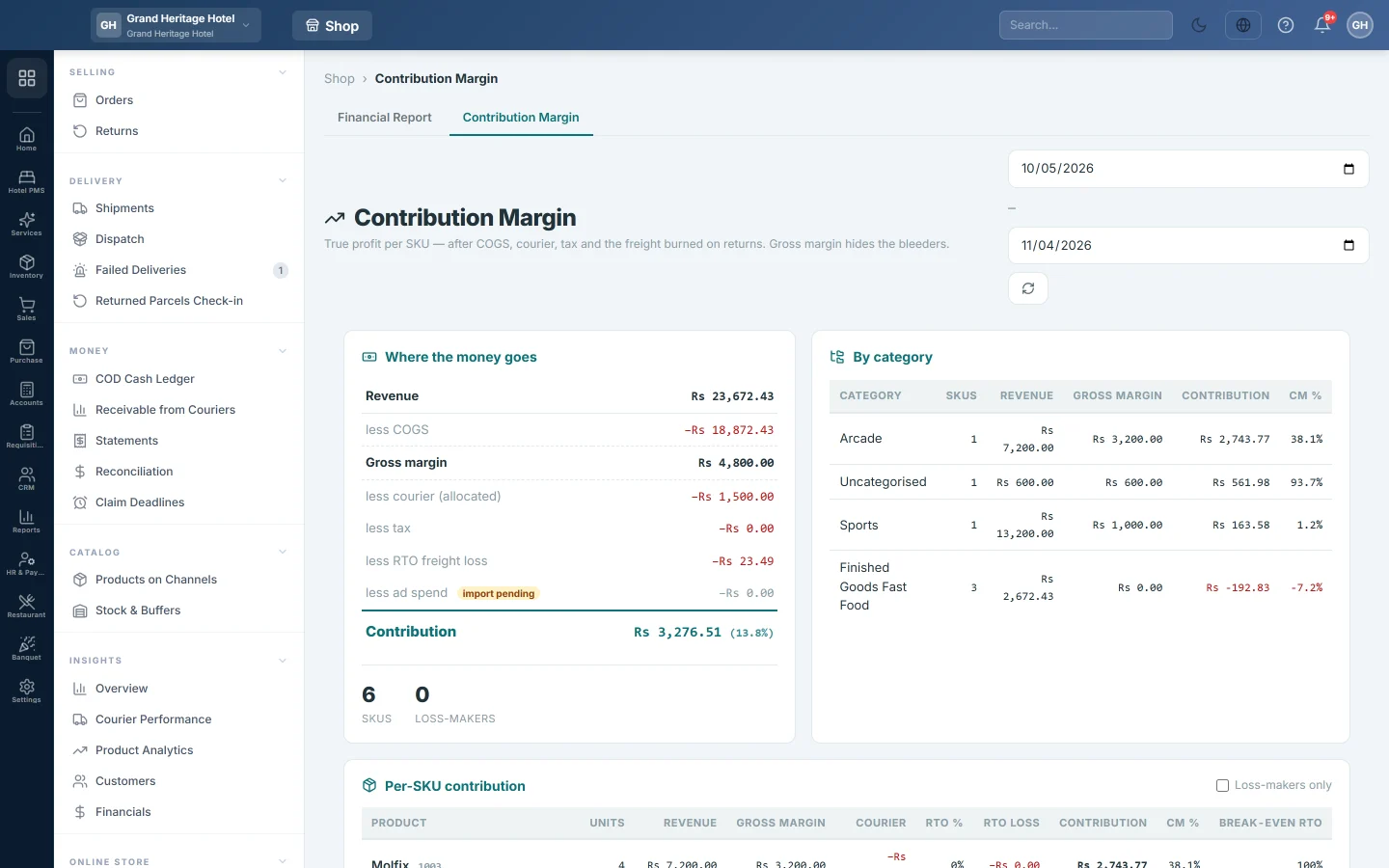
Where the money goes starts at Revenue and takes off COGS, courier (allocated), tax and RTO freight loss, the freight paid on parcels that came back. The result is Contribution. Ad spend shows import pending: it stays zero until an ad import is connected.
Per-SKU contribution lists each product with its RTO %, RTO Loss, Contribution, CM % and Break-even RTO, the return rate at which it stops making money. Tick Loss-makers only to see products with a positive gross margin but a negative contribution.
Courier cost is booked per order, so EloERP shares the period's courier cost across products by revenue. Read it as a close estimate, not a per-line figure.
Common questions
Why is Platform Fees zero? No fee rule is set on the channel, or the channel charges no fee.
Why do Courier and Returns show zero in the Monthly Breakdown? The monthly table splits revenue, cost and fees only. Use the totals in the statement for courier charges and refunds.
Which number should I trust for tax returns? Your books. Use Profit & Loss and the tax reports, not this page.
What does a loss-maker mean? The product sells above cost, but after courier, tax and returns it loses money. Raise its price, cut returns or stop COD for it.
谢谢。 如果仍需帮助,请发邮件至 info@eloerp.net。