Receivables Aging (AR)
Unpaid customer invoices and installments sorted by how many days they are overdue, so you know who to chase first.
Receivables Aging puts every unpaid customer invoice into an age bucket: not yet due, 1-30, 31-60, 61-90 or more than 90 days overdue. Use it to plan recovery calls, starting with the oldest amounts.
Before you begin
- Give credit invoices a due date. An invoice without one is aged from its invoice date. See Sales Invoices.
- Record customer payments against their invoices, so the unpaid balance on each invoice is right. See Receipt Voucher (RV).
- Your role needs permission to view the aging report. Your administrator sets this in Users & Roles.
Where to find it
Open Accounting → Reports → Receivables Aging (AR).
Run the report
The report opens as of today for the branch shown in the top bar.
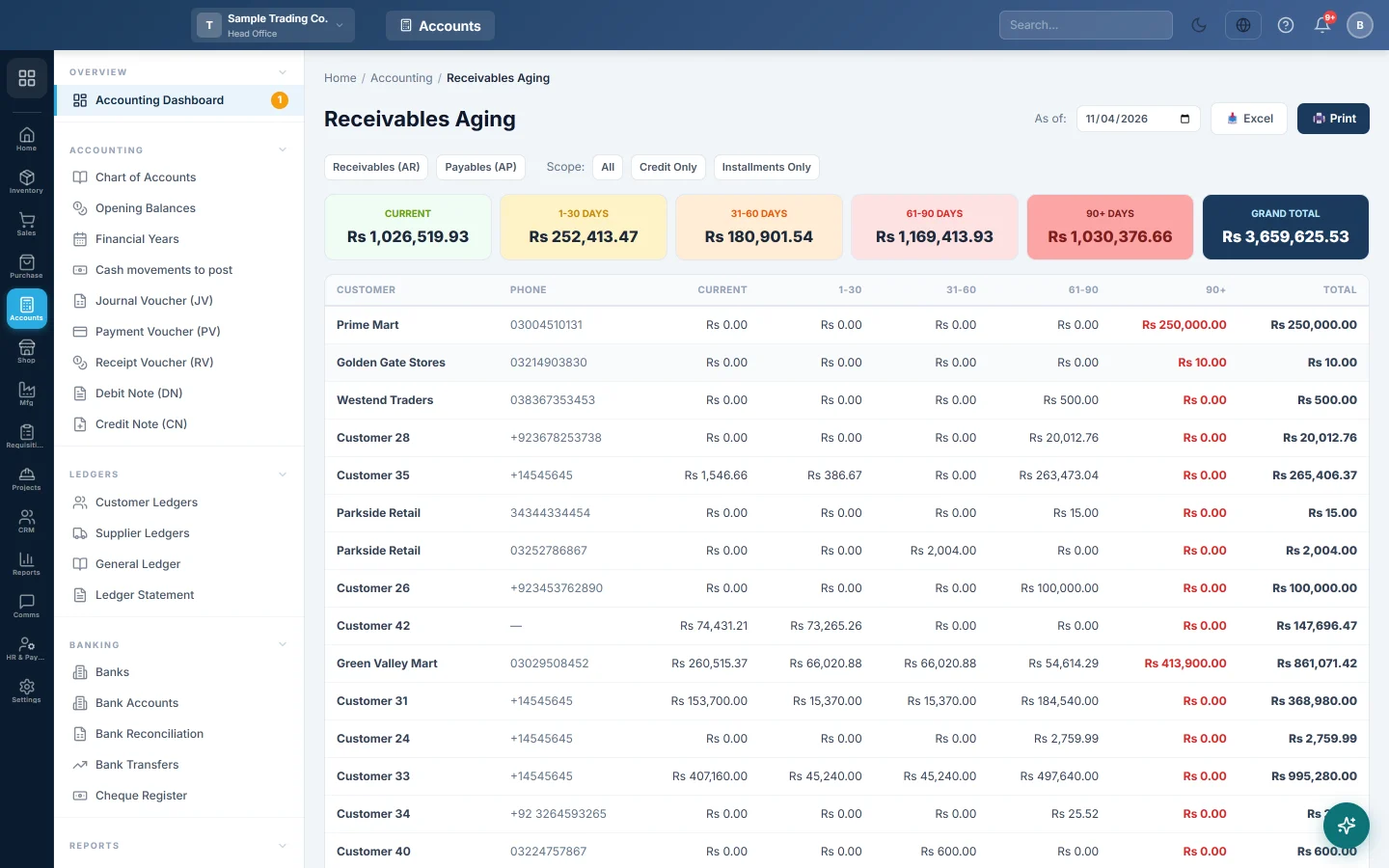
- Set As of: to the date you want the ages worked out on.
- Next to Scope:, click All, Credit Only or Installments Only.
- Click a customer's row to see their invoices.
Use Excel or Print to keep a copy. The Payables (AP) button switches to the Payables Aging.
Read the report
The six cards at the top add up each bucket for all customers: Current, 1-30 days, 31-60 days, 61-90 days, 90+ days and Grand Total.
The table has one row per customer with the same buckets and a Total. The 90+ amount is shown in red.
Click a row to see each unpaid item:
| Column | What it shows |
|---|---|
| Invoice / Plan | The invoice number. An installment shows the invoice or plan number with its place, such as (Inst 3/12). |
| Type | Credit for a credit invoice, Installment for an installment. |
| Date | The invoice date. |
| Promise Date | The due date of the invoice, or the date the installment is due. |
| Days Overdue | Days from the promise date to the As of: date. Orange above 30, red above 90. |
| Outstanding | What is still unpaid. |
How items are aged
| Days past the promise date | Bucket |
|---|---|
| Not yet due, or due today | Current |
| 1 to 30 | 1-30 |
| 31 to 60 | 31-60 |
| 61 to 90 | 61-90 |
| More than 90 | 90+ |
For example, as of 30 June, Ali Traders has an invoice of Rs 10,000 due on 15 June and one of Rs 6,000 due on 10 April. The first is 15 days overdue and goes into 1-30. The second is 81 days overdue and goes into 61-90.
Installments
With All or Installments Only, each unpaid installment of an active or defaulted plan is listed with its own promise date. Installments due later are in Current, so you see the full amount still to come.
Why figures can look wrong
- Different from the Account Receivable register. This report reads unpaid invoices. The Account Receivable (AR) register reads the books. Opening balances, journal vouchers and receipts not matched to an invoice show in one and not the other.
- A past As of date still shows today's balance. The report picks invoices dated on or before As of:, but uses what is unpaid on them today. Payments made after that date are already taken off.
- Only confirmed invoices count. Draft and cancelled invoices are left out.
- Only your branch. The report shows the branch in the top bar. Switch branch to see another one.
Common questions
Why is a paid invoice still on the list? The payment was not matched to that invoice. Open the receipt and pick the invoice on the line, or check the customer's ledger. See Receipt Voucher (RV).
What is "Cash Customer"? An unpaid invoice with no customer picked. Each one is listed on its own row.
Why is everything in Current? The invoices have due dates in the future, or the installments are not yet due. That is money you will collect later, not overdue money.
Can head office see all branches together? No. The report covers one branch at a time, the one in the top bar.
Where do I see the customer's full history? Open Customer Ledgers and click the customer.
Gracias. Si todavía necesita ayuda, escriba a info@eloerp.net.