Account Receivable (AR)
Every customer with an account, with their opening balance, debits, credits and closing balance from the books, and a check that ties the total to the Trial Balance.
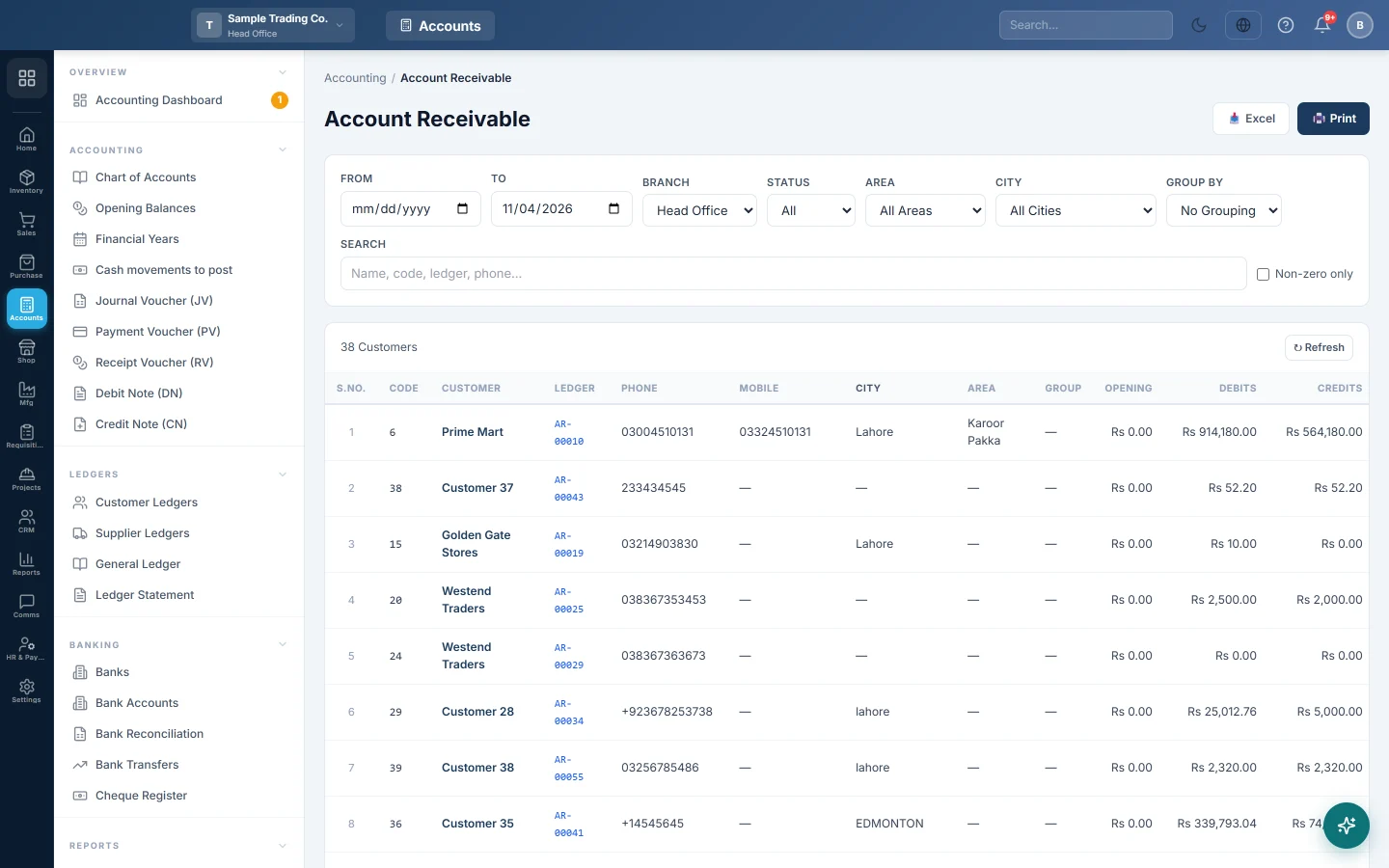
The Account Receivable register lists every customer who keeps a ledger, with what they owe you on a date. The balances come straight from the books, so the total matches the receivables in your Trial Balance.
Before you begin
- A customer appears only when Create Ledger in Accounts is on in their customer record. See All Customers.
- Customer groups, categories and areas make the filters useful. See Customer Groups & Categories and Areas & Routes.
- Your role needs access to the Accounting reports. Your administrator sets this in Users & Roles.
Where to find it
Open Accounting → Reports → Account Receivable (AR).
Run the report
The register opens with every balance from the start of your books up to today.
- Leave From blank for the lifetime balance, or set it to see an opening balance on that date.
- Set To, the date the closing balance is worked out on.
- If you work at head office, pick a Branch, or All Branches.
Changing a date or branch reloads the list. Click Refresh to load it again.
Filter, search and group
These work on the loaded list at once, without reloading:
- Status: All, Active, Inactive or Blocked.
- Group, Category, Area and City: shown when your customers have them.
- Search: name, code, ledger code, phone or mobile.
- Non-zero only: hides customers with no balance.
- Group By: Group, Category, Area or City, each with a subtotal row.
Click Print or Excel to take the list as filtered and grouped.
Read the report
| Column | What it shows |
|---|---|
| Code / Customer | The customer's code and name. |
| Ledger | The customer's account code in the books. no ledger means the account is missing, so no balance can show. |
| Phone, Mobile, City, Area, Group | Contact and grouping details for follow-up calls. |
| Opening | The balance before From. Zero when From is blank. |
| Debits | Sales and other charges between From and To. |
| Credits | Receipts, returns and credit notes in the same period. |
| Closing | Opening plus Debits minus Credits: what the customer owes on To. |
| Last Txn | The date of the last entry in the period. |
A red closing balance means the customer owes you. A green one means you owe the customer, for example after an advance or an overpayment. Click a row to open the customer's Ledger Statement for the same dates.
A worked example:
| Customer | Opening | Debits | Credits | Closing |
|---|---|---|---|---|
| Ali Traders | Rs 20,000 | Rs 50,000 | Rs 45,000 | Rs 25,000 |
| Sara Khan | Rs 0 | Rs 8,000 | Rs 10,000 | Rs -2,000 |
| Grand Total | Rs 20,000 | Rs 58,000 | Rs 55,000 | Rs 23,000 |
The reconciliation line
The line under the table explains how the register ties to the books:
- parties have no GL ledger: customers listed without an account.
- customer-cum-supplier accounts: customers who share one account with a supplier record. The account is counted in one register only; in the other it shows greyed out with counted in Payables and stays out of the totals.
- Control: entries posted to the general Accounts Receivable account instead of a customer's own account.
- unlinked ledgers: receivable accounts that belong to no customer, for example a deleted customer's account.
- no-branch entries excluded: entries with no branch, which a branch filter cannot see.
- Reconciles to TB: the register total plus the control and unlinked amounts. It should equal the receivables group in the Trial Balance for the same dates and branch.
Common questions
A customer is missing from the list. Their record does not have Create Ledger in Accounts switched on, or they were deleted. Walk-in and cash customers without a ledger are left out on purpose.
Why does the total differ from the Receivables Aging? This register reads the books. The Receivables Aging reads unpaid invoices. Opening balances, journal vouchers and payments not matched to an invoice change one but not the other.
What is the Control amount? Sales posted to the general receivables account rather than a customer's own account, usually cash sales. A large amount there is worth checking with your accountant.
Why does a customer show a green balance? They paid more than they owe, or paid in advance. The next sale uses up the credit.
How do I see the details behind a balance? Click the customer's row. The Customer Ledgers screen shows the same balances with the full statement.
Gracias. Si todavía necesita ayuda, escriba a info@eloerp.net.