Day Book
Today's cash in and cash out with opening and closing cash, for all cash ledgers or one cash counter.
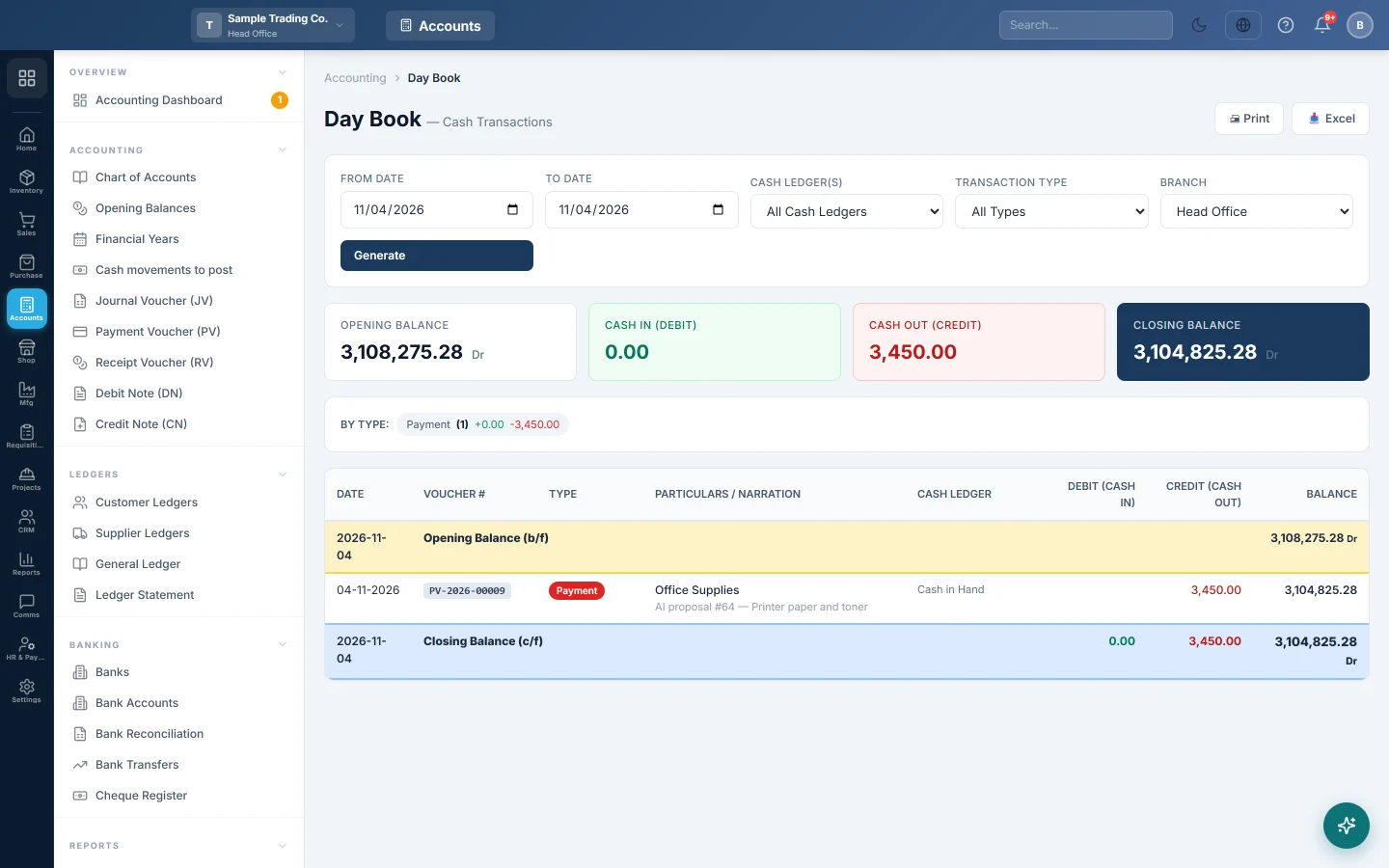
The Day Book is your cash book. It shows every entry that moved cash on the days you pick: opening cash, each sale, receipt, payment or expense paid in cash, and the closing cash you should have in hand.
Before you begin
- Your role needs the View Day Book permission, set under Users & Roles.
- You need at least one cash ledger. The Day Book counts every account whose name or group contains "Cash", such as Cash in Hand or Petty Cash. Set them up in the Chart of Accounts.
Where to find it
Open Accounting → Reports → Day Book.
See today's cash
The page opens on today and loads by itself.
- To see other days, change From Date and To Date.
- In Cash Ledger(s), keep All Cash Ledgers or pick one cash account, such as one counter's cash.
- In Transaction Type, pick a type to see only those entries, such as Payment or POS Sale.
- Click Generate.
The By Type: strip lists each kind of entry with its count, cash in and cash out. Click one to filter the book to that type.
How to read it
The four cards give Opening Balance, Cash In (Debit), Cash Out (Credit) and Closing Balance. The table repeats them line by line.
| Type | Particulars / Narration | Debit (Cash In) | Credit (Cash Out) | Balance |
|---|---|---|---|---|
| Opening Balance (b/f) | 12,000 Dr | |||
| Sale | Sales +1 | 18,500 | 30,500 | |
| Receipt | Ali Traders | 5,000 | 35,500 | |
| Payment | Staff Tea | 1,200 | 34,300 | |
| Closing Balance (c/f) | 23,500 | 1,200 | 34,300 Dr |
Particulars / Narration names the other side of the entry: who paid you, or what you paid for. When an entry has several other accounts, the first is named followed by "+2" and so on. With All Cash Ledgers, a Cash Ledger column shows which cash account each line hit.
The Closing Balance is the cash that should be in the drawer or safe. Count the cash and compare.
Print or export
- Print prints the book with the period and the cash ledger at the top.
- Excel downloads it once there is at least one entry.
Common questions
The closing cash does not match the cash I counted. Look for a sale taken by card or bank but posted as cash, a payment made from the drawer but not entered, or a receipt entered on the wrong day. Each one shows in the book, or is missing from it, on the day it happened.
Why are bank payments missing? They are not cash. The Day Book covers cash ledgers only; use the Ledger Statement for a bank account.
An account I do not think of as cash is included. The Day Book takes every account whose name or group contains "Cash". Pick your cash account in Cash Ledger(s) to see it alone.
It says no cash ledgers were found. Create a cash account under the Cash account group in the Chart of Accounts.
I cannot see another branch's cash. The Day Book shows the cash of the branch you are signed in to. Switch branch in the top bar.
Can I open an entry from here? Clicking a line opens the Voucher Register. Find the voucher there by its number and click View.
شكرًا لك. إذا كنت لا تزال بحاجة إلى مساعدة، راسلنا على info@eloerp.net.