Statement of Cash Flow
How net income turned into the real change in cash and bank over a period, split into operating, investing and financing activities.
The Statement of Cash Flow explains why your cash and bank balances went up or down over a period. It starts from net income and adjusts it for everything that moved cash differently from profit, such as credit sales, stock bought and loans taken.
Before you begin
- Your plan must include the Balance Sheet; this statement comes with it. If it is missing from the menu, your plan does not have it.
- Your cash and bank accounts must be set up as asset accounts. Bank accounts created under Bank Accounts are recognised automatically.
- The statement is easiest to trust when the Trial Balance balances for the same period.
Where to find it
Open Accounting → Reports → Statement of Cash Flow.
Run the report
The report opens for 1 January of this year to today.
- Set From and To.
- If you work at head office, pick a Branch, or All Branches (Consolidated).
- Click Generate.
Read the statement
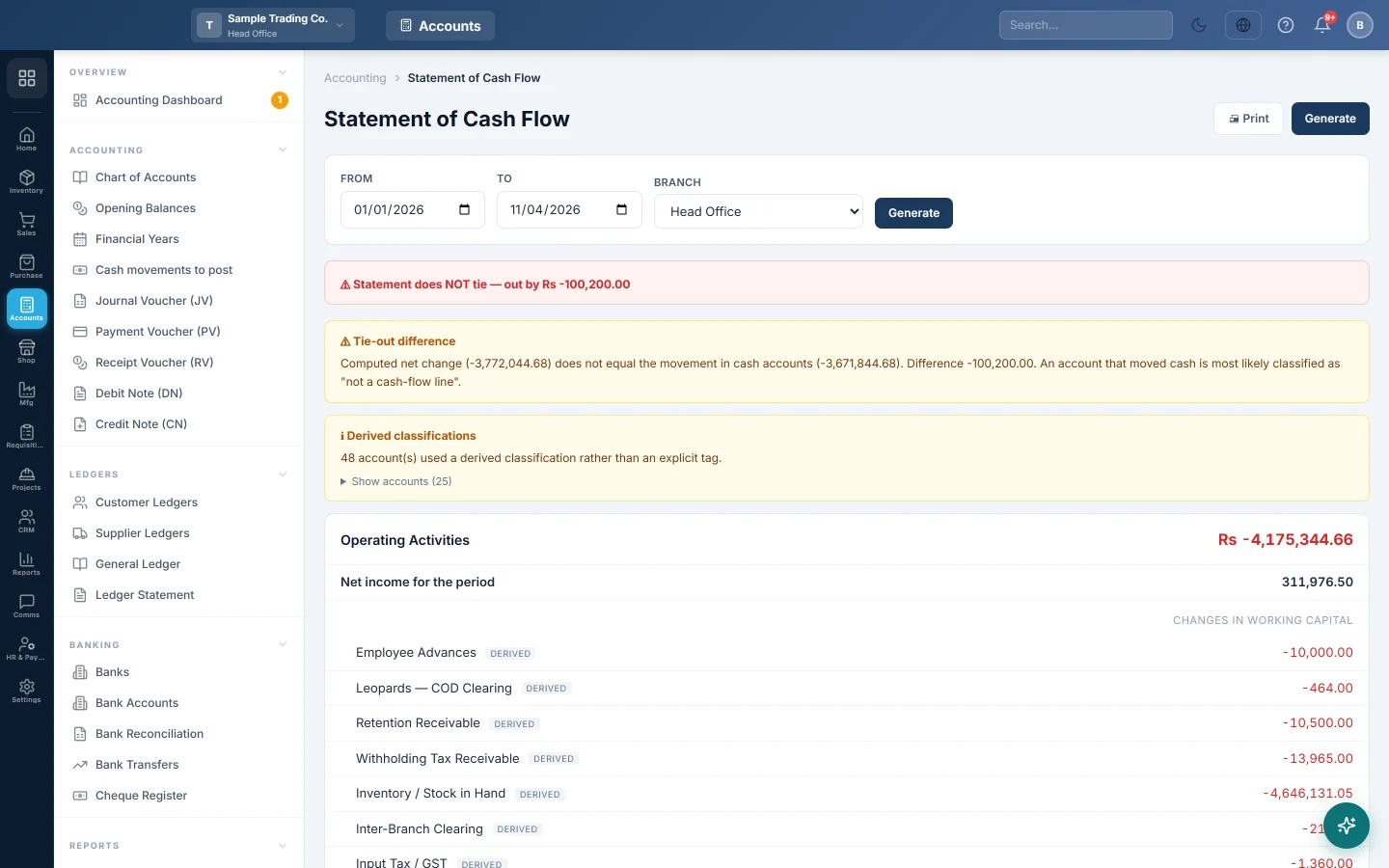
The first line is the tie-out banner. Statement ties means the statement's net change equals the real movement in your cash and bank accounts. Statement does NOT tie shows the amount it is out by.
Then come three sections:
| Section | What it holds |
|---|---|
| Operating Activities | Net income for the period, then Non-cash adjustments such as depreciation added back, then Changes in working capital: receivables, stock, payables, advances and accruals. |
| Investing Activities | Money spent on or received for fixed assets: furniture, equipment, vehicles, buildings. |
| Financing Activities | Loans taken or repaid, capital put in and drawings taken out. |
Each section ends with its net cash. The last card shows Net change in cash, Cash at beginning of period and Cash at end of period.
Positive amounts brought cash in; negative amounts, shown in red, took cash out. An increase in receivables or stock uses cash. An increase in payables provides cash.
A worked example for one month:
| Line | Amount |
|---|---|
| Net income for the period | Rs 50,000 |
| Increase in receivables | Rs -20,000 |
| Increase in stock | Rs -30,000 |
| Increase in payables | Rs 15,000 |
| Net cash from operating activities | Rs 15,000 |
| Equipment bought | Rs -40,000 |
| Loan taken | Rs 60,000 |
| Net change in cash | Rs 35,000 |
If cash was Rs 100,000 at the start, Cash at end of period is Rs 135,000. That matches your cash and bank balances on the Balance Sheet.
How lines are classified
Each account is placed automatically from its group type, its code and its name in the Chart of Accounts. Lines placed this way carry a small derived label. A box headed Derived classifications counts them; click Show accounts to list them.
- Cash, bank, petty cash and wallet accounts are the result the statement explains, so they never appear as lines.
- Income and expense accounts are already inside net income, so they are not listed again.
- Depreciation, amortisation, provisions and write-offs are added back as non-cash adjustments.
- Liability accounts with loan, borrowing or overdraft in the name go to financing.
- Fixed asset accounts go to investing; accumulated depreciation is left out.
To move a line, put the account under the right group and give it a clear name. For example, keep a bank loan under liabilities with loan in its name.
When it does not tie
A yellow box explains the cause:
- General ledger does not balance: one or more vouchers in the period post unequal debits and credits. The table lists up to ten of them with Voucher, Type, Date and Out by. This is a posting fault; have those vouchers corrected first.
- Tie-out difference: the ledger balances, but an account that moved cash was not placed in any section. Check how that account is named and grouped.
Common questions
Why does net income here differ from the Profit & Loss? Check that the dates and branch match. If the period includes a year you have closed, the closing voucher moves that year's result into Retained Earnings and net income shows lower here. Run the Profit & Loss for the year's result.
Why are cash accounts not listed as lines? Cash is what the statement explains. Its movement appears once, as Net change in cash.
My opening balances show up as financing. Opening balances posted in the period move cash against Opening Balance Equity, which is equity. Start the period after the date your opening balances were entered.
Why does a line say derived? It was classified automatically from the account's group, code and name. The amount is still correct; only its section was worked out for you.
Thank you. If you still need help, write to info@eloerp.net.