Trial Balance
Every account's opening, period and closing debit and credit for a date range, with a check that total debits equal total credits.
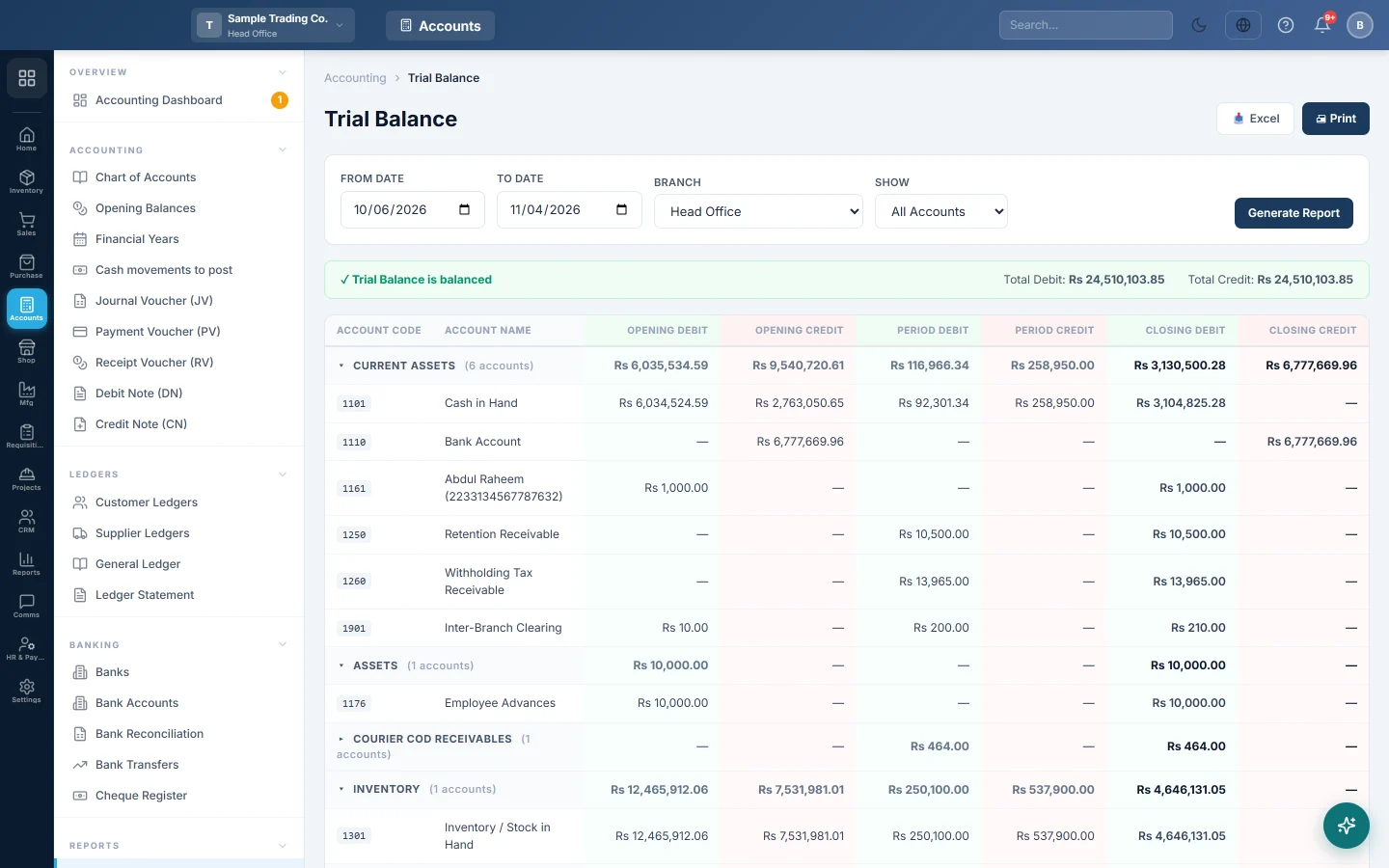
The Trial Balance lists every account in your books with its debit or credit balance for a period. It is the first check before you read the Profit & Loss or the Balance Sheet: when total debits equal total credits, every entry was posted on both sides.
Before you begin
- Your plan must include the Trial Balance. If it is missing from the menu, your plan does not have it.
- Your role needs permission to view the Trial Balance. Your administrator sets this in Users & Roles.
- Enter your opening balances first, so the opening columns are complete. See Opening Balances.
Where to find it
Open Accounting → Reports → Trial Balance.
Run the report
The report loads for the default date range when you open it. The default range is set under Settings → Company → Default Report Date Range.
- Set From Date and To Date.
- If you work at head office, pick a Branch, or All Branches (Consolidated) for the whole company.
- In Show, pick All Accounts or Non-Zero Only.
- Click Generate Report.
Users outside head office do not see the Branch box. Their report always shows their own branch.
Read the report
Accounts are grouped by their account group in the Chart of Accounts. Click a group's name to open or close it. Receivable and payable groups, and any group with more than 50 accounts, start closed so the page stays fast. The group row still shows the group's totals.
| Column | What it shows |
|---|---|
| Account Code / Account Name | The account from the Chart of Accounts. |
| Opening Debit / Opening Credit | Everything posted to the account before the From date, including opening balances. |
| Period Debit / Period Credit | What was posted between From and To. |
| Closing Debit / Closing Credit | Opening plus period, shown on one side as the net balance on the To date. |
The GRAND TOTAL row adds each column. The banner above the table says Trial Balance is balanced when total closing debits equal total closing credits. Otherwise it says Trial Balance is NOT balanced and shows the Difference.
A worked example for a small shop:
| Account | Closing Debit | Closing Credit |
|---|---|---|
| Cash in Hand | Rs 50,000 | |
| Ali Traders (customer) | Rs 20,000 | |
| Sales | Rs 60,000 | |
| Owner's Capital | Rs 10,000 | |
| GRAND TOTAL | Rs 70,000 | Rs 70,000 |
Assets and expenses normally sit in the debit column. Liabilities, capital and income normally sit in the credit column.
Print or export
- Click Print for a landscape print of the report, grouped by account group.
- Click Excel to download the same rows as a spreadsheet.
Both use the dates, branch and Show choice on screen.
When it does not balance
When the totals differ, a yellow box headed Likely cause(s): names what the system found. The usual causes are:
- Opening balances without the other side. An opening balance typed on one account only. Enter opening balances on the Opening Balances screen, which posts the offset to an equity account.
- Rows marked orphan. Red rows tagged orphan carry entries for an account that no longer exists in the Chart of Accounts. Ask your administrator to investigate those entries.
- Rows marked inactive. Yellow rows tagged inactive are switched-off accounts that still carry entries. Reactivate the account or reverse the entries.
- One branch only. If All Branches (Consolidated) balances but one branch does not, an entry has its lines in two branches.
A deleted or cancelled document leaves no trace here: its vouchers are removed or reversed on both sides. A few internal posting types are kept out of all financial reports until they are proven to balance. They move both sides together, so they never unbalance this report.
Common questions
Why does the opening column show income and expense from last year? The opening columns add up everything before the From date. Close the old year on Financial Years; its profit then moves into Retained Earnings and income and expense start again from zero.
Why do income accounts show zero after I closed the year? The closing voucher moves each income and expense balance into Retained Earnings on the last day of the year. Run the Profit & Loss to see that year's result; it leaves the closing voucher out.
An account's balance here differs from its ledger. Which is right? Both read the same posted vouchers. Check that the dates and branch match, then open the account in the General Ledger or Ledger Statement to see each entry.
Why does Non-Zero Only still show some accounts with zero closing? It keeps any account with an opening or closing balance. It hides accounts with no balance at either end.
I cannot see the Branch box. Only head-office users with administrator-level access can pick a branch or the consolidated view. Everyone else sees their own branch. See Branches.
Why does it say balanced when there is a few paisa difference? The banner treats a difference under Rs 1 as balanced, to allow for rounding. The Difference is still shown when it is Rs 1 or more.
Vielen Dank. Wenn Sie weitere Hilfe brauchen, schreiben Sie an info@eloerp.net.