Receipt Voucher (RV)
Record money received in cash, by bank transfer or by cheque, from a customer or any other source, and settle customer invoices.
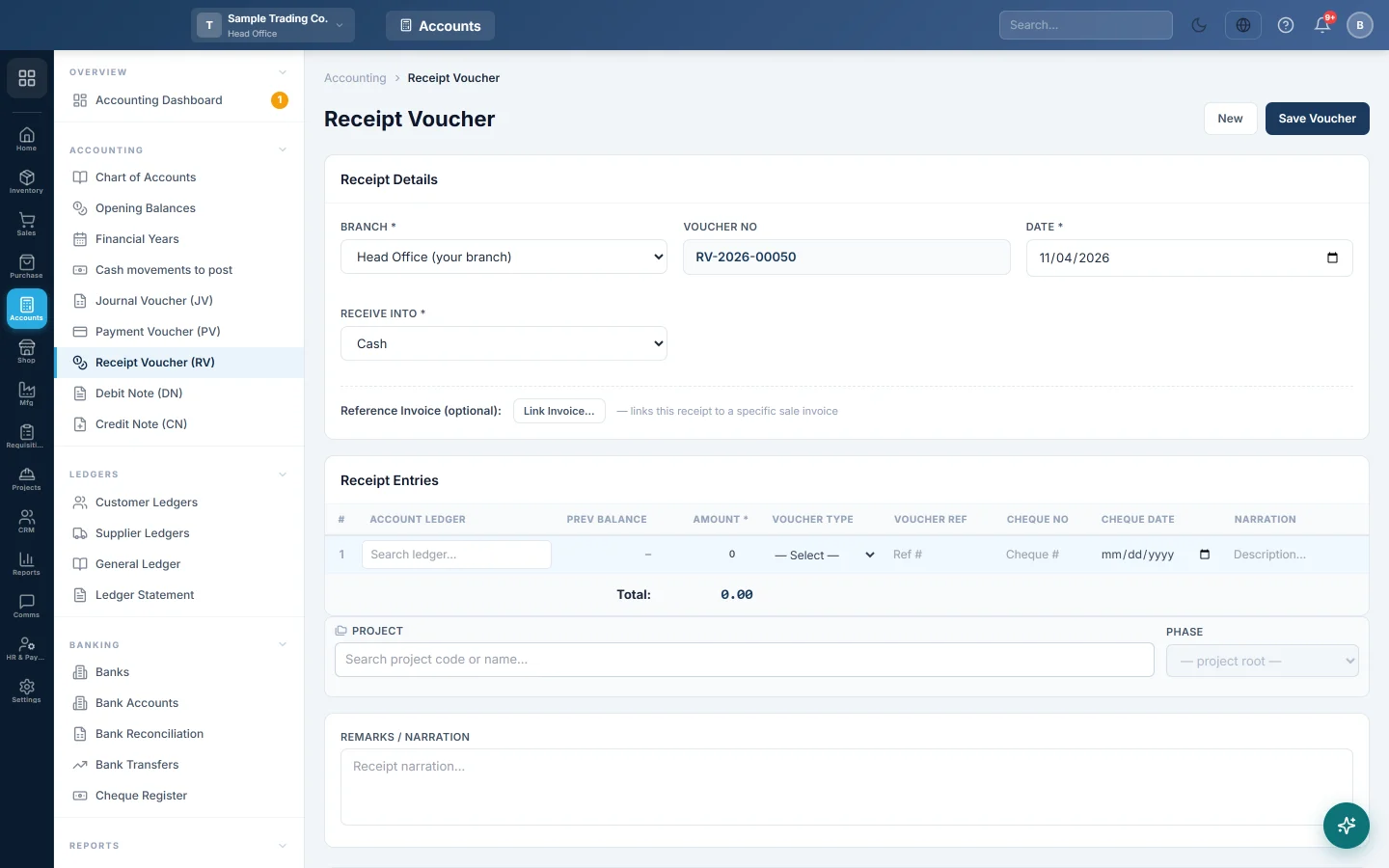
A receipt voucher records money coming into your cash or bank: a customer paying an invoice, an advance, rent received or any other income. You pick who or what the money came from; EloERP adds the cash or bank side from the method you receive into.
Before you begin
- Your role needs permission to create vouchers. See Users & Roles.
- At least one payment method must exist and be linked to a cash or bank account. See Payment Methods. If your user has a list of allowed methods, only those appear.
- The customer or income account must exist. Each customer has its own account, made when you add the customer.
- The voucher date must fall in an open financial year. See Financial Years.
Where to find it
Open Accounting → Accounting → Receipt Voucher (RV). The quick action New RV opens the same screen.
Record a receipt
- Check the Voucher No. It is filled in for you and runs per branch (for example RV-2026-00051).
- Set the Date.
- Choose where the money went in Receive Into: the cash drawer, a bank account and so on. Your default method is picked for you.
- In Receipt Entries, click Account Ledger and search for who paid you, usually the customer.
- Enter the Amount. Prev Balance shows that account's balance before this receipt.
- Add a Narration for the line if it needs one.
- Press Enter to move along the row. On the last row, Enter adds a new line, so one voucher can take money from several accounts.
- Type the Remarks / Narration for the whole voucher.
- Click Save Voucher.
Settle a customer's invoice
Set the line's type so the receipt clears a real sale invoice:
- On the line, pick the customer's account in Account Ledger.
- Set Voucher Type to Sale Invoice.
- Open Voucher Ref. It lists that customer's unpaid invoices with the balance of each. Pick one.
- The Amount fills with the invoice balance if it was empty. Lower it for a part payment.
- To settle several invoices, add a line for each invoice.
- Click Save Voucher. Each invoice's paid amount and balance update straight away.
You can also link the whole voucher to one invoice with Reference Invoice (optional): and Link Invoice… above the grid.
Receive a cheque or bank transfer
When the method is a bank or cheque method, a cheque panel appears next to it.
- For a bank method, choose Received by: Online transfer or Cheque.
- For a cheque, enter the Cheque No and Cheque Date. Both are required. A cheque dated later shows as post-dated, with the days until it matures.
- Optionally enter the Amount (leave blank to use the full amount), the Bank of Cheque and Notes.
The cheque number goes onto the bank line for Bank Reconciliation. When Cheque Management is on, under Settings → Accounting Preferences, the cheque is also added to the Cheque Register as a cheque received.
Post a receipt for another branch
Head office sees a Branch field when the branch topology is One unified company. See Branch Topology.
- Choose the Branch the receipt belongs to.
- The voucher number switches to that branch's series, and invoice lines list that branch's open invoices.
- Save as usual. The voucher posts to that branch's books.
Find, print, edit or delete a voucher
The Receipt Vouchers list shows the last 30 days. Change the dates, pick a branch, or search by voucher number or narration.
- Print opens the voucher with signature lines.
- Edit loads it into the form after you confirm. Click Update Voucher. It keeps its number unless you move it to another branch.
- Delete opens Delete permanently, which shows the ledger changes and asks for a reason and your password. Any invoice it settled gets its balance back.
What happens in the books
The cash or bank account linked to the method in Receive Into is debited with the total. Each line is credited with its amount.
Example: Ali Traders pays Rs 5,000 in cash against their invoice.
| Account | Debit | Credit |
|---|---|---|
| Cash in Hand | Rs 5,000 | |
| Ali Traders (customer) | Rs 5,000 |
Cash rises by Rs 5,000, Ali Traders owes Rs 5,000 less, and the linked invoice's balance falls by Rs 5,000.
Common questions
My voucher was saved as "pending approval". Receipt vouchers at or above the limit in Settings → Accounting Preferences → Approval Workflow wait for approval. Someone with approval rights approves it in the Voucher Register. Until then nothing is posted.
Voucher Ref says "No unpaid invoices" or "Not a party ledger". The account on that line has no open invoices, or it is not a customer's account. Pick the customer's own account first.
The customer paid at the counter when I made the invoice. Do I need an RV? No. A payment taken on the invoice or at the till already posts its own receipt. An RV as well would count the money twice. See Sales Invoices.
Can a receipt voucher settle a purchase invoice, for a supplier refund? No. A receipt voucher only settles sale invoices. Record the refund without linking it.
Where do I see what each customer still owes? Open Customer Ledgers or the Account Receivable (AR) report.
Terima kasih. Jika masih butuh bantuan, kirim email ke info@eloerp.net.