Loyalty
Reward repeat customers with points, stamp cards or cashback, and give big spenders a tier that earns extra points.
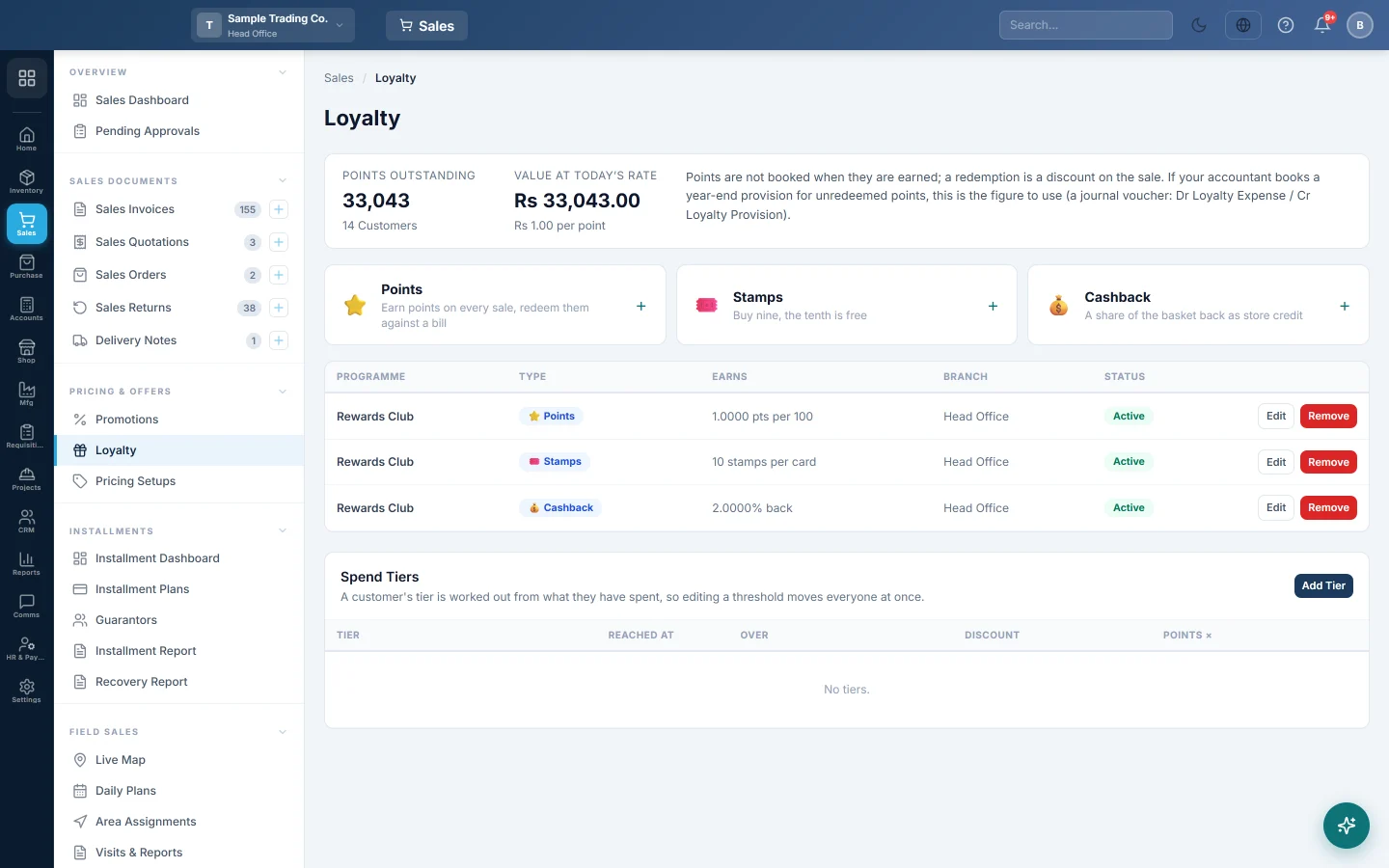
Loyalty rewards customers who come back. Choose points, a stamp card or cashback, and add spend tiers for your best customers. Rewards are earned on till sales to a saved customer.
Before you begin
- Your role needs the manage loyalty permission. See Users & Roles.
- Rewards are earned only on sales to a saved customer, not on walk-in sales. See All Customers.
- Cashback is paid as store credit, so store-credit accounting must be set up.
Where to find it
Open Sales → Pricing & Offers → Loyalty.
Choose a programme
| Programme | How it works |
|---|---|
| Points | The customer earns points on every till sale and spends them against a later bill. |
| Stamps | One stamp per qualifying item bought. The card fills up towards a reward. |
| Cashback | A share of the bill goes back to the customer as store credit. |
Set up points
- Click Points.
- Type a Name and pick a Branch, or leave All branches.
- Set From and To dates if it is a campaign.
- Set Points per 100 spent, for example 1 for one point per Rs. 100.
- Set what One point is worth, for example 1 for Rs. 1. 0 means points cannot be redeemed.
- Set the Minimum to redeem and after how many days Points expire after. 0 means points never expire.
- Leave Active ticked and click Save.
A sale earns points from the one points programme that is active and in its dates at that branch. A branch's own programme comes before an all-branches one.
Redeem points at the till
- Pick the customer on the till.
- Tick Redeem Points. The box shows how many points can be used now.
- Complete the sale.
The discount is the points used times what One point is worth, and never more than the bill. Below the Minimum to redeem, the box cannot be ticked. Expired points are not counted.
Set up a stamp card
- Click Stamps.
- Type a Name, for example Coffee Card.
- Set the Stamps per card.
- Pick the product in Stamp on this product, or a category in …or this category. Leave both blank to stamp every item.
- Click Save.
Set up cashback
- Click Cashback.
- Set the Cashback percentage of the bill.
- Optionally set a Cap per sale and Only above a bill amount.
- Click Save.
Add spend tiers
- Under Spend Tiers, click Add Tier.
- Type a Name, such as Gold, and pick a Colour.
- Set Reached at spend and Over how many months, for example Rs. 100,000 over 12 months.
- Set the Points multiplier, for example 2 for double points.
- Click Save Tier.
A customer's tier is worked out from their confirmed sales in that window. Changing a threshold moves everyone at once.
Change or remove a programme
Click Edit on a programme to change it, or untick Active to pause it. Remove deletes the programme; stamp cards and history already earned are kept.
What happens in the books
- Points are not booked when they are earned. Redeeming them is a discount on the sale.
- Cashback is real money owed to the customer. It is booked as store credit, the same way as a gift card.
The Points outstanding panel shows the points not yet redeemed and their value at today's rate. If your accountant books a year-end provision for them, post a Journal Voucher (JV): debit Loyalty Expense and credit Loyalty Provision.
Good to know
- Points, stamps and cashback are earned at the till only, not on sale invoices.
- The offline till does not show Redeem Points. Redeem at an online till.
- A tier's Discount is saved for later. It is not given at the till yet.
- Redeeming a full stamp card is not available yet. The Reward setting is saved for later.
- Expired points stay in the customer's balance and in Points outstanding. Removing them from the balance automatically is not available yet.
Common questions
A customer did not earn points. The sale was to a walk-in customer, or no active points programme runs at that branch today. Pick the customer on the till before you complete the sale.
Why can't the customer redeem points? One point is worth may be 0, or the customer has fewer usable points than the Minimum to redeem. Points older than Points expire after cannot be used.
Can I run points and cashback together? Yes. Each programme earns on its own.
What happens to a stamp card if I raise the stamps needed? Cards already started keep the number they started with.
Gracias. Si todavía necesita ayuda, escriba a info@eloerp.net.