FBR POS Integration
Pakistan only: see which sale invoices and returns have reached FBR Digital Invoicing, push the ones that have not, and read the reply when FBR rejects one.
For businesses in Pakistan connected to FBR Digital Invoicing. This page lists your sale invoices and returns with their FBR status, so you can push any that did not reach FBR and see why a push failed.
Before you begin
- Your service provider has switched FBR on for your company. Until then this menu item is hidden.
- FBR is set up and tested under FBR Digital Invoicing: tokens, seller details and passed scenarios. The badge next to the title shows SANDBOX or PRODUCTION.
- Invoices go to FBR automatically when they are confirmed with FBR ticked under FISCAL PUSH. This page is for the ones that did not.
Where to find it
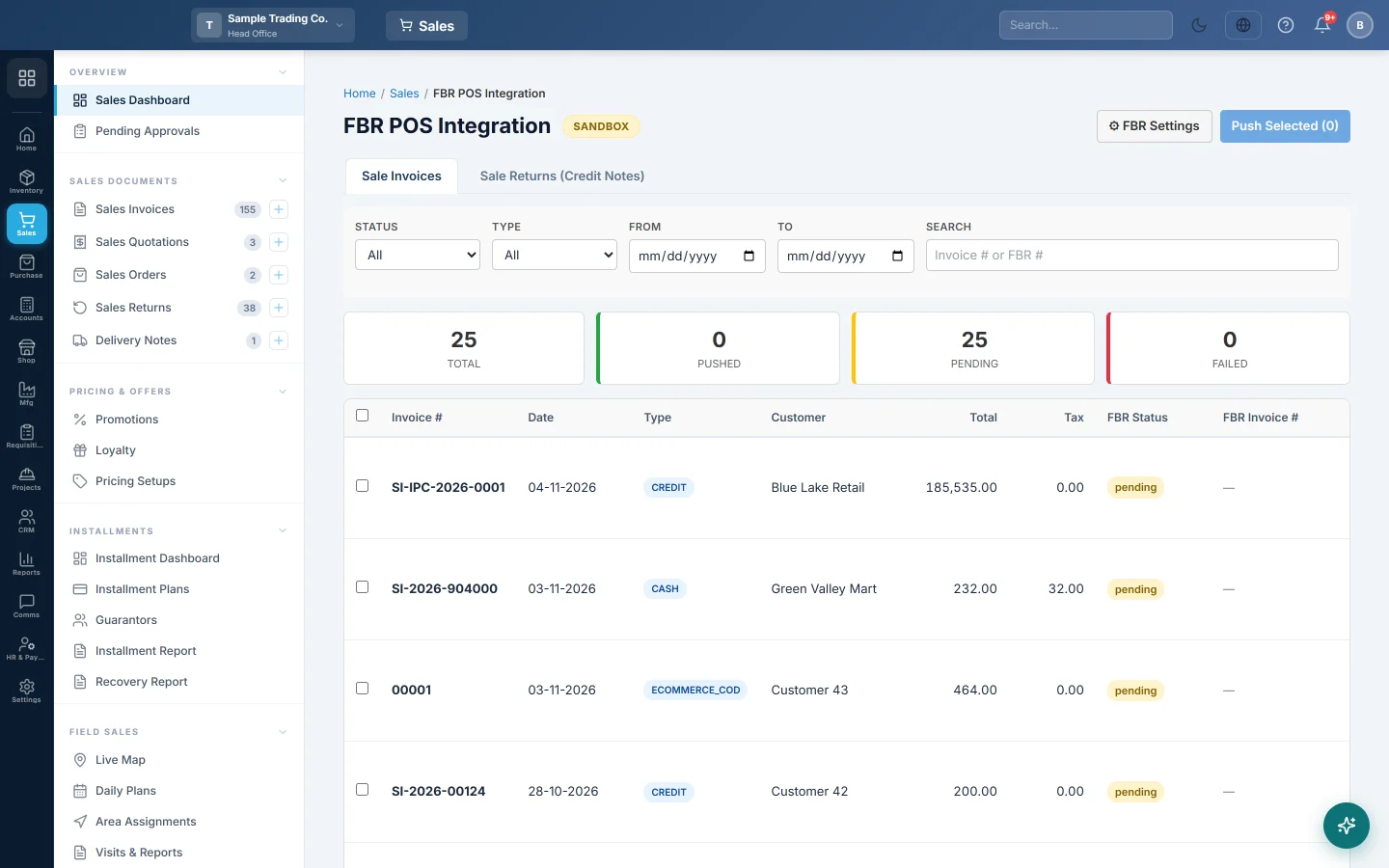
Open Sales → Sales Documents → FBR POS Integration. ⚙ FBR Settings at the top opens the setup page.
Find invoices that did not reach FBR
- Stay on the Sale Invoices tab.
- In Status, pick Failed, or Pending for invoices not sent yet.
- Narrow it with Type, From and To, or type an invoice number or FBR number in Search.
The tiles above the list count Total, Pushed, Pending and Failed for the rows shown. A failed row shows FBR's error under its FBR Status; hover over it to read all of it.
Push an invoice
- Check that the invoice is confirmed and its details are right.
- Click Preview to see the exact data that will be sent.
- Click Push. A message shows the FBR Invoice #, or FBR's reason for rejecting it.
To push several at once, tick them and click Push Selected ({n}). A summary shows how many were pushed and how many failed.
A pushed invoice shows its FBR Invoice # and a Print button that prints it with the FBR QR code. Re-push sends it again; when nothing has changed, FBR's number stays the same.
Post credit notes for returns
- Open the Sale Returns (Credit Notes) tab. It lists returns whose original invoice reached FBR.
- Click Push on a return to post its credit note. The FBR Credit Note # appears when FBR accepts it.
FBR accepts credit notes only when the buyer on the original invoice is registered. Returns on walk-in or unregistered sales cannot be credited on FBR.
Read the history of a push
Click Logs on a row to see every attempt, with what was sent and what FBR replied. Click Close to go back.
Common questions
FBR rejected an invoice. What now? Read the error under FBR Status or in Logs. Most rejections are about a missing NTN or CNIC, an HS code or unit of measure on a product, or a scenario not passed. Fix the master data, then click Push again.
Does this page change my books? No. Pushing only reports the invoice to FBR. The sale was posted when the invoice was confirmed.
Can I cancel an invoice that is on FBR? EloERP refuses to cancel a fiscalised invoice, because FBR would still hold it. Make a sales return and post its credit note instead.
Can I push from the invoice itself? Yes. Open the confirmed invoice and click Push to FBR. See Sales Invoices.
Where is the monthly picture? See the FBR Submission Report and FBR Reconciliation.
Vielen Dank. Wenn Sie weitere Hilfe brauchen, schreiben Sie an info@eloerp.net.