Serial / IMEI Stock
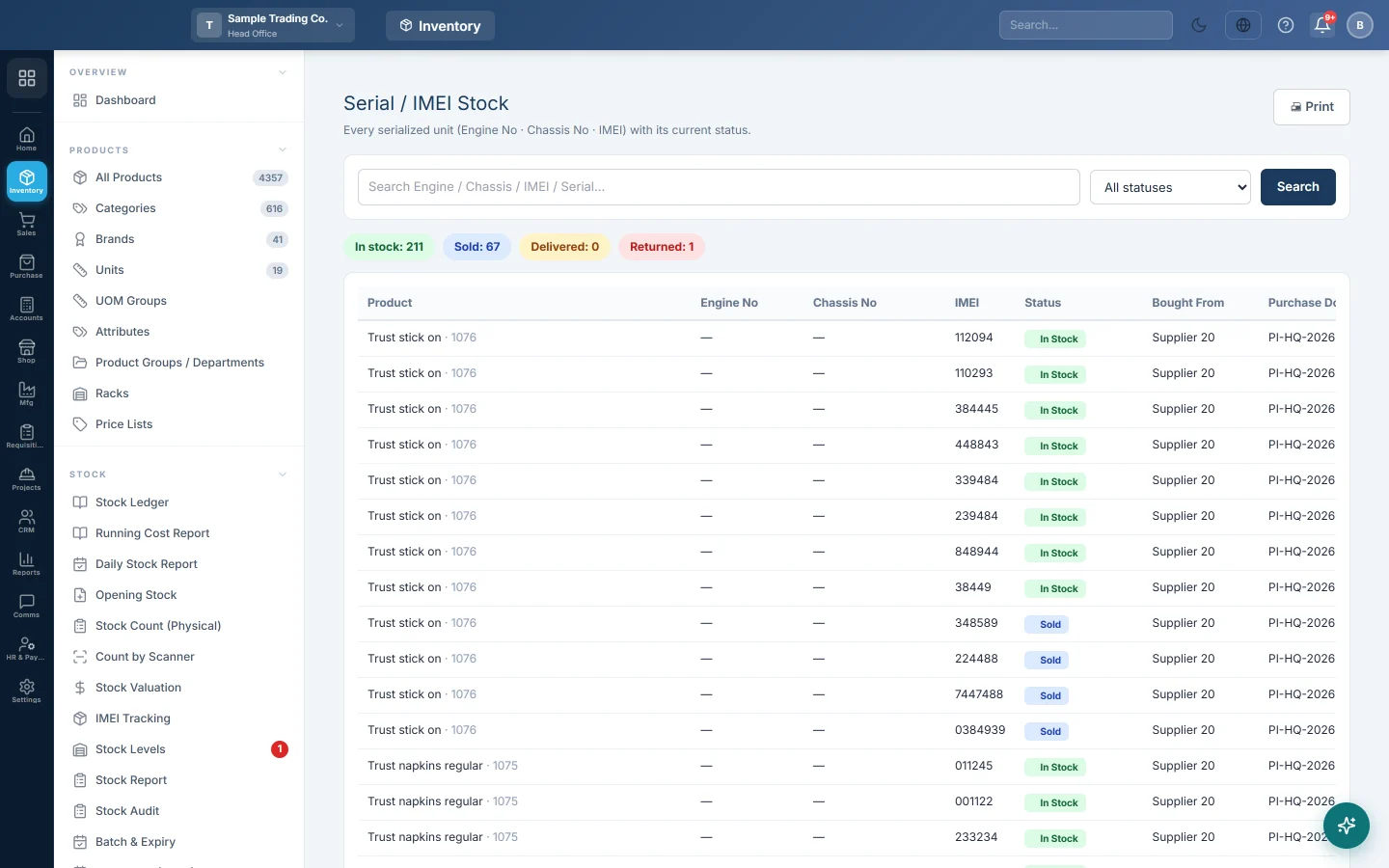
Every serialised unit, by engine number, chassis number, IMEI or serial number, with its status, supplier, customer and documents.
Serial / IMEI Stock lists every unit you track one by one: phones by IMEI, vehicles by engine and chassis number, appliances by serial number. Each line shows whether the unit is in stock or sold, who supplied it and who bought it.
Before you begin
- On each product you track by unit, tick Track Engine No, Track Chassis No or Enable IMEI on the product form. See All Products.
- Enable IMEI only appears when IMEI Number System is on under Settings → Configuration → Features & Add-ons. See Features & Add-ons.
- Units come in on a purchase invoice or GRN: click ⛓ Serials on the line and enter one identifier per unit received.
Where to find it
Open Inventory → Stock → Serial / IMEI Stock.
Read the list
| Column | What it shows |
|---|---|
| Product | The product name and SKU. |
| Engine No, Chassis No | The vehicle identifiers, if tracked. |
| IMEI | The IMEI, or the serial number when there is no IMEI. |
| Status | in stock, sold, delivered or returned supplier. |
| Bought From, Purchase Doc | The supplier, and the purchase document number and date. |
| Sold To, Sale Doc | The customer, and the sale document number and date. |
The chips above the list count units In stock, Sold, Delivered and Returned (to the supplier).
Find a unit
- Type all or part of an engine, chassis, IMEI or serial number in the search box.
- Press Enter or click Search.
- To see one status only, choose it in the status list: In stock, Sold, Delivered or Returned to supplier.
- Click Print to print the list on screen.
What happens in stock
- A purchase or GRN puts each unit in stock.
- A sale marks the unit sold; a delivery note marks it delivered. The customer and document are recorded on the unit.
- A sale return puts the unit back in stock.
- A purchase return marks it returned supplier.
Common questions
A unit I bought is missing. Check that the serials were entered with ⛓ Serials on the purchase line, and that the purchase is saved. Lines without serials add quantity but no units.
Can one IMEI be entered twice? No. A unit that is already in stock, sold or delivered for the same product cannot be received again.
How do I find the customer's phone and CNIC for a unit? Use Serial Trace (Police), which adds supplier and customer contact details.
How many units does the list show? The latest 2,000 units that match your search. Search by number to find older ones.
谢谢。 如果仍需帮助,请发邮件至 info@eloerp.net。