How payroll works in EloERP
Payroll lives in the HR & Payroll module, and every salary, deduction and payment it produces is posted automatically to Accounts. You never type a salary journal by hand.
A payroll run moves through three statuses: Draft while you review and adjust, Processed once finalized (and posted to accounts), and Paid when every employee has received their net salary.
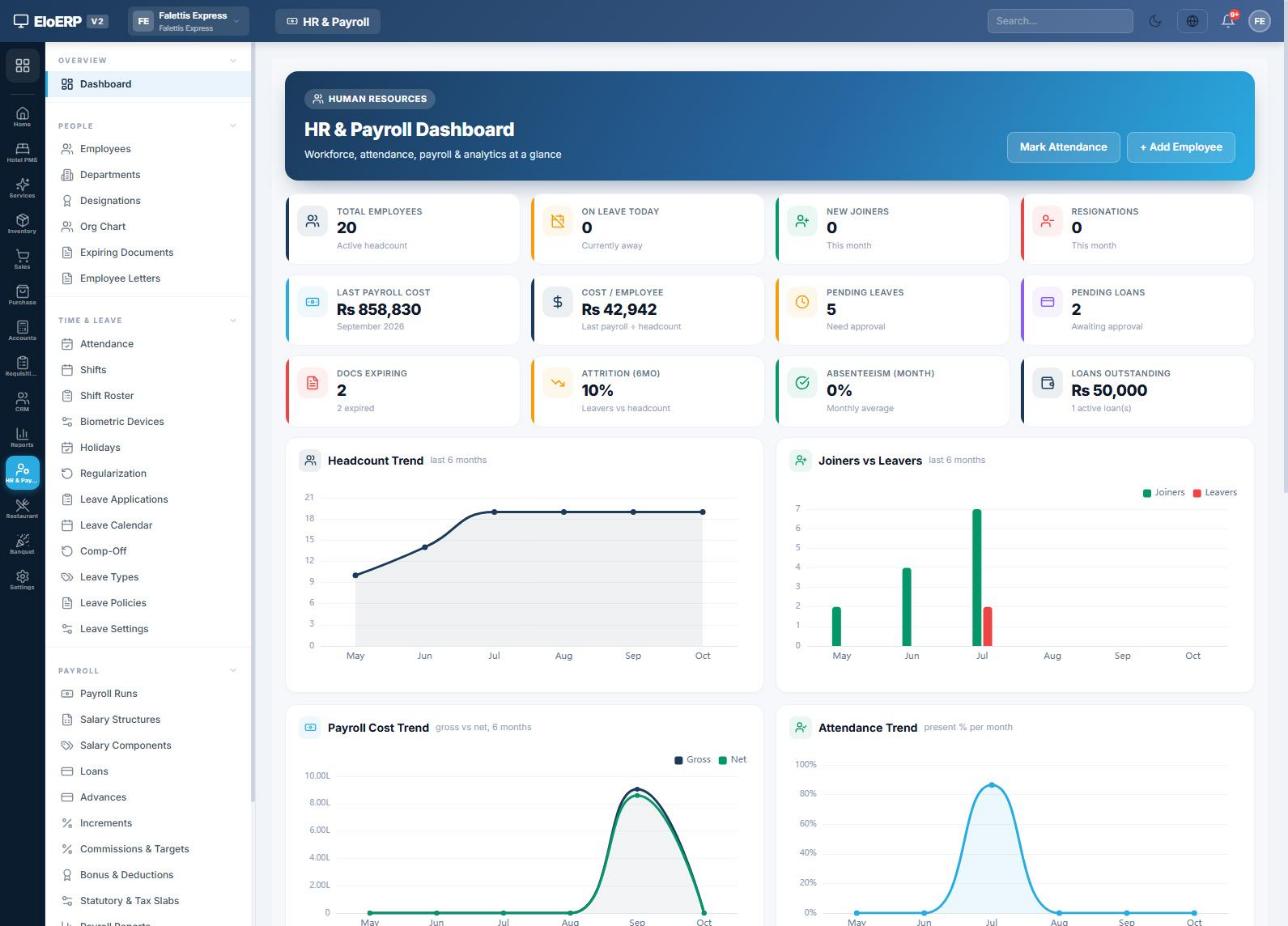
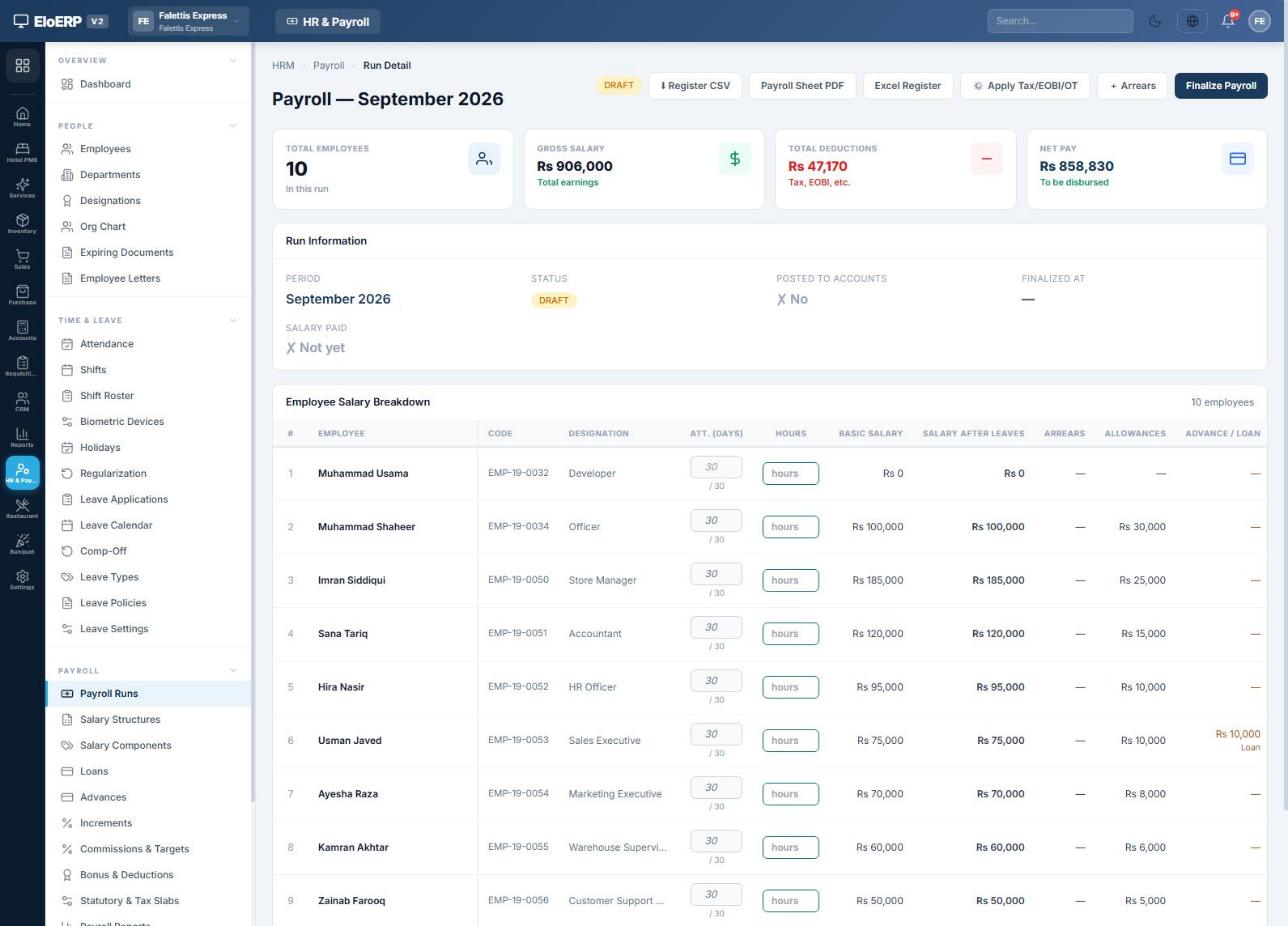
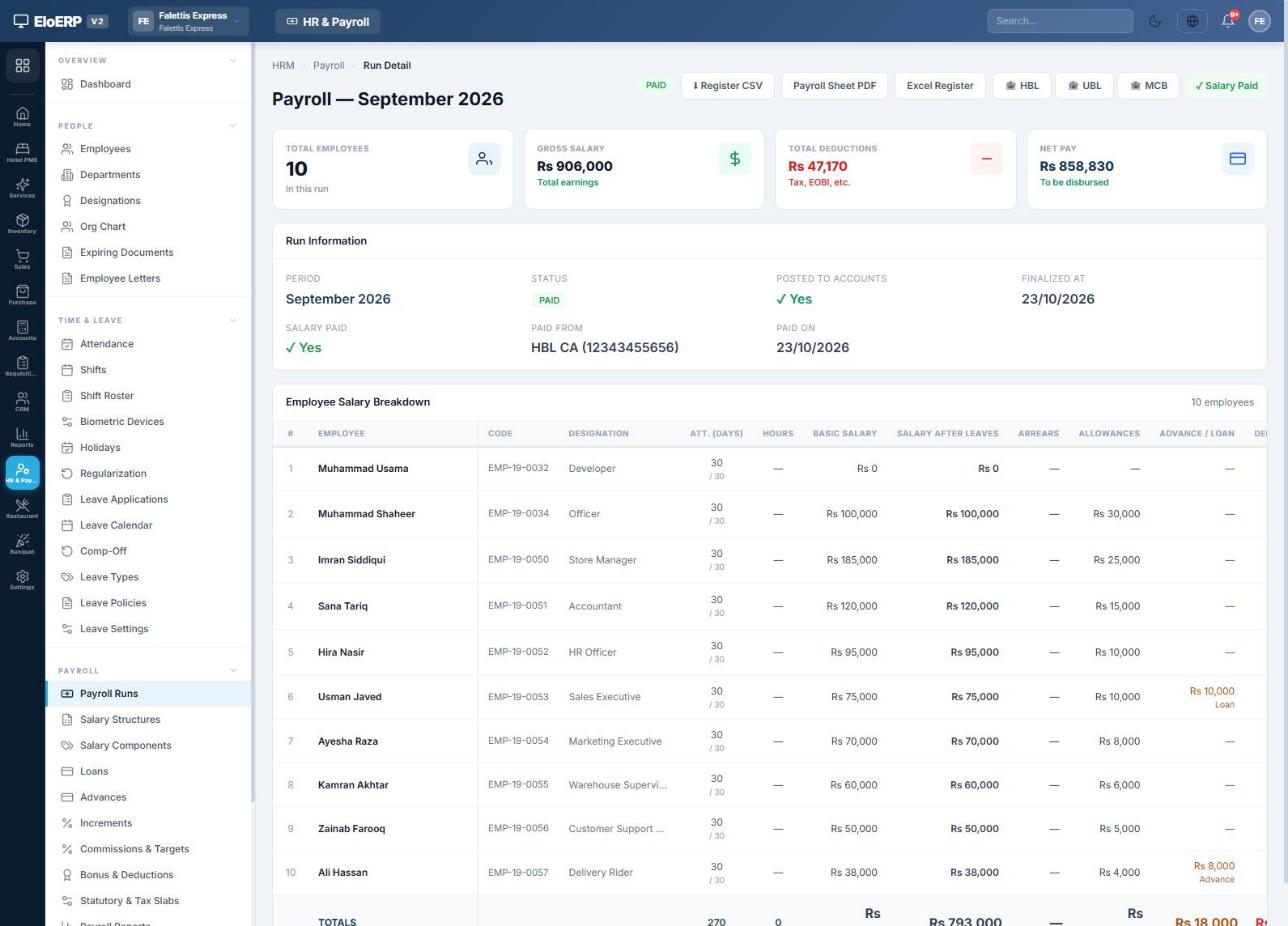
All screenshots come from a demo company with eight staff and a September 2026 payroll: gross salaries of Rs 906,000, total deductions of Rs 47,170 and net pay of Rs 858,830. Your screens will look the same with your own data.
One-time setup
Before the first payroll, open HR & Payroll → Payroll → Statutory & Tax Slabs. These settings decide how every salary is calculated, so review them once and save.
Working week and how people get paid
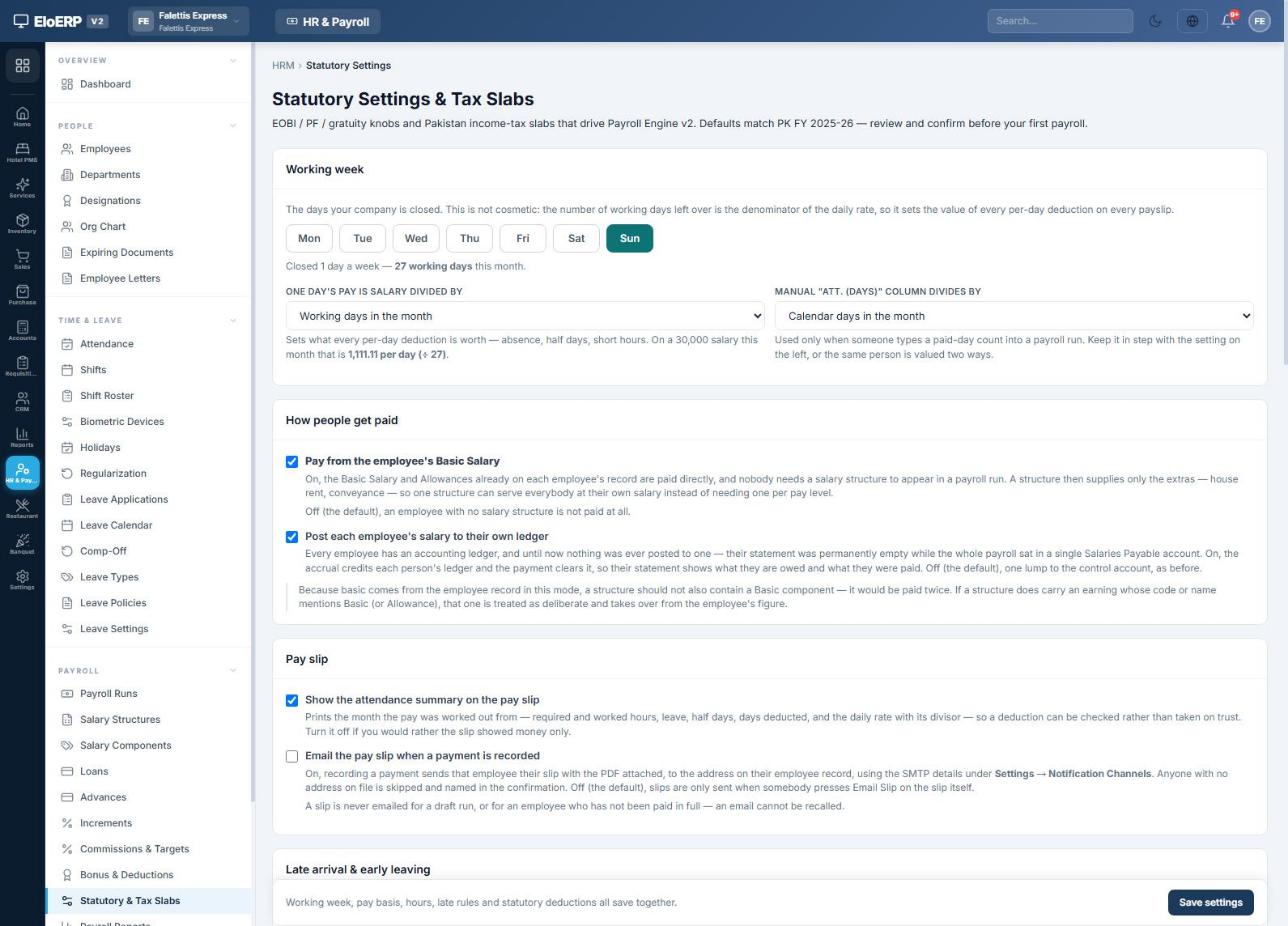
- Working week: click the days your company is closed (here, Sunday). The remaining working days are what a day's pay is divided by, so this sets the value of every absence deduction.
- One day's pay is salary divided by: working days in the month (recommended), calendar days, a fixed 30 or a fixed 26.
- Pay from the employee's Basic Salary: tick this to pay each person the Basic Salary and Allowances typed on their employee record. Leave it off if every employee is paid through a salary structure.
- Post each employee's salary to their own ledger: tick this to give every employee a complete account statement in Accounts, with what they are owed and what they were paid. Chapter 11 shows the result.
- Pay slip: show the attendance summary on the slip, and optionally email the slip automatically when a payment is recorded.
Salary components
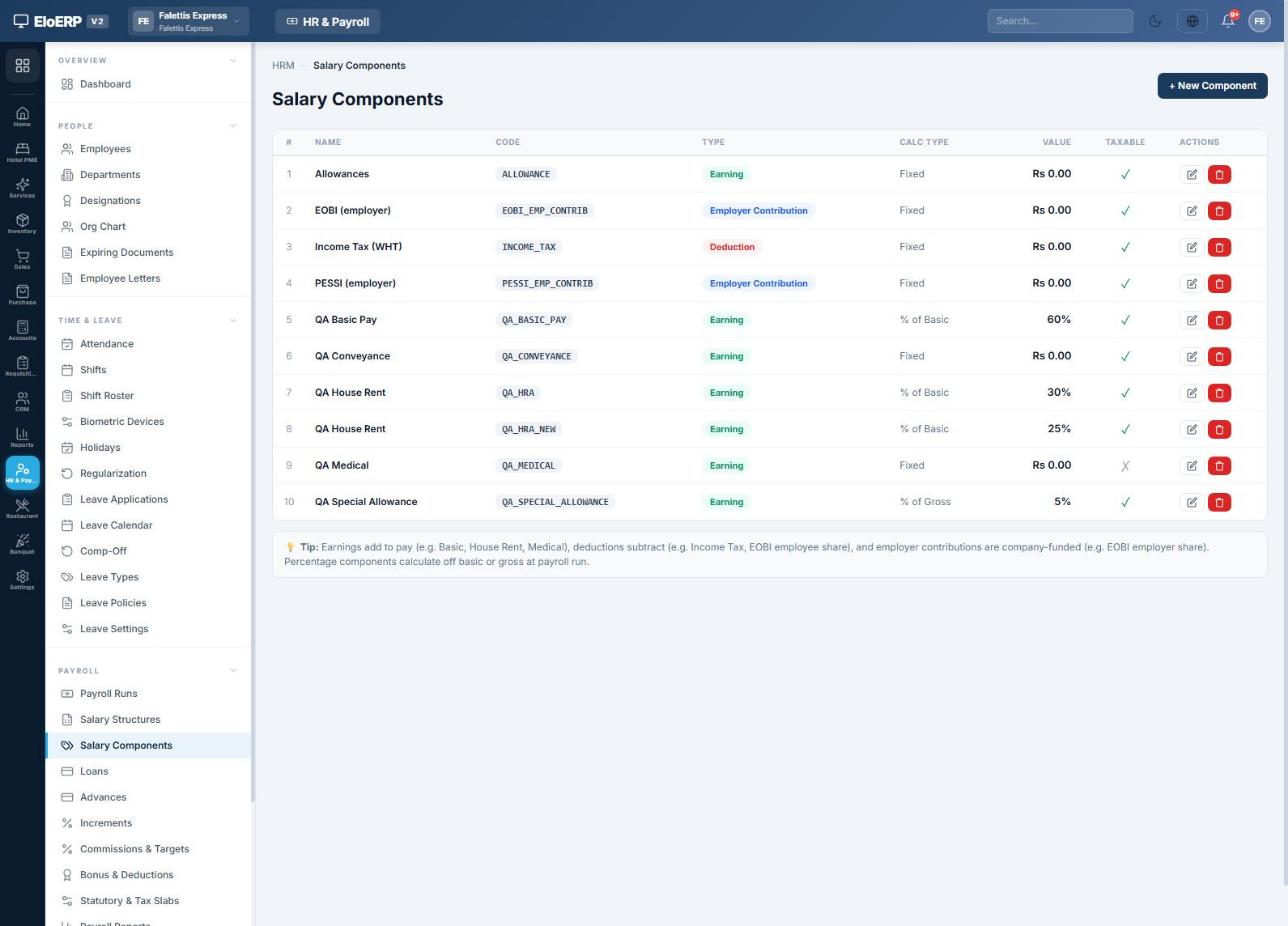
Open Payroll → Salary Components for the building blocks of pay: earnings (Basic, House Rent, Allowances), deductions (Income Tax, EOBI employee share) and employer contributions (EOBI and PESSI employer share). Each component is a fixed amount, a percentage of basic or a percentage of gross. Tick Taxable on every earning that counts towards income tax.
Shifts, leave types and holidays
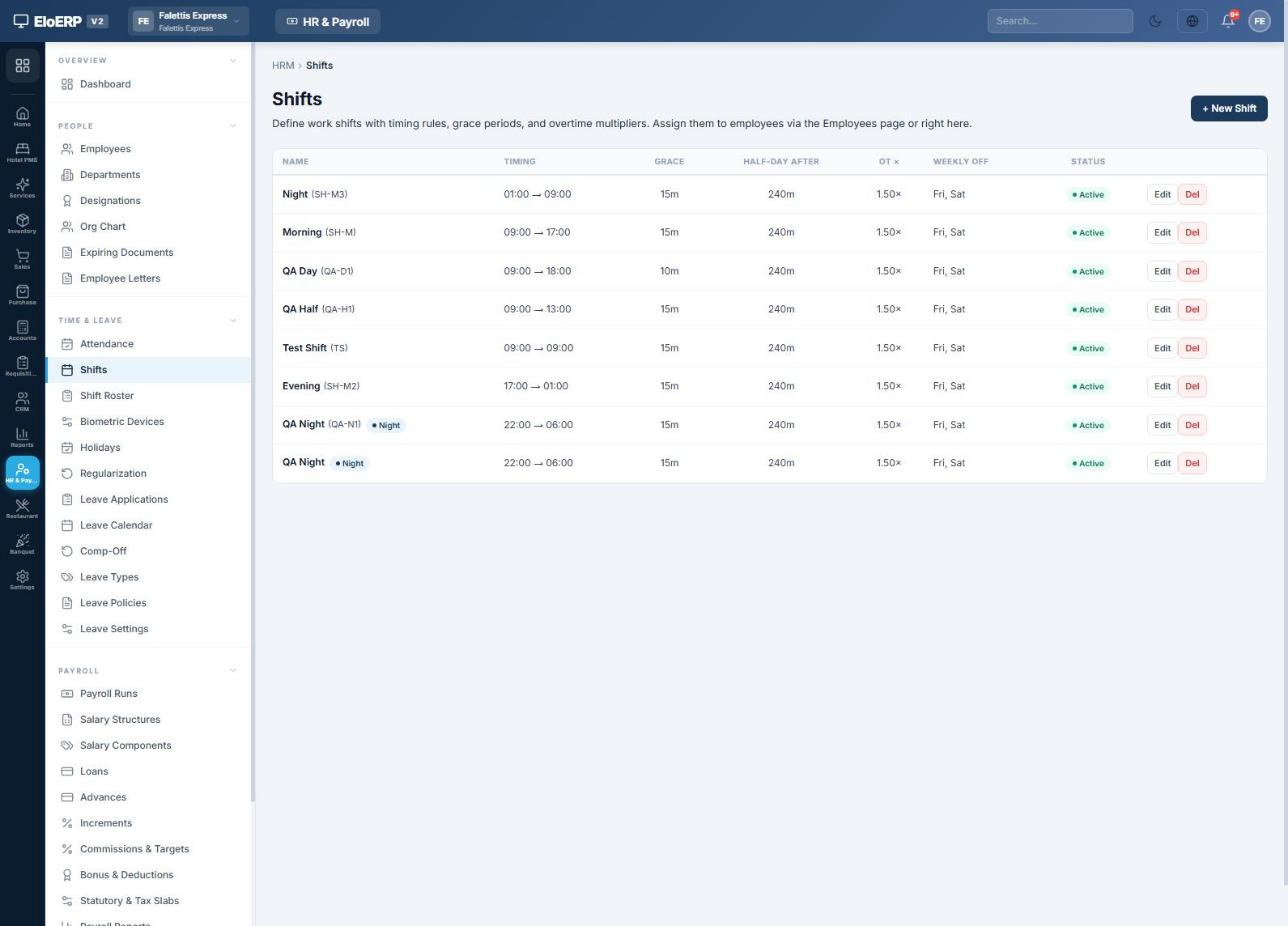
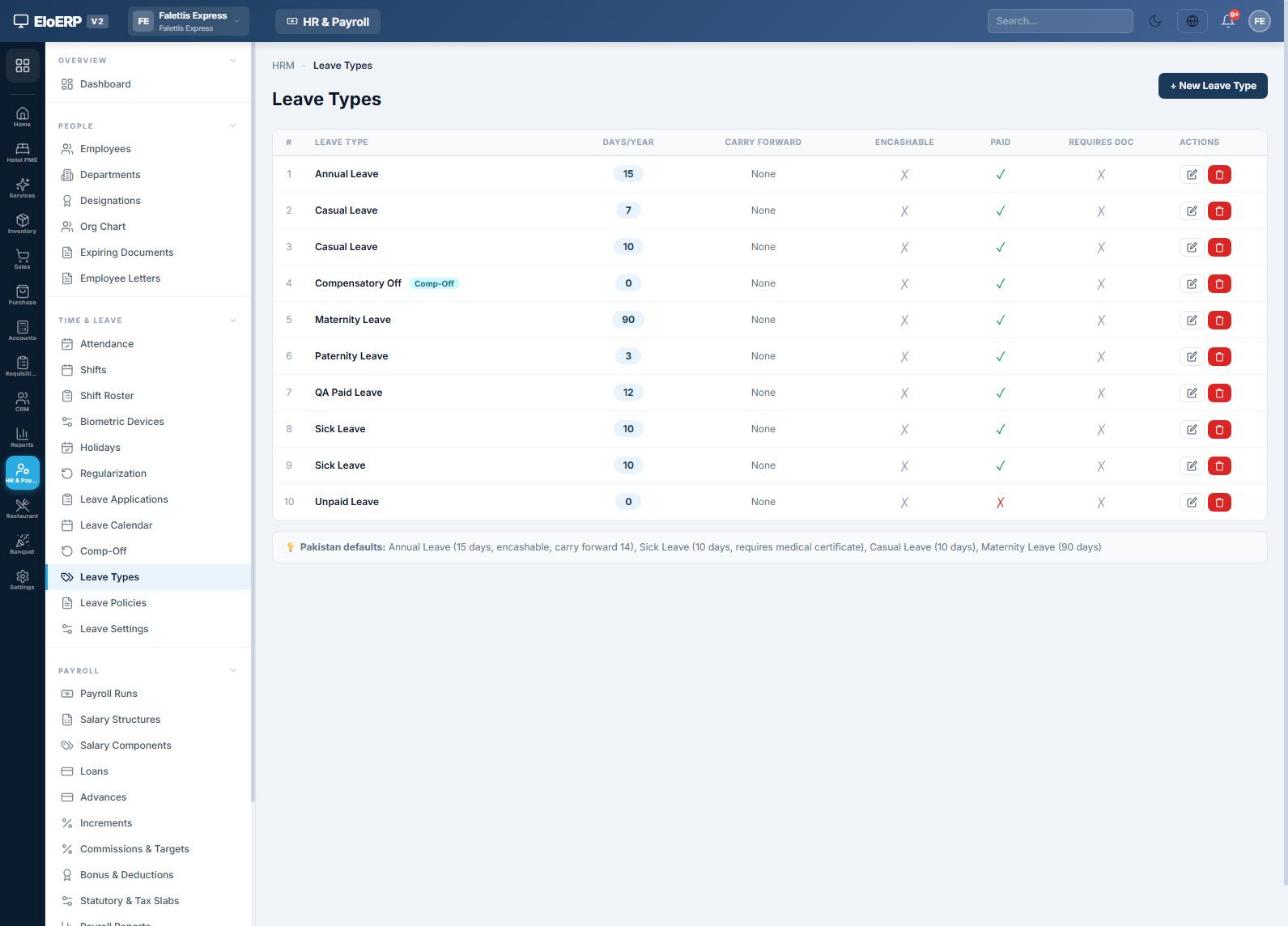
Add public holidays under Time & Leave → Holidays (the Seed PK Holidays button loads the national list). Holidays marked for all employees are not counted as working days.
Income tax and statutory deductions
EloERP withholds income tax, EOBI and provincial social security automatically when you press Apply Tax/EOBI/OT on a payroll run. The rates come from the same settings page.
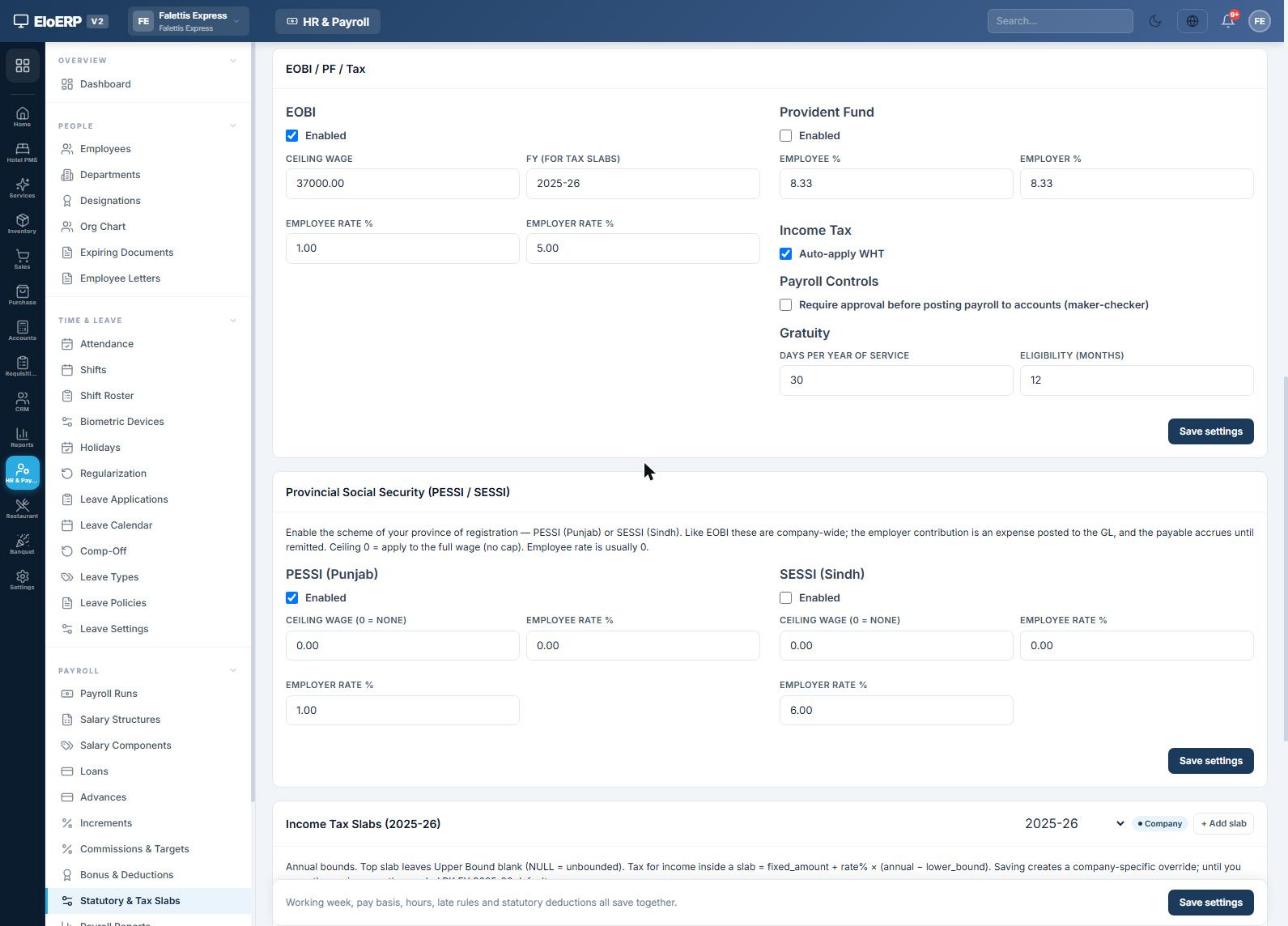
| Item | What it does | Example setting |
|---|---|---|
| EOBI | Employee share is deducted from salary; employer share is a company expense. Both are worked out on gross pay, capped at the ceiling wage. | Ceiling Rs 37,000 · employee 1% · employer 5% |
| PESSI / SESSI | Punjab or Sindh social security. Usually employer-only, on full wages unless a ceiling is set. | PESSI employer 1% |
| Income tax (WHT) | Tick Auto-apply WHT. Tax is calculated from the slabs below on taxable earnings. | FY 2025-26 slabs |
| Provident Fund | Optional employee and employer percentages of gross. | Off in the example |
| Maker-checker | Requires a second person to approve a finalized run before it can be posted. | Optional |
| Gratuity | Days per year of service; used for final settlement. | 30 days after 12 months |
Income tax slabs
Choose the tax year, enter the annual slabs from the current Finance Act, and press Save slabs (override). Leave the upper bound of the top slab blank.
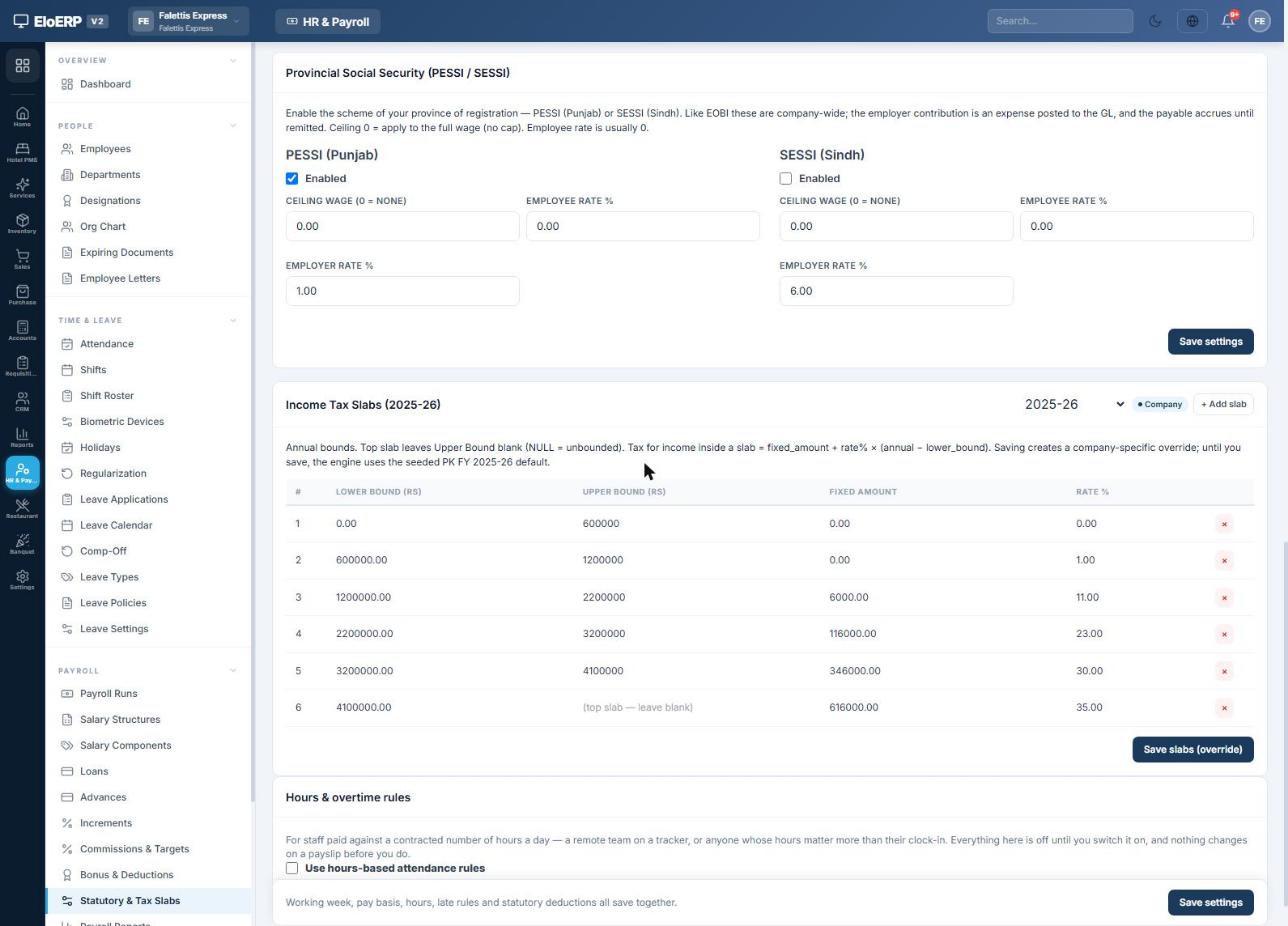
How the monthly tax is worked out
EloERP annualises the month's taxable pay, applies the slab, and divides the annual tax by 12. Example: the Store Manager earns Basic Rs 185,000 + Allowances Rs 25,000.
Each July, add the new tax year's slabs and change FY (for tax slabs) in the EOBI card to that year. Tax is recalculated every time you apply the engine on a draft run.
Employees
HR & Payroll → People → Employees lists everyone, with search, department and status filters, export and import.
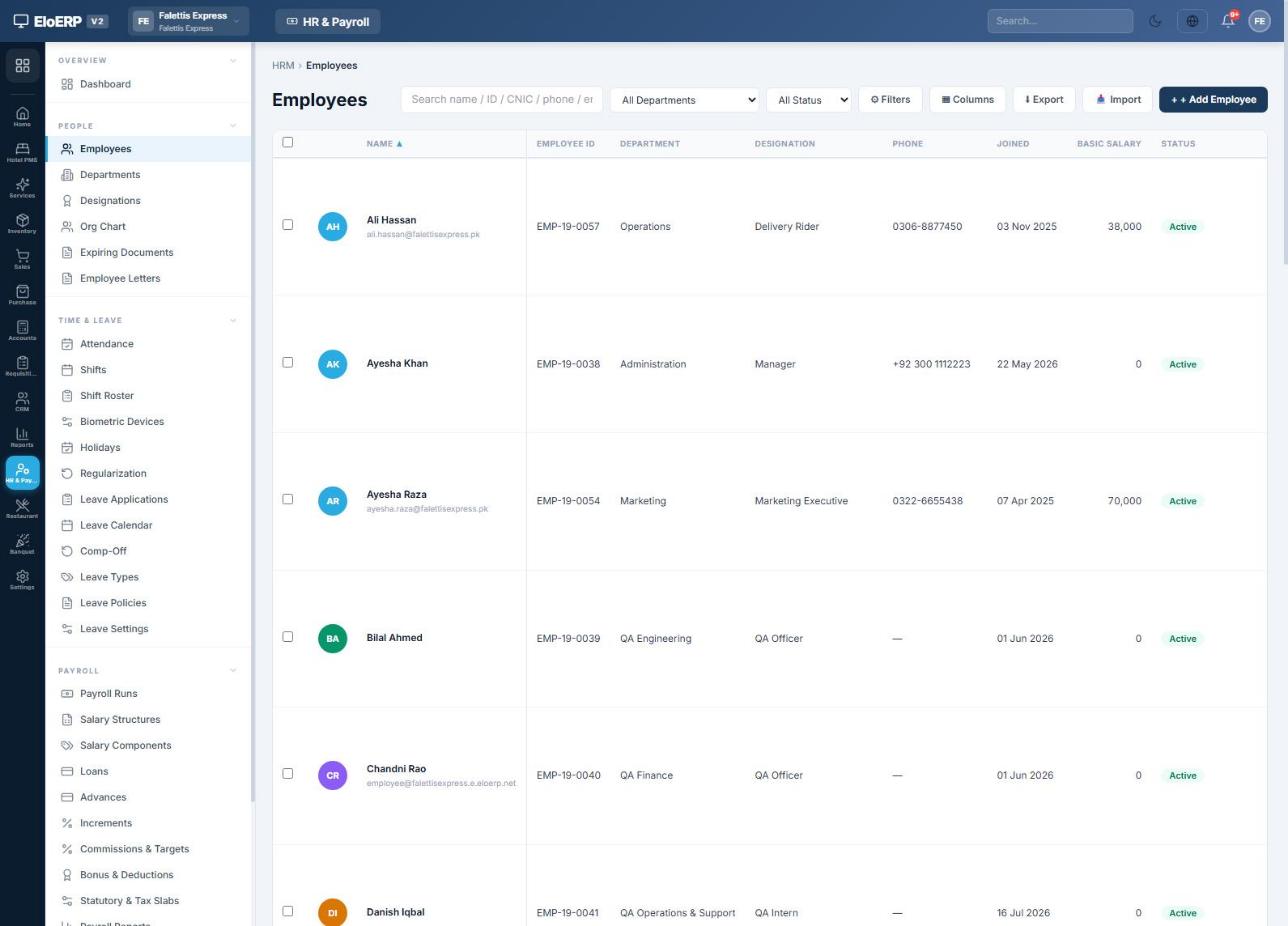
Adding an employee
- Personal: name, CNIC, gender and contact details. Under Statutory IDs (Pakistan) enter the NTN and EOBI registration number; they appear on tax certificates and EOBI reports.
- Employment: department, designation, branch, joining date and status. Under Salary enter the Basic Salary and Allowances, and choose whether overtime is allowed.
- Emergency & Bank: bank name, account number and IBAN. These print on the bank transfer files and the payslip.
- Ledger & Opening Balance (bottom of the Employment tab): keep Create GL ledger for this employee ticked. EloERP creates the employee's own account, numbered
EMP-00050and so on. Enter an opening balance only if the employee already owes the company money (Debit) or is owed money (Credit) from before EloERP. - Press Save Employee.
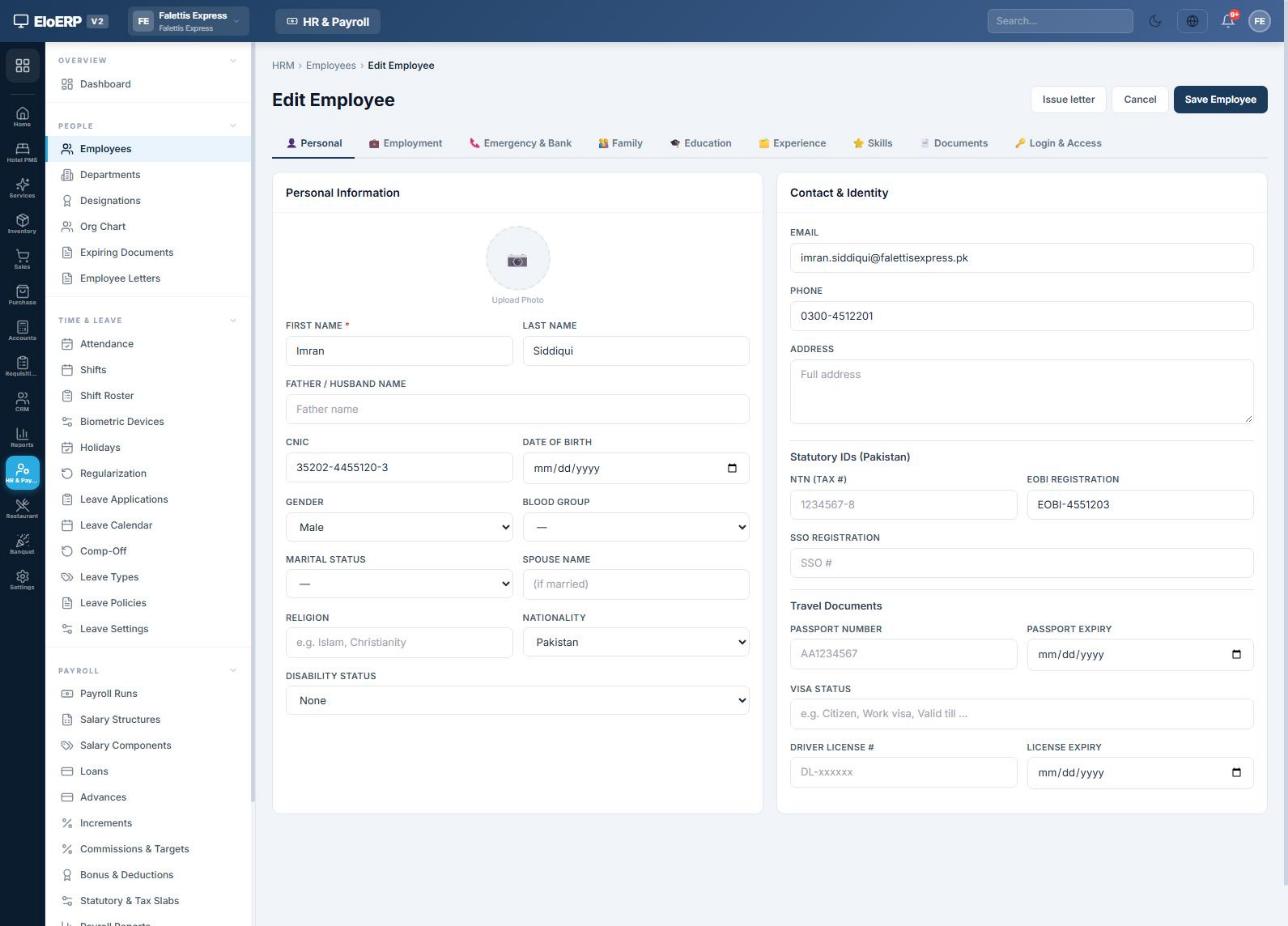
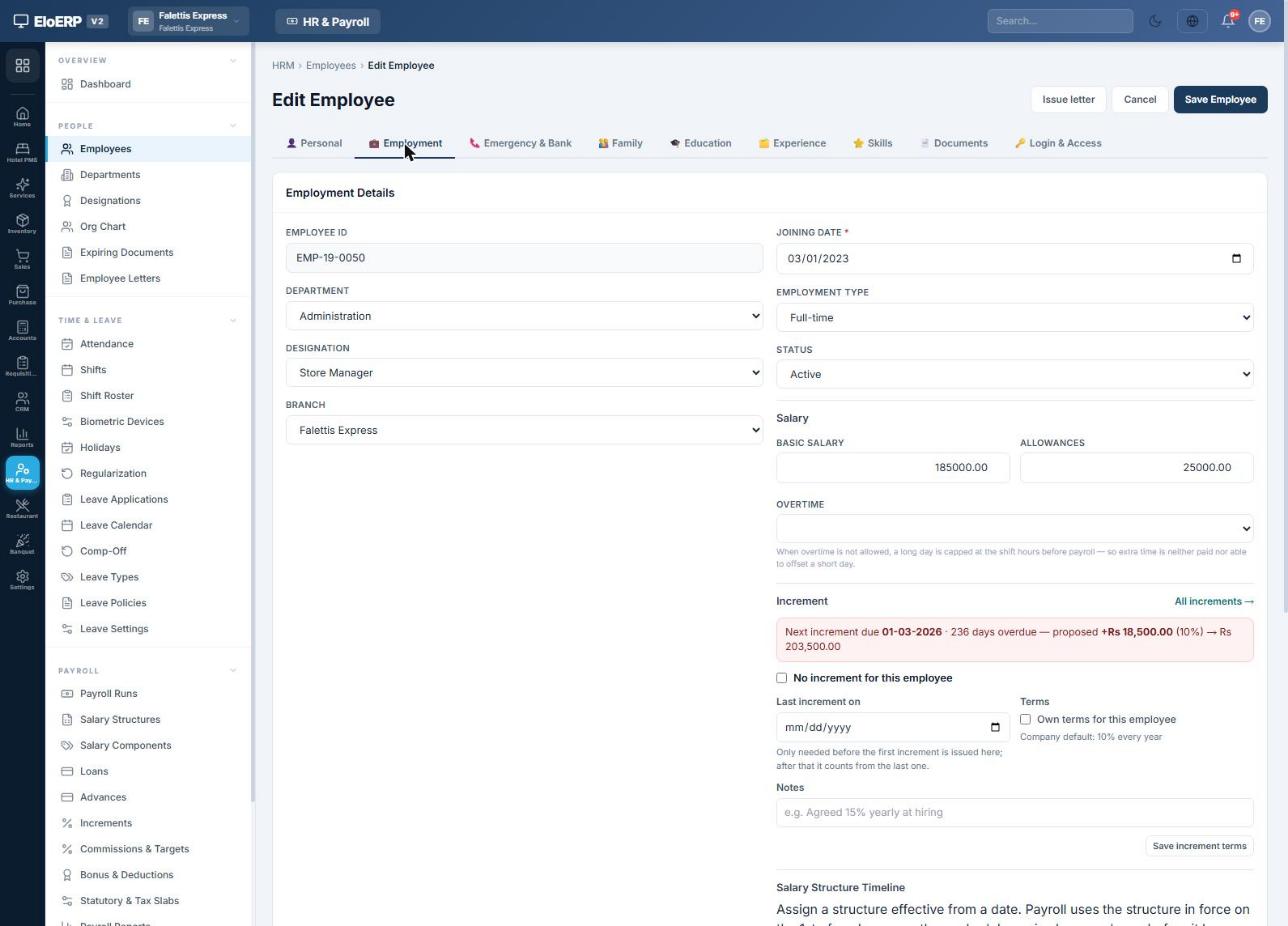
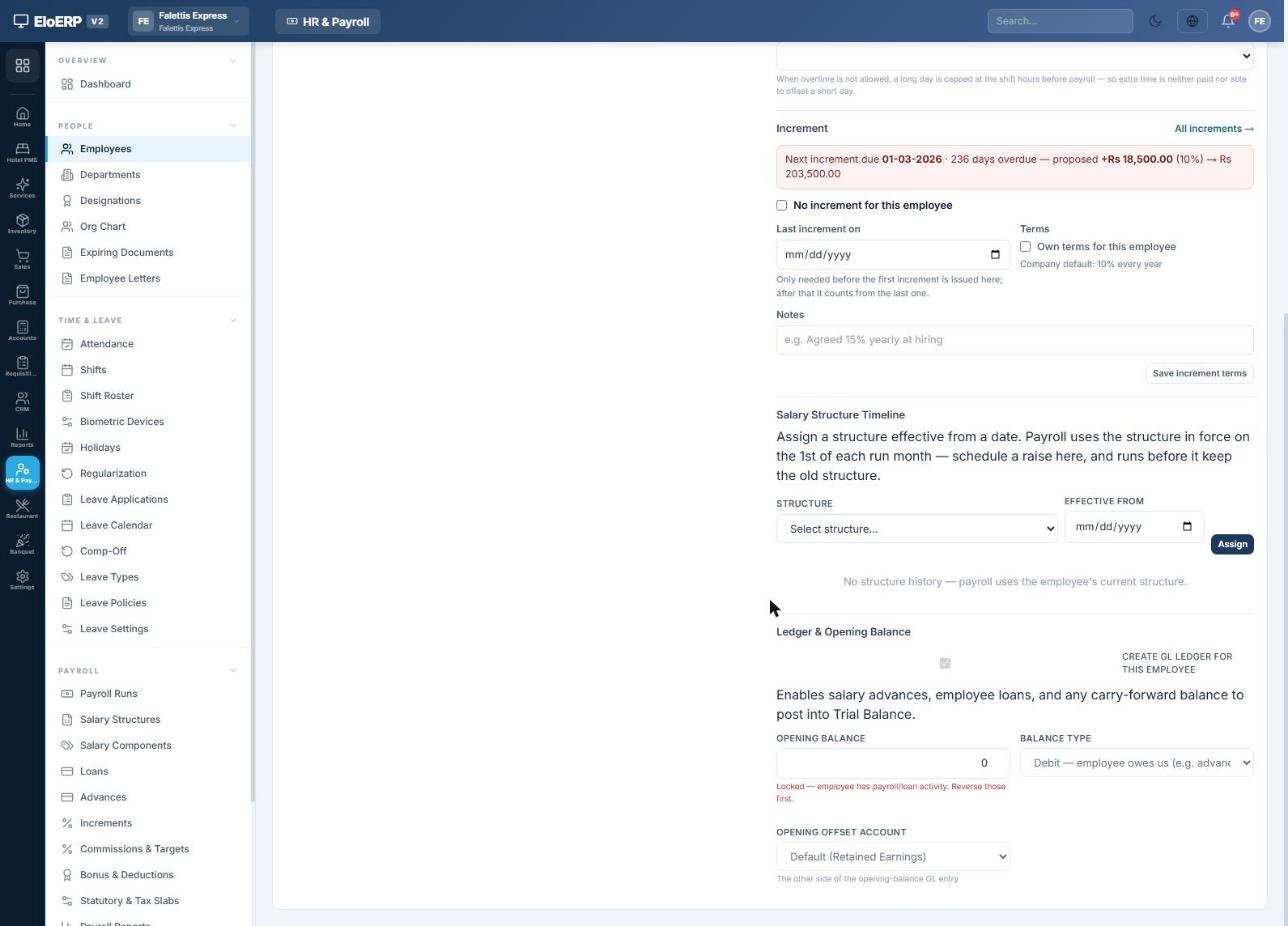
Other People pages: Departments, Designations, Org Chart, Expiring Documents and Employee Letters (appointment, experience and bank letters on your letterhead). Annual raises are managed under Payroll → Increments, which lists who is due and prints increment letters.
Attendance and leave
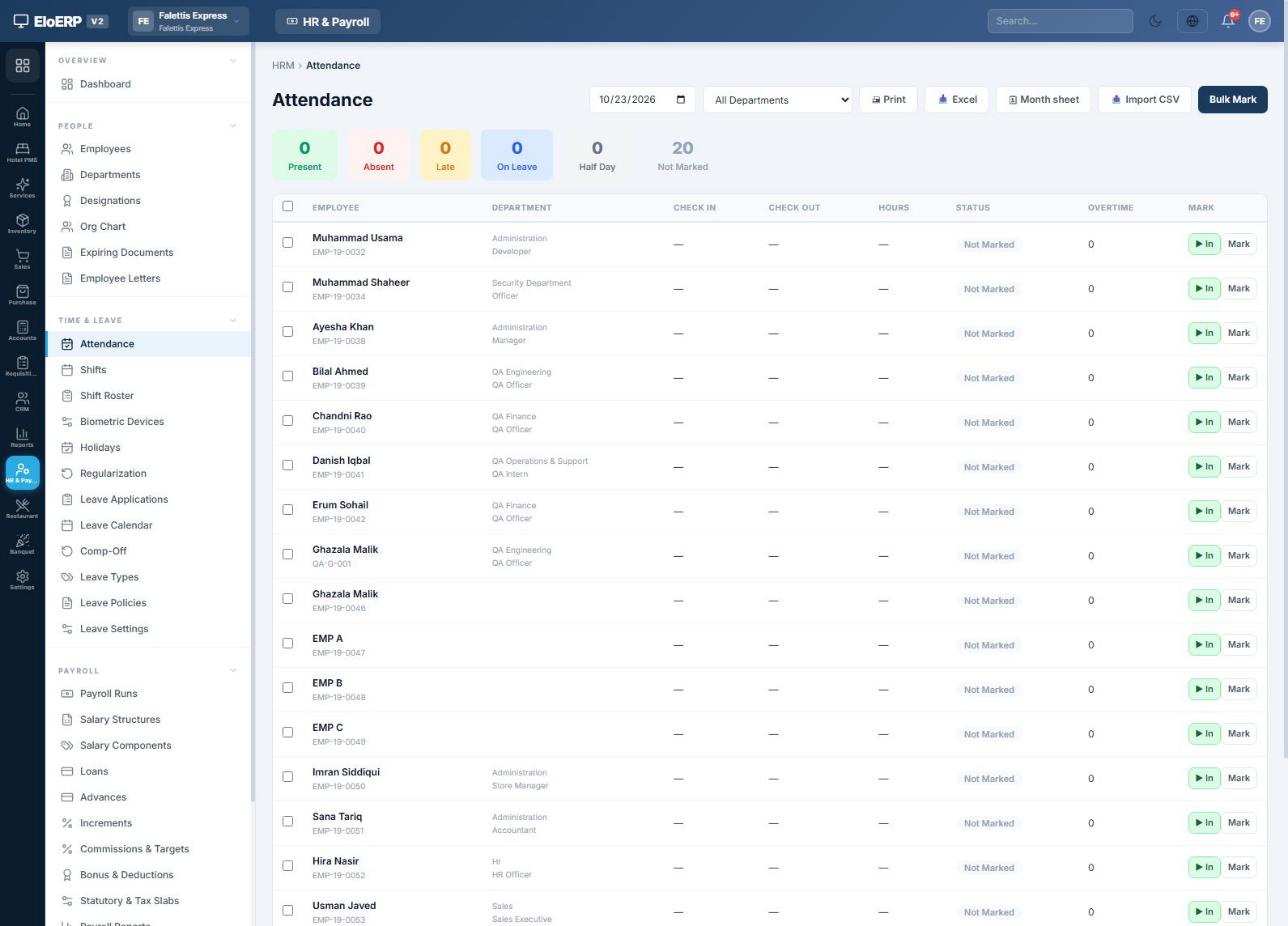
Attendance drives deductions and overtime. Mark it daily, import it, or sync it from a biometric device.
| What happens | Effect on pay |
|---|---|
| Absent on a working day | One day's pay deducted. A day's pay = monthly gross ÷ working days (Rs 210,000 ÷ 26 = Rs 8,076.92 in September 2026). |
| Half day | Half a day's pay deducted. |
| Approved paid leave | No deduction; the day shows as On Leave. |
| Approved unpaid leave | Deducted like an absence (leave types not ticked Paid). |
| Late arrival / early leaving | Optional fines, with grace minutes and free occurrences per month (Statutory settings). |
| Overtime | Paid only if switched on: either time clocked out after the shift, or hours above the contracted day, at the multiplier you set. |
| Joined or left mid-month | Salary prorated automatically. |
Missed punches are fixed through Regularization: the employee or HR raises a request, and approving it rewrites that day. Leave requests are entered under Leave Applications and approved there; balances follow your Leave Policies.
Loans and advances
Both are paid out from cash or bank and recovered automatically from salary, and both post to the employee's ledger.
Employee loans
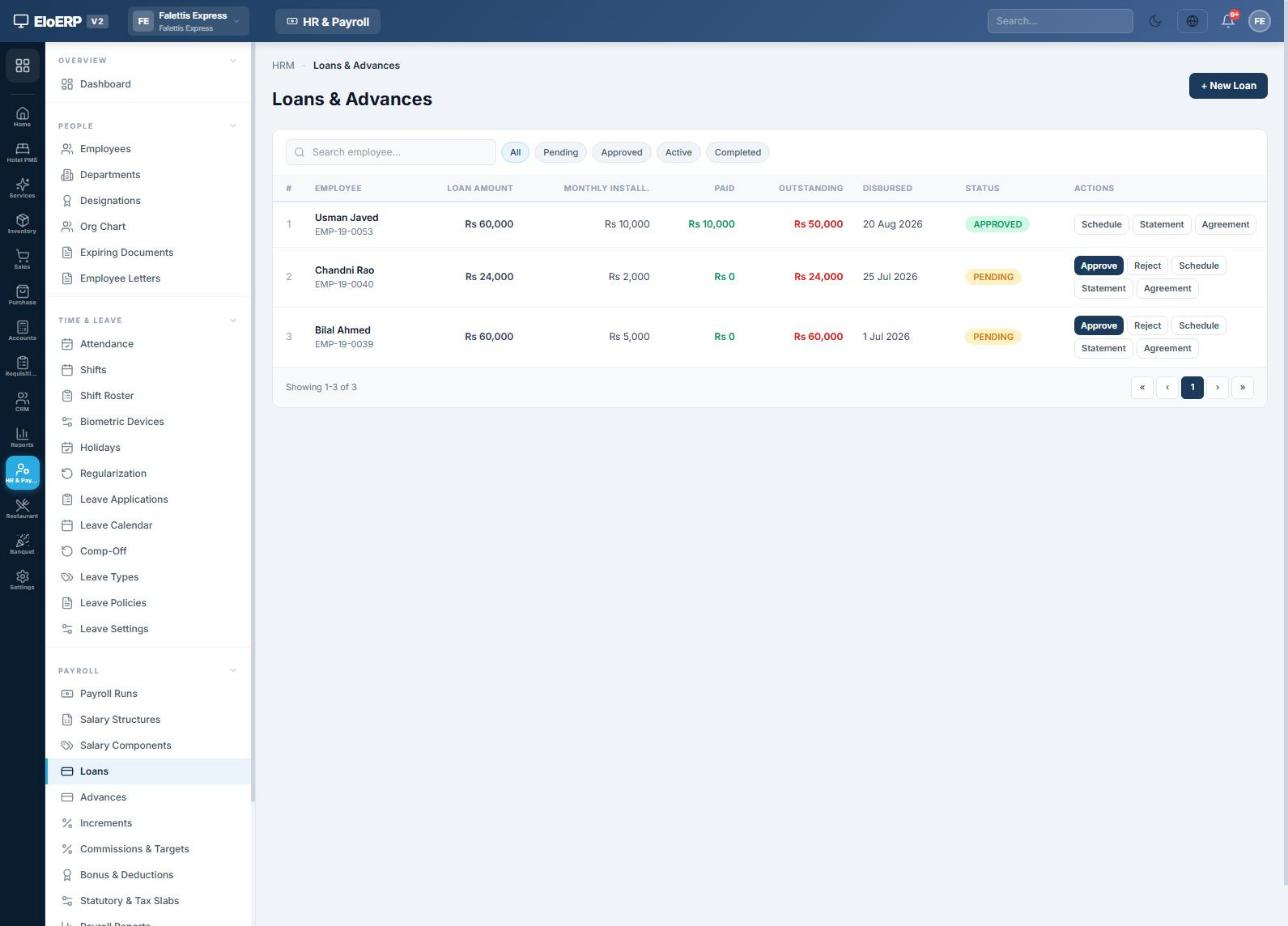
- Open Payroll → Loans and press + New Loan. Enter the employee, amount, number of monthly instalments, start date and purpose.
- Press Approve, choose Paid from (bank or cash) and the date, then Approve & post. EloERP posts voucher
LOAN-DISB-…and builds the instalment schedule. - Every payroll run deducts that month's instalment until the loan is cleared. Statement and Agreement print the loan statement and a loan agreement.
Salary advances
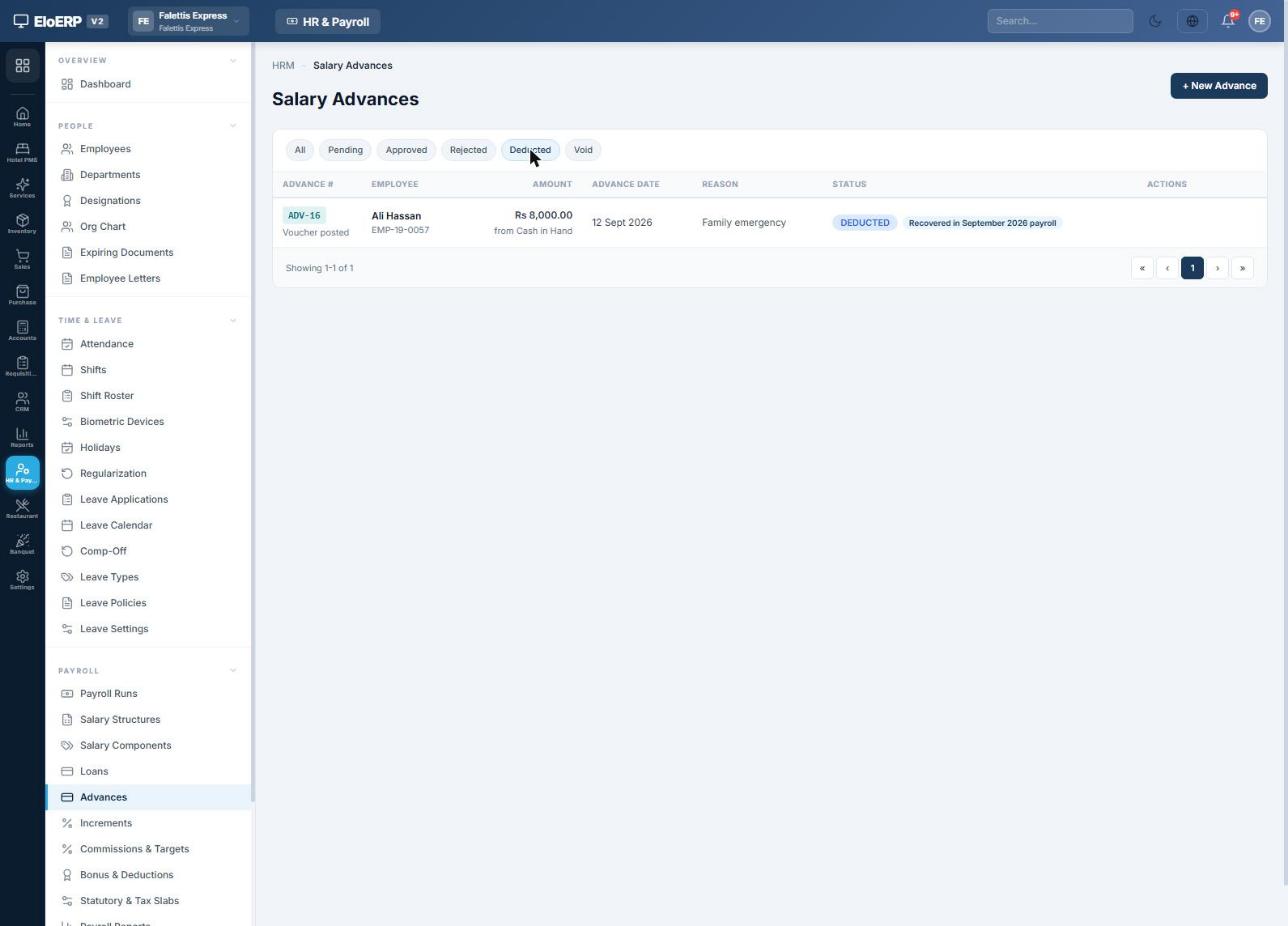
An advance is recovered in full from the next payroll (or as much as the salary allows; any balance carries to the following month). Open Payroll → Advances, press + New Advance, then Approve and choose Paid from. EloERP posts voucher ADV-….
| Event | Debit | Credit |
|---|---|---|
| Loan or advance paid out | Employee's ledger | Bank / Cash |
| Instalment recovered in payroll | (part of the payroll entry) | Employee's ledger |
Running monthly payroll
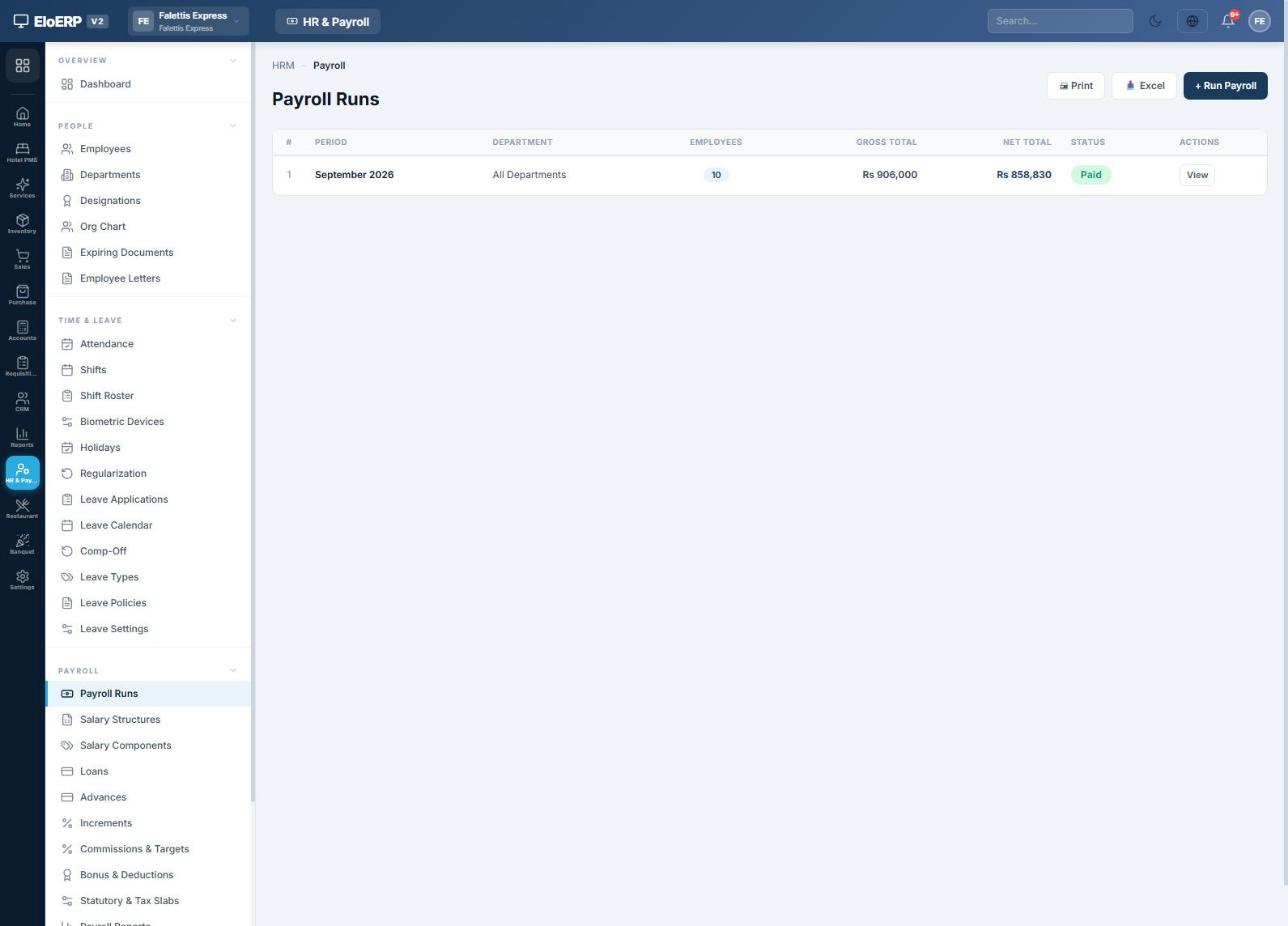
Once attendance, leave, loans and advances for the month are in, run payroll from HR & Payroll → Payroll → Payroll Runs.
Step 1 · Generate the run
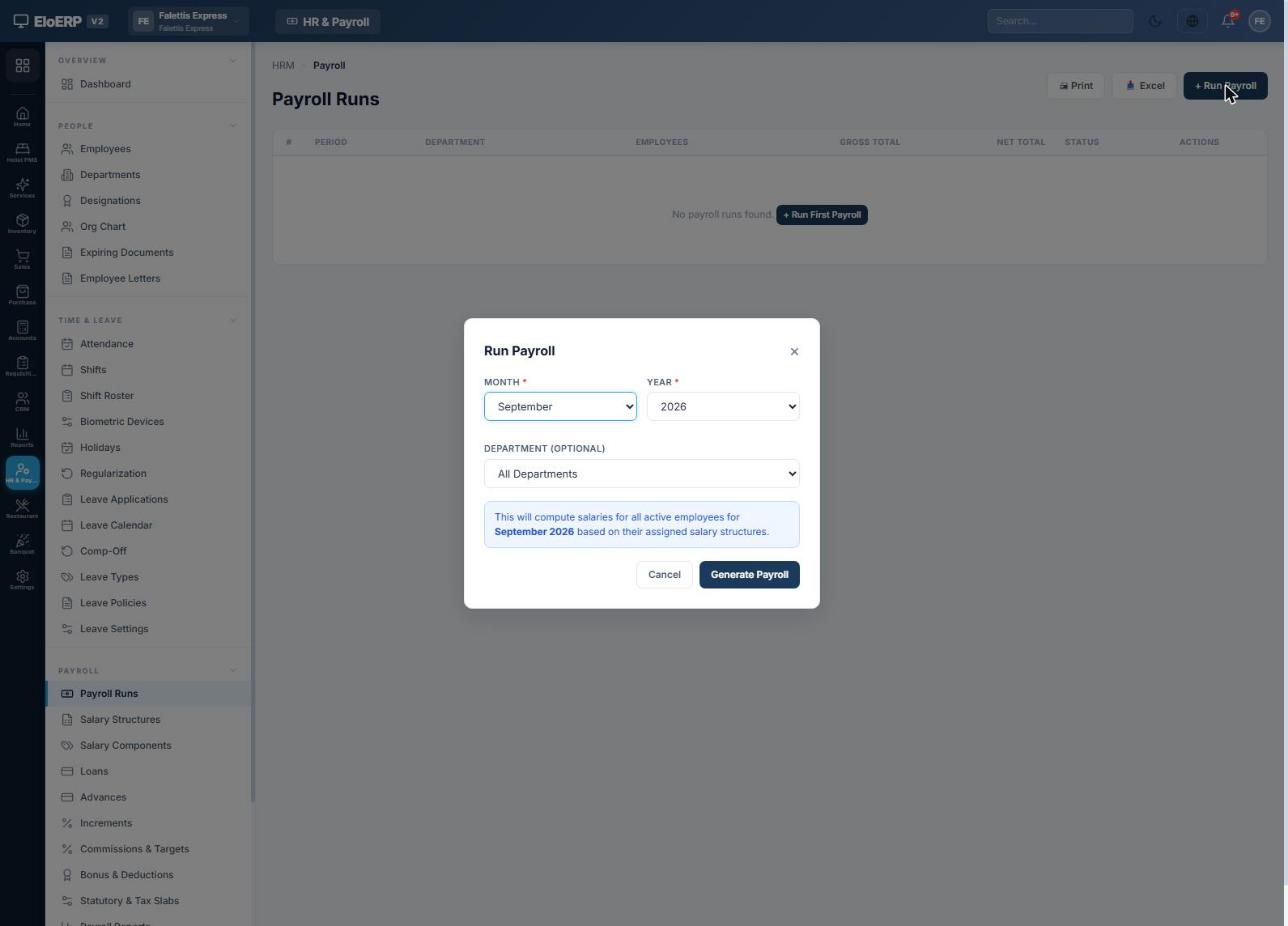
Press + Run Payroll, pick the Month and Year, and press Generate Payroll. EloERP picks up every active employee with a salary, prorates new joiners and leavers, and adds loan instalments and advance recoveries.
Step 2 · Apply tax, EOBI and overtime
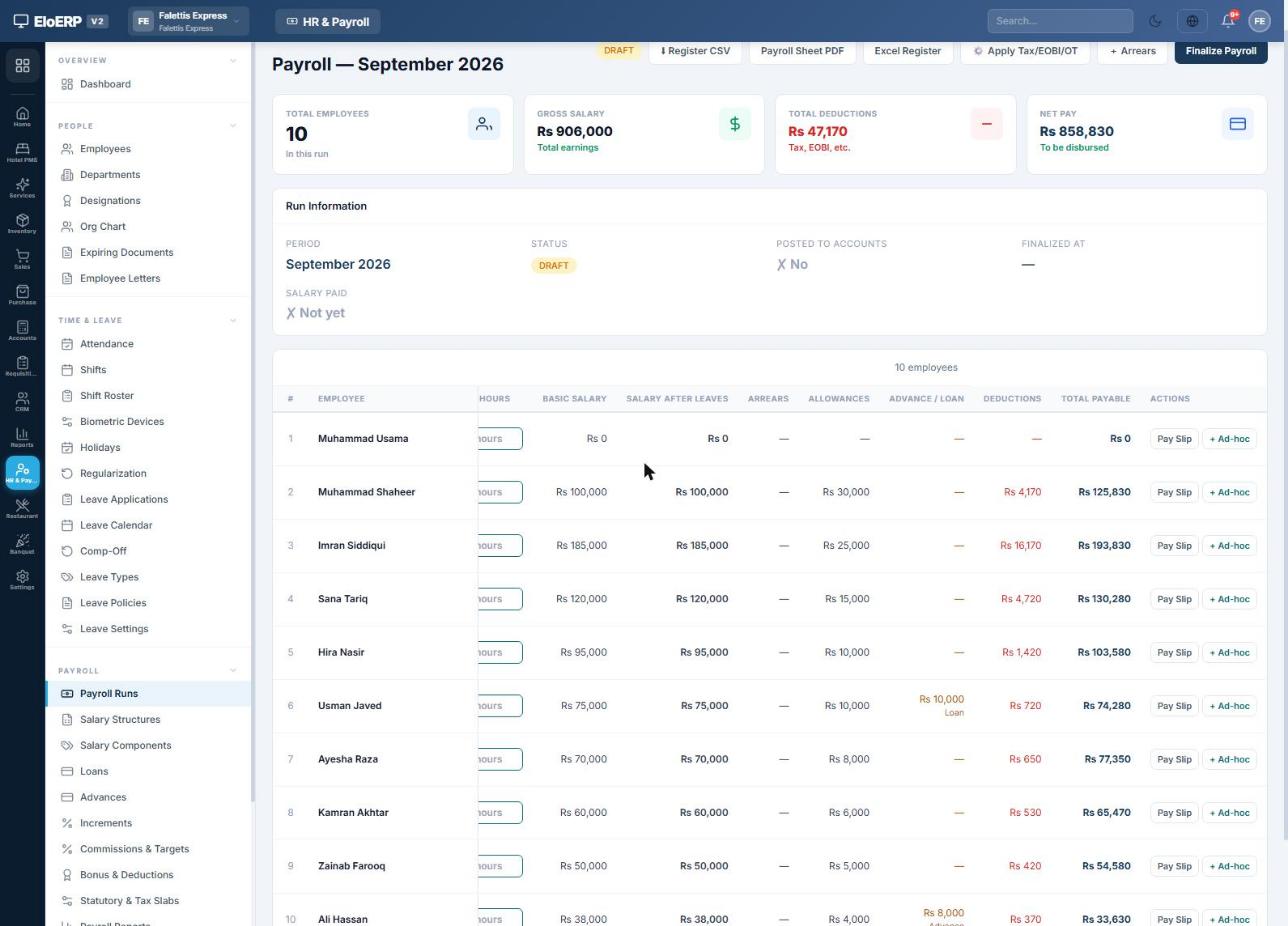
The run opens as a Draft. Press Apply Tax/EOBI/OT. EloERP calculates absences, half days, late fines, unpaid leave, overtime, commissions, EOBI, PESSI/SESSI, provident fund and income tax for every employee. It is safe to press again after any change.
Adjusting a draft
- Att. (days) and Hours: type paid days directly when you don't keep daily attendance; the row recalculates.
- + Ad-hoc on a row: add a one-off earning (bonus, commission) or deduction for this month only.
- + Arrears: pay a backdated raise for earlier months.
- Pay Slip: preview any employee's slip before finalizing.
Step 3 · Finalize
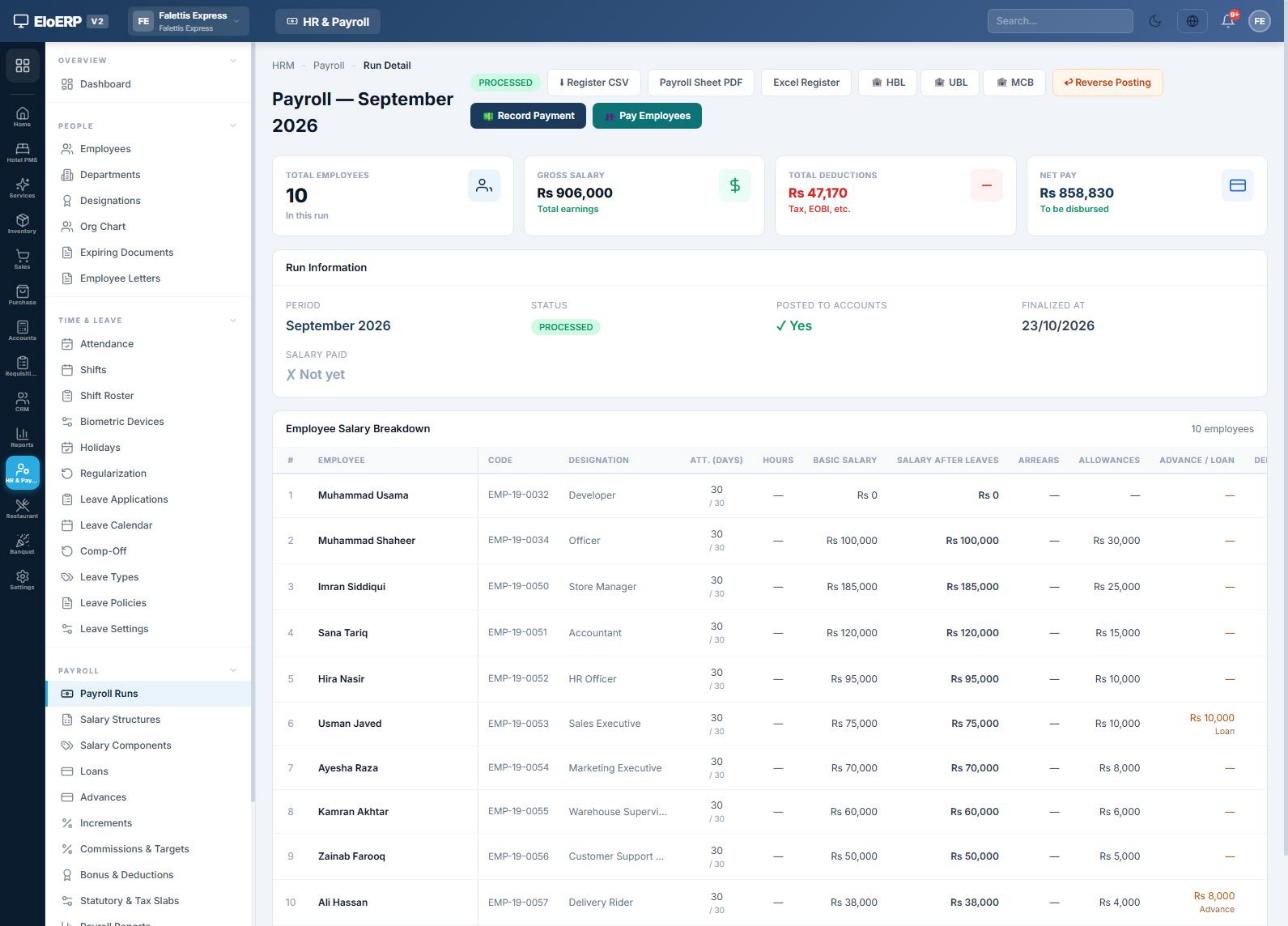
When the figures are right, press Finalize Payroll. The run becomes Processed and payslips are generated. If maker-checker approval is on, a second person presses ✓ Approve (or ✕ Reject, which sends it back to draft) before it can be posted.
A finalized run can no longer be regenerated. Later changes are made as corrections (chapter 14).
Posting to accounts
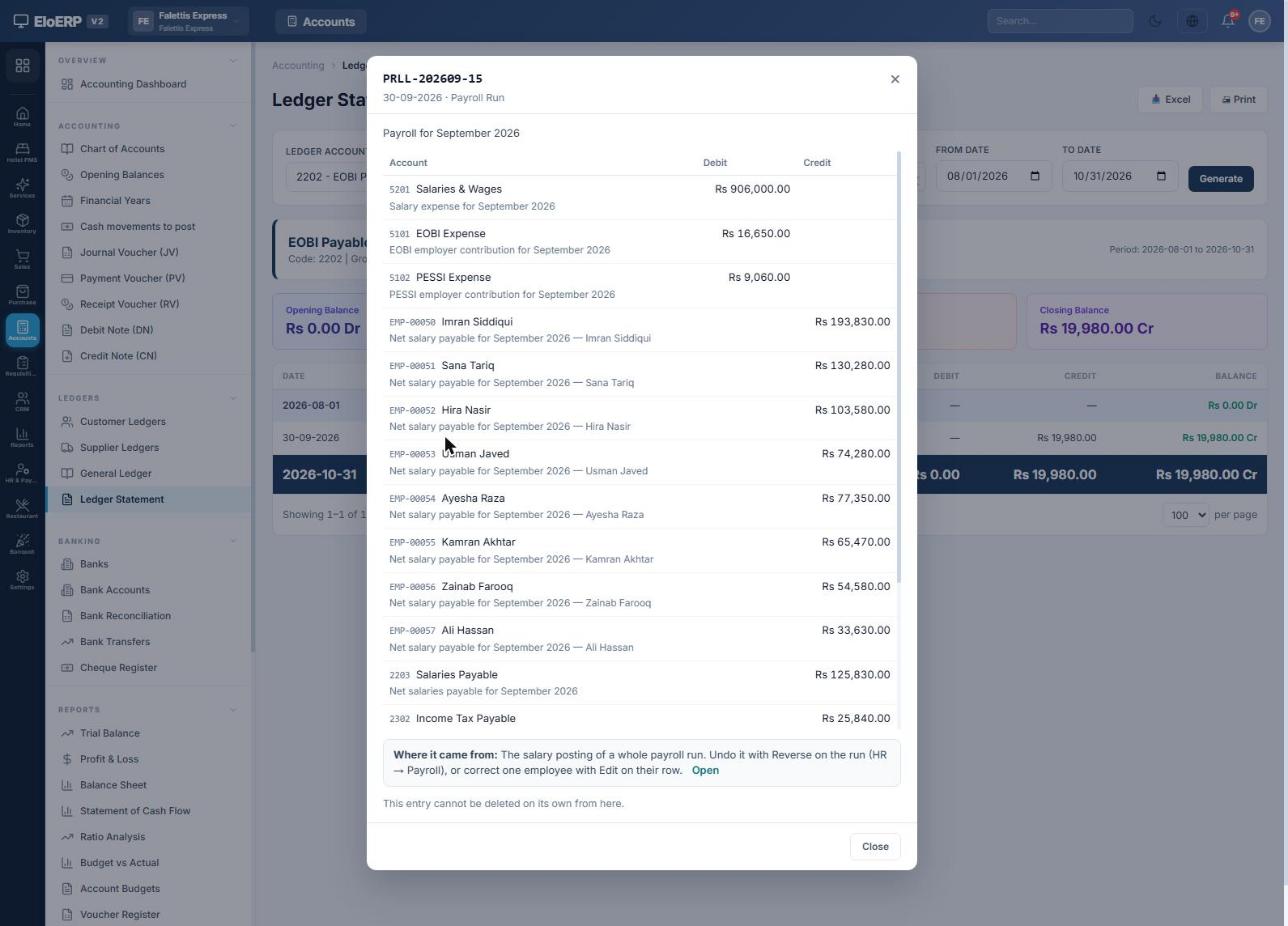
Press Post to Accounts on the processed run. EloERP posts one balanced journal entry, numbered PRLL-YYYYMM-run, that records the whole month's payroll.
| Account | Debit (Rs) | Credit (Rs) | Why |
|---|---|---|---|
| 5201 Salaries & Wages | 906,000 | Gross salary expense | |
| 5101 EOBI Expense | 16,650 | Employer EOBI, 5% × 37,000 × 9 | |
| 5102 PESSI Expense | 9,060 | Employer PESSI, 1% of gross | |
| EMP-xxxxx Each employee's ledger | 733,000 | Net salary owed to each person | |
| 2203 Salaries Payable | 125,830 | Net salary of anyone without an own ledger | |
| 2302 Income Tax Payable | 25,840 | Tax withheld, owed to FBR | |
| 2202 EOBI Payable | 19,980 | Employee 1% + employer 5%, owed to EOBI | |
| 2205 PESSI Payable | 9,060 | Owed to PESSI | |
| EMP-00053 Employee's ledger | 10,000 | Loan instalment recovered | |
| EMP-00057 Employee's ledger | 8,000 | Advance recovered | |
| Total | 931,710 | 931,710 |
Salary expense appears in the Profit & Loss straight away. The amounts owed to staff, FBR, EOBI and PESSI sit as liabilities until they are paid.
Paying salaries
You can pay everyone at once or pay employees individually, fully or partly.
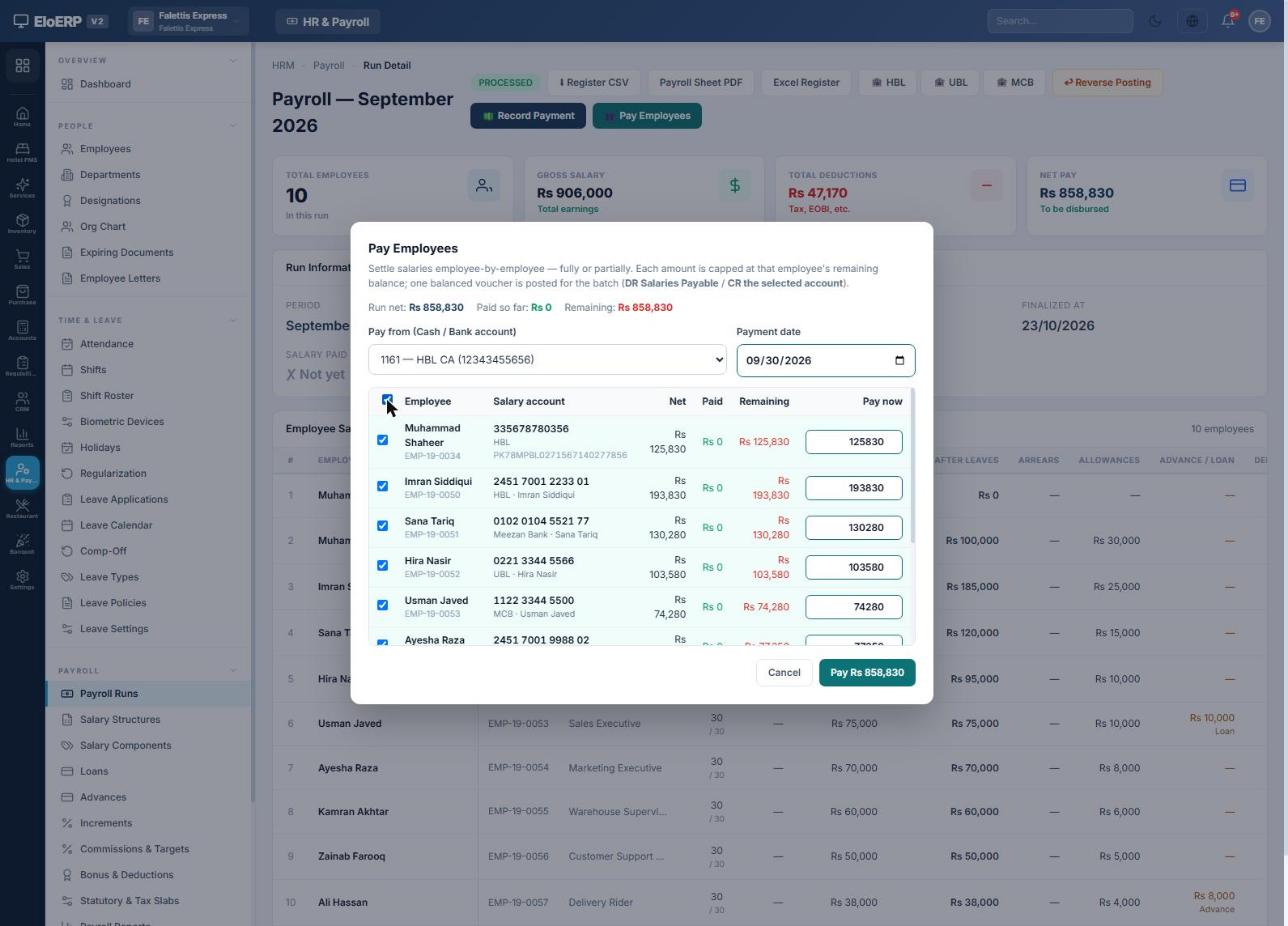
- 👥 Pay Employees: choose Pay from (a bank or cash account) and the Payment date, tick the employees, adjust any Pay now amount, and press Pay Rs …. The dialog shows each person's bank account. One voucher
PRLP-YYYYMM-run-P1is posted per batch. - 💵 Record Payment: pays the whole run's net pay in a single voucher.
- 🏦 HBL / UBL / MCB: download the bank's bulk-transfer file to upload to internet banking.
| Payment entry | Debit | Credit |
|---|---|---|
| Salary paid | Each employee's ledger (or Salaries Payable) | Bank / Cash |
When everyone is paid, the run shows Paid with the account and date.
Payslips
Press Pay Slip on any employee's row. The slip shows earnings, deductions, attendance, net pay in words, payment status and the employer's contributions.
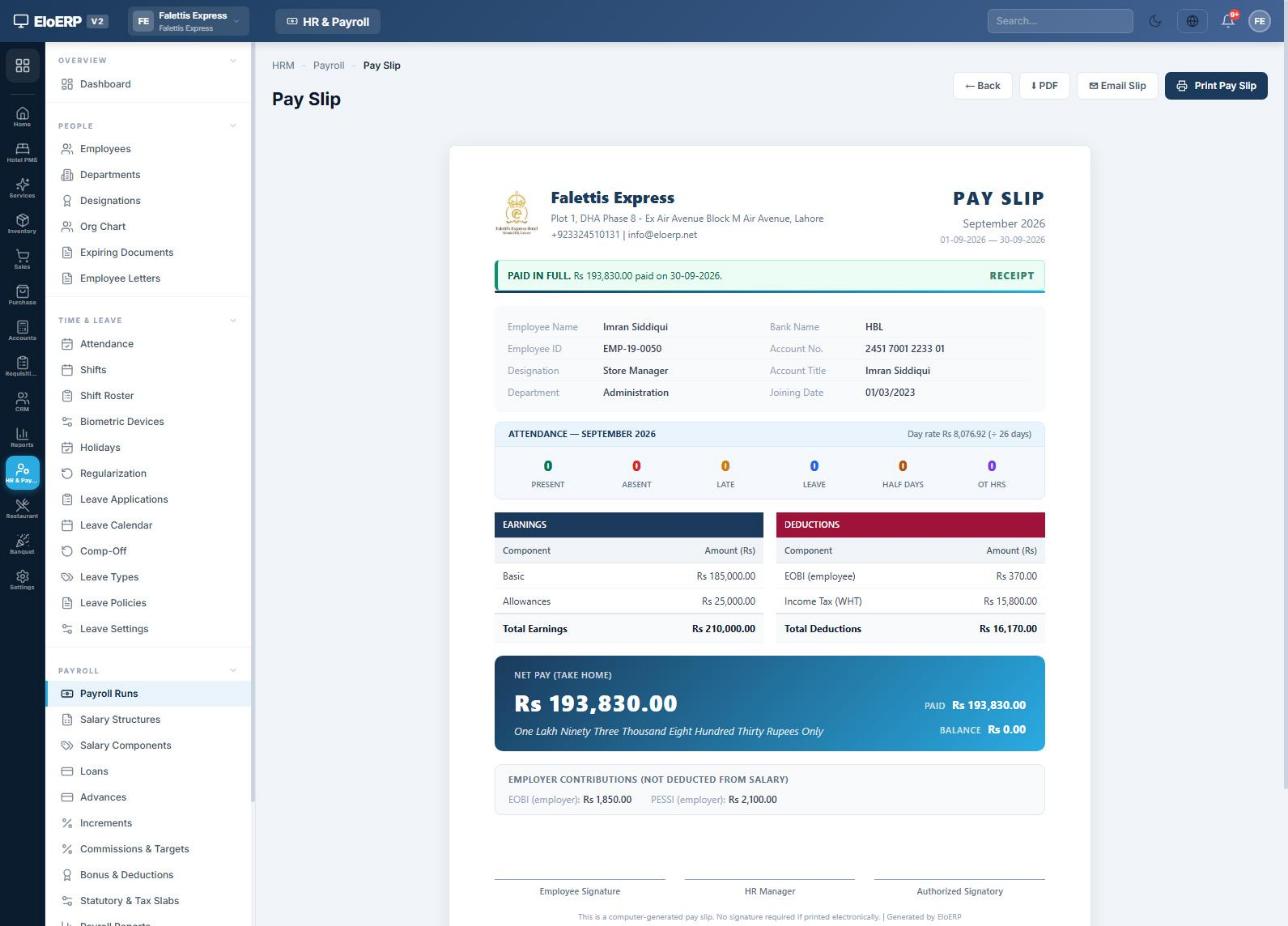
- ⬇ PDF downloads the slip; Print Pay Slip prints it.
- ✉ Email Slip sends it to the employee's email once their salary is fully paid. You can also have slips emailed automatically on payment (Statutory settings → Pay slip).
- All slips for a month in one PDF: HR & Payroll Reports → Payslips (Batch).
- Employees with a login see their own slips in the My HR Portal (
/my), along with leave balances, attendance and loans.
Employee general ledger
Every employee has their own ledger account in the chart of accounts. With Post each employee's salary to their own ledger switched on, it is a complete running account of everything between the company and that person.
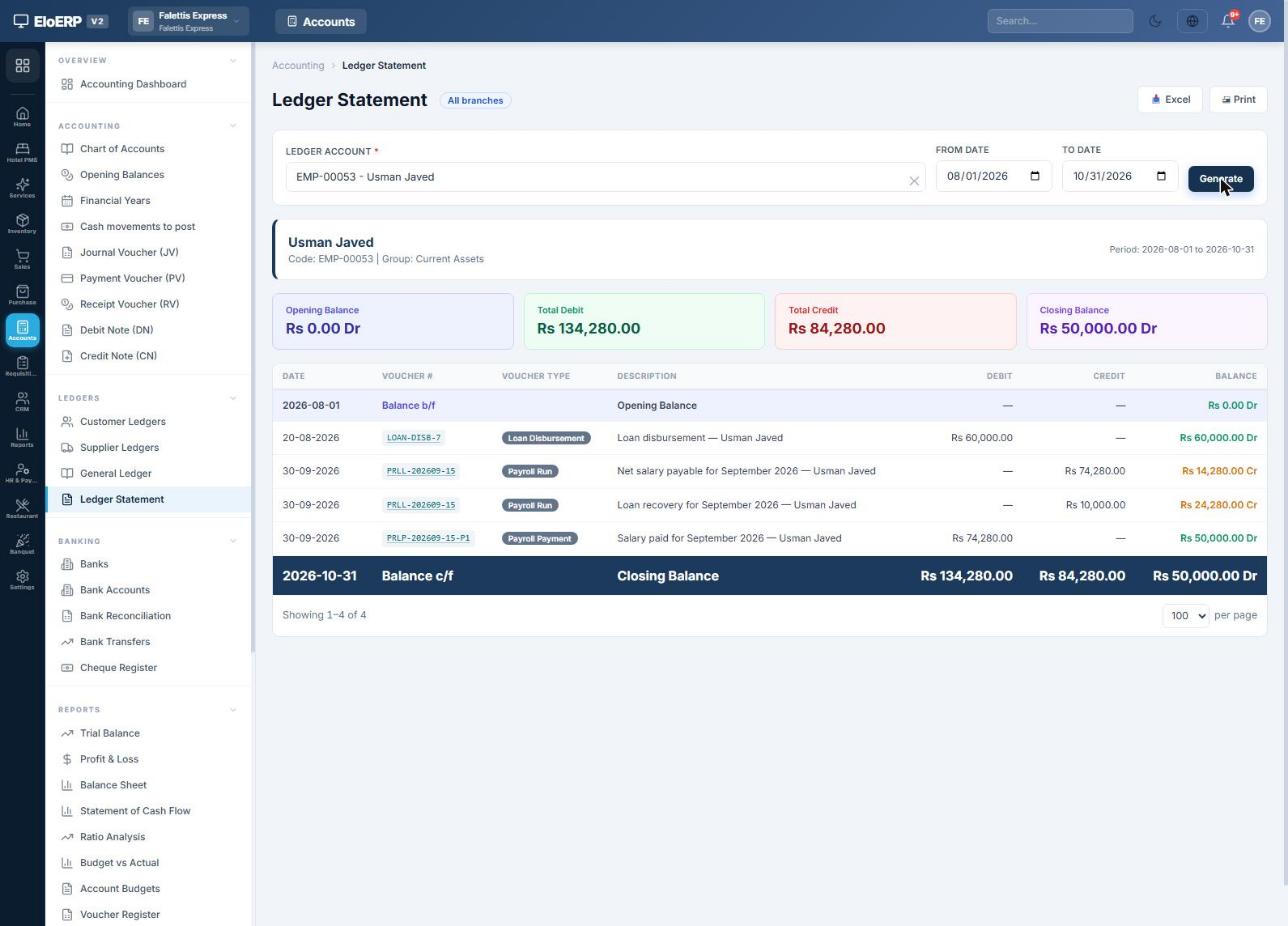
Opening an employee's ledger
- Go to Accounts → Ledgers → Ledger Statement.
- In Ledger Account, type the employee's name or code (for example
EMP-00053). - Set From Date and To Date and press Generate. Use Print or Excel to share it.
Reading the statement
| Date | Voucher | Entry | Debit | Credit | Balance |
|---|---|---|---|---|---|
| 20-08-2026 | LOAN-DISB-7 | Loan paid to the employee | 60,000 | 60,000 Dr | |
| 30-09-2026 | PRLL-202609-15 | September net salary owed to him | 74,280 | 14,280 Cr | |
| 30-09-2026 | PRLL-202609-15 | Loan instalment recovered from salary | 10,000 | 24,280 Cr | |
| 30-09-2026 | PRLP-202609-15-P1 | Salary paid from HBL | 74,280 | 50,000 Dr |
A debit balance means the employee owes the company; here Rs 50,000 is exactly the loan still outstanding. A credit balance means the company owes the employee, for example salary posted but not yet paid. An employee whose salary has been paid in full and who has no loan or advance shows a zero balance.
Employee ledgers are numbered EMP-… under Current Assets in Accounts → Chart of Accounts. Use the General Ledger (Accounts → Ledgers → General Ledger) to see every payroll entry across all accounts for a period.
Tax and EOBI payables
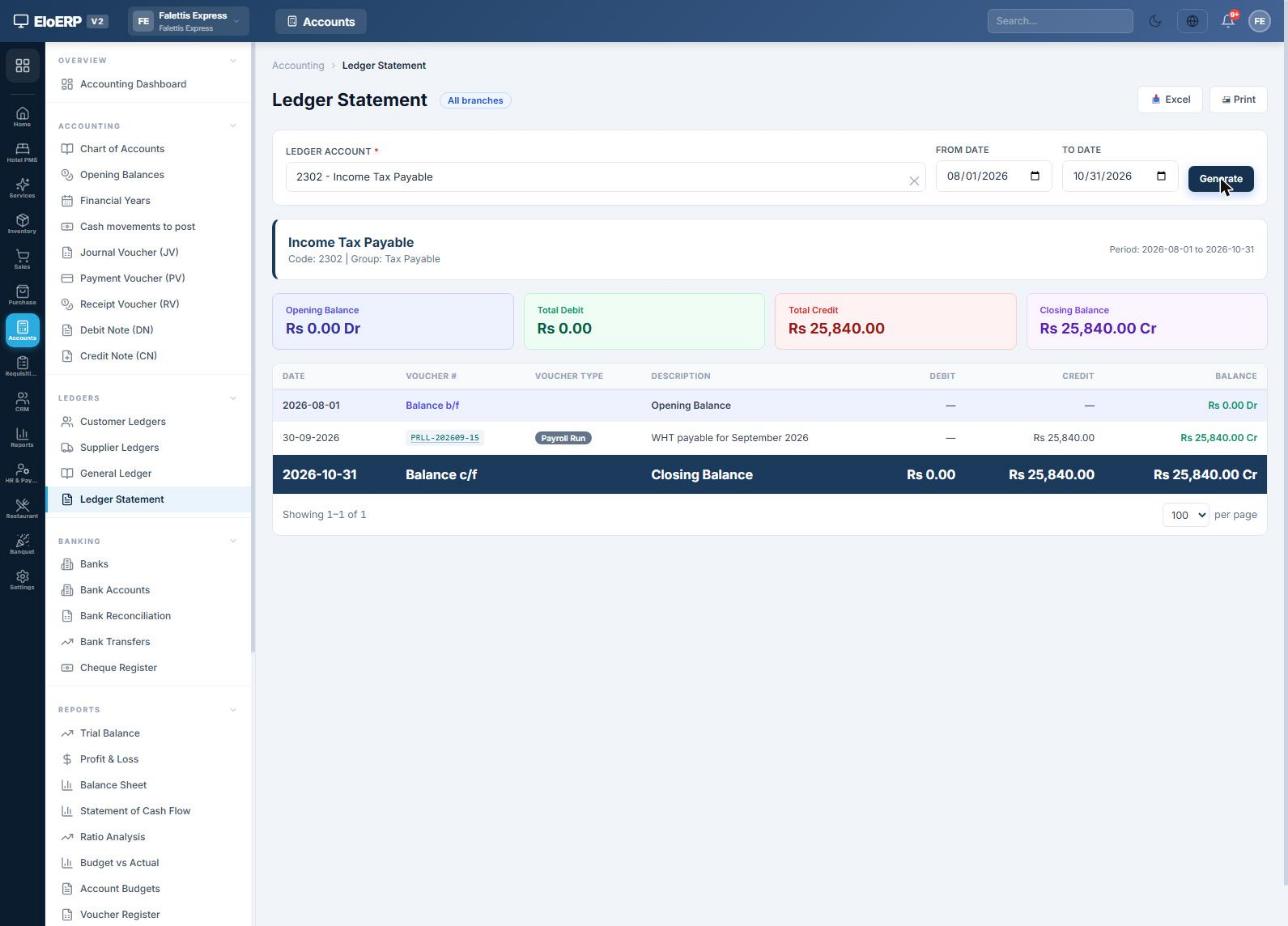
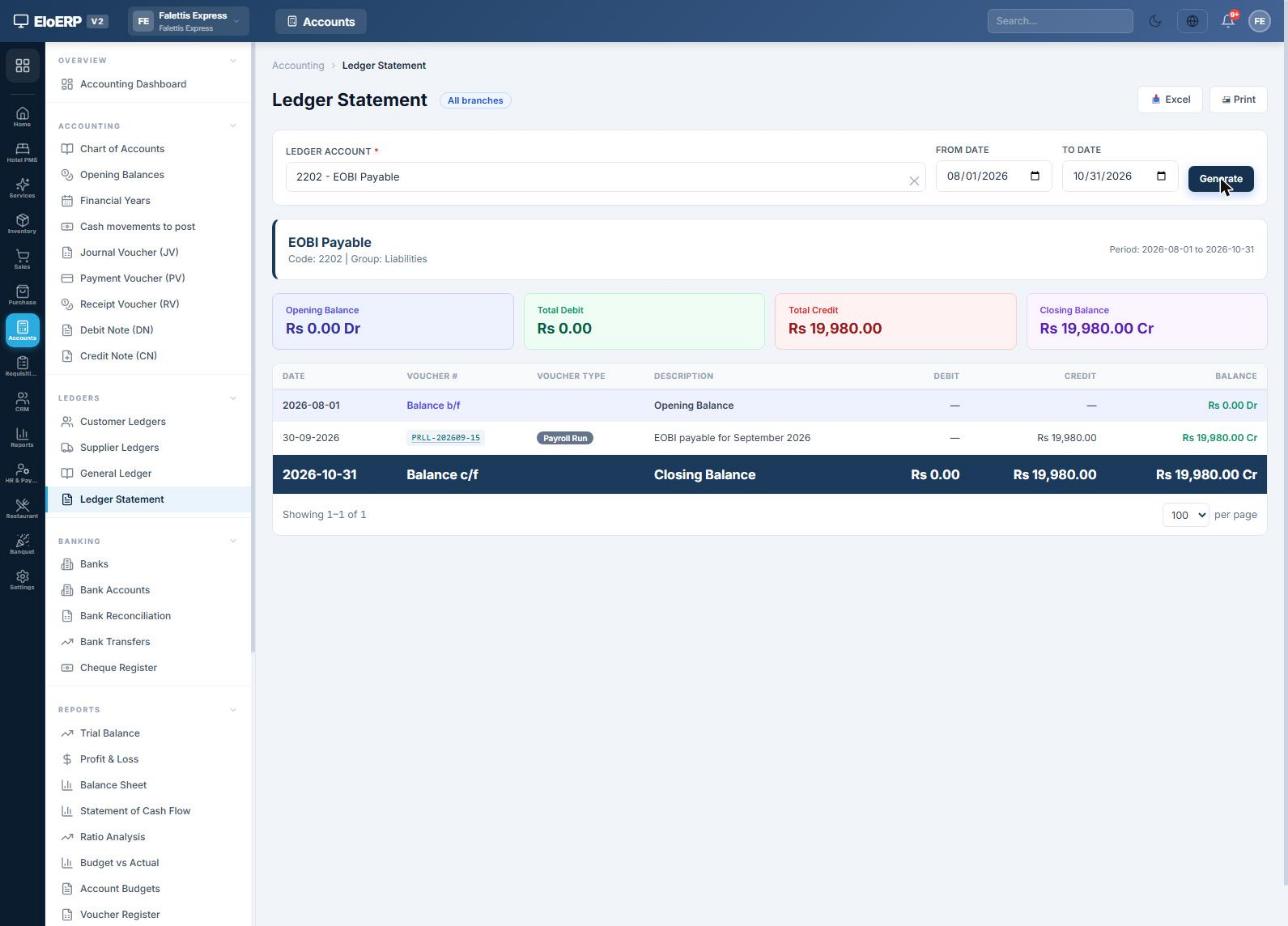
Tax and EOBI withheld from salaries belong to the government. They stay as liabilities in Accounts until you deposit them.
Depositing withheld tax (and EOBI)
- Pay the tax to FBR (by the 15th of the following month) and keep the CPR.
- In EloERP open Accounts → Payment Voucher (PV).
- Choose the bank you paid from, add a line for 2302 Income Tax Payable with the amount, and put the CPR number in the narration. Save.
- The voucher debits Income Tax Payable and credits the bank; the payable returns to zero.
Do the same for 2202 EOBI Payable and 2205 PESSI Payable when you pay those institutions.
| Deposit | Debit | Credit |
|---|---|---|
| Income tax deposited with FBR | 2302 Income Tax Payable | Bank |
| EOBI contribution paid | 2202 EOBI Payable | Bank |
| PESSI / SESSI paid | 2205 PESSI Payable (or SESSI) | Bank |
Tax reports
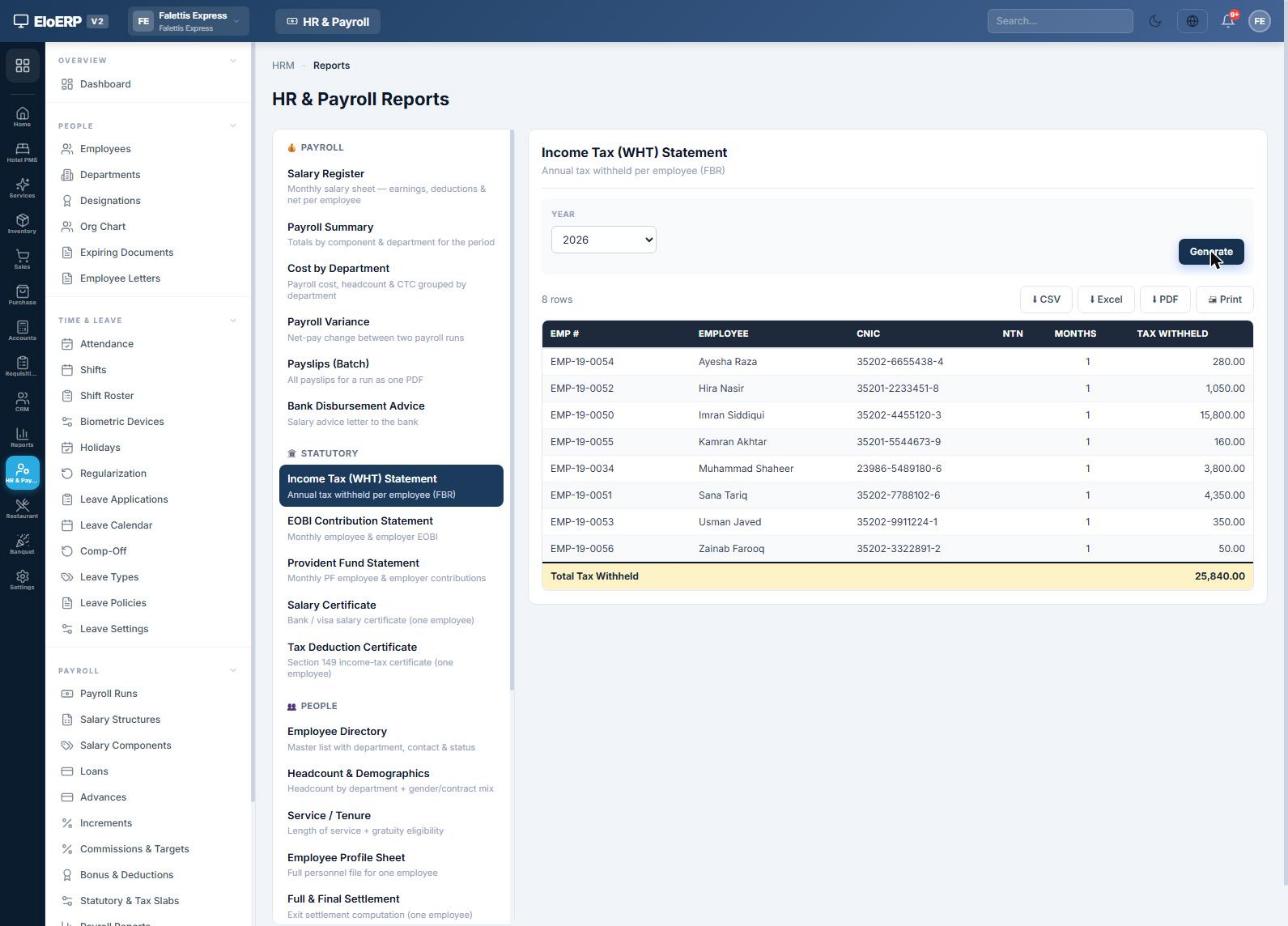
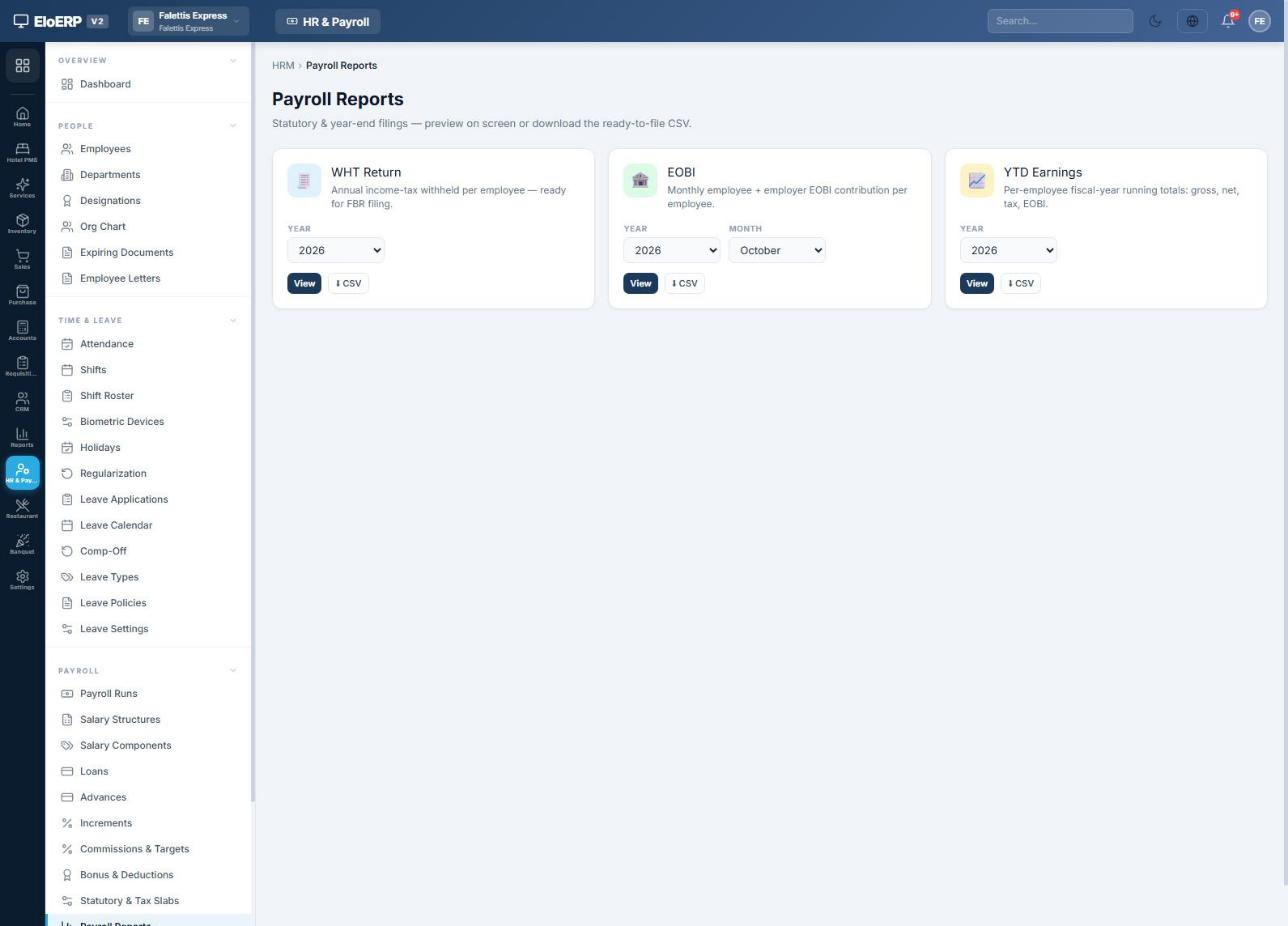
For each employee you can also issue a Tax Deduction Certificate (Section 149) from the same reports page. Payroll → Payroll Reports gives the ready-to-file WHT Return, the monthly EOBI contribution list and YTD Earnings as CSV.
Reports
Payroll → HR & Payroll Reports holds every HR report in one catalogue. Pick a report, choose the run or period, and press Generate.
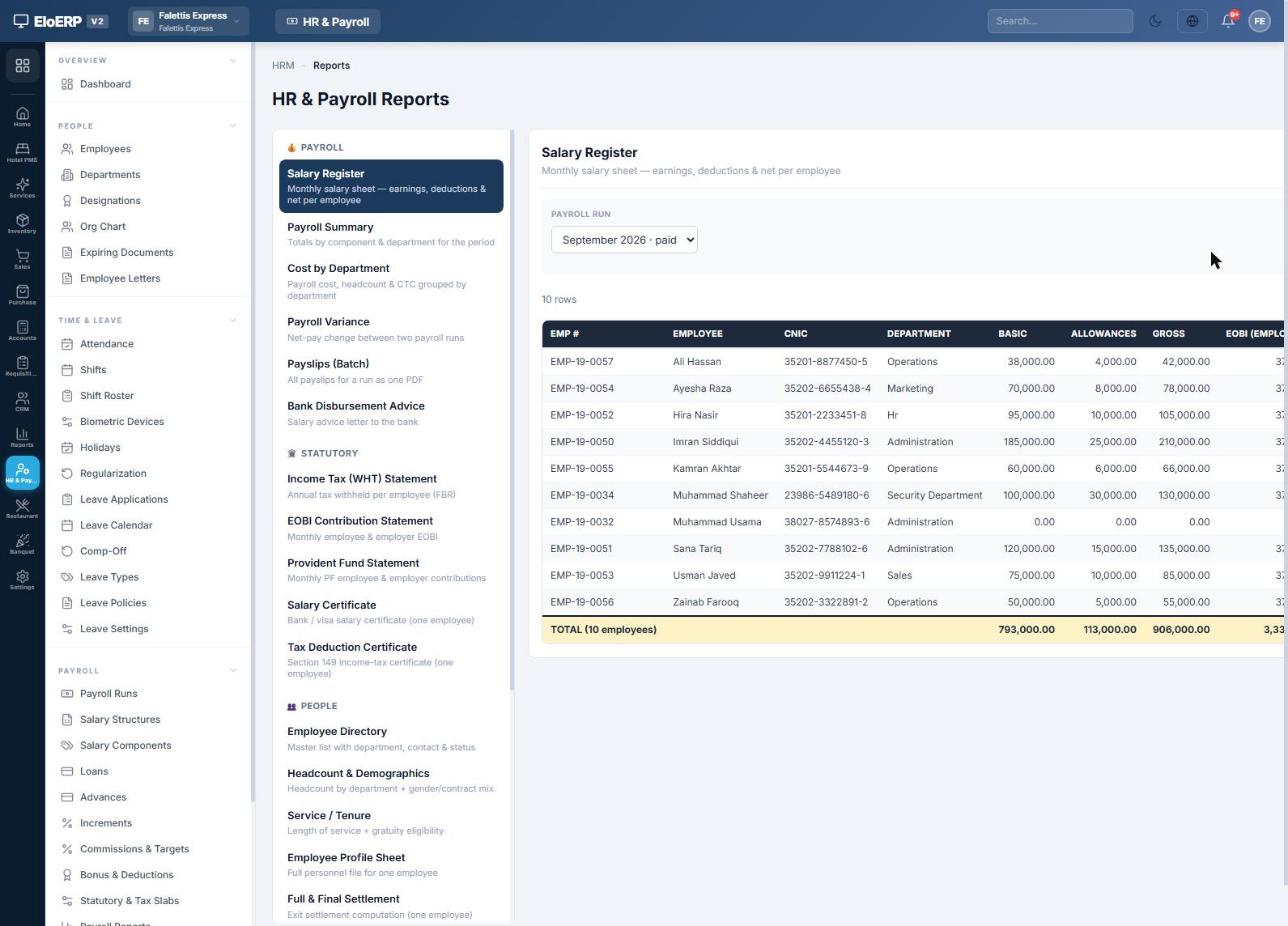
| Group | Reports |
|---|---|
| Payroll | Salary Register · Payroll Summary · Cost by Department · Payroll Variance · Payslips (Batch) · Bank Disbursement Advice |
| Statutory | Income Tax (WHT) Statement · EOBI Contribution Statement · Provident Fund Statement · Salary Certificate · Tax Deduction Certificate |
| People | Employee Directory · Headcount & Demographics · Service / Tenure · Employee Profile Sheet · Full & Final Settlement |
| Time & Leave | Attendance Register · Attendance Summary · Leave Balance · Leave Register |
| Loans | Loan & Advance Ledger · Document & Contract Expiry |
Each payroll run also offers Register CSV, Payroll Sheet PDF and Excel Register at the top of the run.
Corrections and reversals
Posted figures are never edited in place. EloERP posts the difference, so the books always show what changed and why.
- Correct one employee: press Edit on their row of a processed run. Change paid days, hours or lines, give a reason, and press Apply & post correction. Only the difference is posted, as
PRLL-…-ADJ1. If the employee was already paid, void their payment first in the same drawer. - Change a loan deduction for this month: press Loan on the employee's row.
- Undo the whole posting: press ↩ Reverse Posting before any salary has been paid. A mirror voucher
…-REVis posted and loan instalments are reopened.
Monthly payroll checklist
- New joiners, leavers and salary changes entered on employee records
- Attendance complete; regularization requests and leave applications approved
- Loans and advances for the month approved and paid out
- Payroll run generated for the month
- Apply Tax/EOBI/OT pressed after the last change; totals reviewed
- One-off bonuses or deductions added with + Ad-hoc
- Run finalized (and approved, if maker-checker is on)
- Posted to accounts
- Salaries paid (bank file uploaded or payments recorded)
- Payslips emailed or printed
- Income tax deposited with FBR by the 15th; payment voucher entered
- EOBI and PESSI/SESSI paid; payment vouchers entered
Accounts used by payroll
EloERP creates these accounts automatically the first time payroll is posted. Codes may differ slightly in your chart of accounts; the names are the same.
| Account | Type | Used for |
|---|---|---|
| 5201 Salaries & Wages | Expense | Gross salaries |
| 5101 EOBI Expense · 5102 PESSI Expense · 5103 SESSI Expense | Expense | Employer contributions |
| EMP-xxxxx (one per employee) | Current asset | Net salary owed, payments, loans and advances |
| Salaries Payable | Liability | Net salary of employees without their own ledger |
| 2302 Income Tax Payable | Liability | Tax withheld from salaries |
| 2202 EOBI Payable · PESSI / SESSI Payable | Liability | Contributions owed |
| 1175 Employee Loan Receivable · 1176 Employee Advances | Current asset | Loans and advances, when employees have no own ledger |
| Other Payroll Deductions Payable | Liability | Other deductions withheld from pay |
Questions or a guided setup? Contact your EloERP support team.